What Is Cost to Serve in B2B and How to Calculate It per Account
Two accounts with identical top-line revenue can yield wildly different profit margins. Here is how to uncover hidden order-fulfillment costs.

Cost to serve represents everything a company spends to support a customer beyond the actual cost of the goods sold: sales rep and customer service time, order processing, order verification, shipping, payment terms, returns, and handling exceptions. In B2B, two accounts generating the exact same revenue can have completely different fulfillment expenses, which leads to vastly different net profit margins.
Gross margin shows what the product leaves behind. Cost to serve shows what the customer actually leaves behind.
Why Cost to Serve Remains Invisible
Why do companies fail to see the true cost of each customer? Because standard accounting groups expenses by functional department (sales, logistics, finance) rather than attributing them to individual accounts.
Why does this obscure the underlying problem? Because a customer placing frequent, low-volume orders over the phone, demanding expedited freight and extended payment terms, looks identical on the top line to a buyer who submits a single large purchase order online once a month.
Why does nobody run the numbers? Because the data sits in operational silos: sales rep hours hide in calendars, freight charges live in logistics systems, payment term financing sits in accounting, and the cost of order rework is tracked nowhere at all. Conducting a structured cost to serve analysis bridges these disconnects.
Why does this matter right now? Because top-line growth often comes from smaller, more frequent buyers, precisely the accounts with the highest fulfillment overhead.
The root cause: companies measure profitability by SKU, even though a major portion of their profit margin is decided by how each account is served.
What Makes Up the Cost to Serve
- Commercial support. Dedicated time from outside sales reps, inside sales teams, and customer service for every inquiry and order.
- Order processing. Manual data entry, price verification, inventory checks, credit approvals, and order corrections.
- Logistics and fulfillment. Warehouse picking, packing, freight, split shipments, and rush deliveries.
- Financial carrying costs. Extended payment terms, working capital costs, collections, and bad debt exposure.
- Exceptions. Off-policy discounting, product returns, exchanges, and re-entered orders.
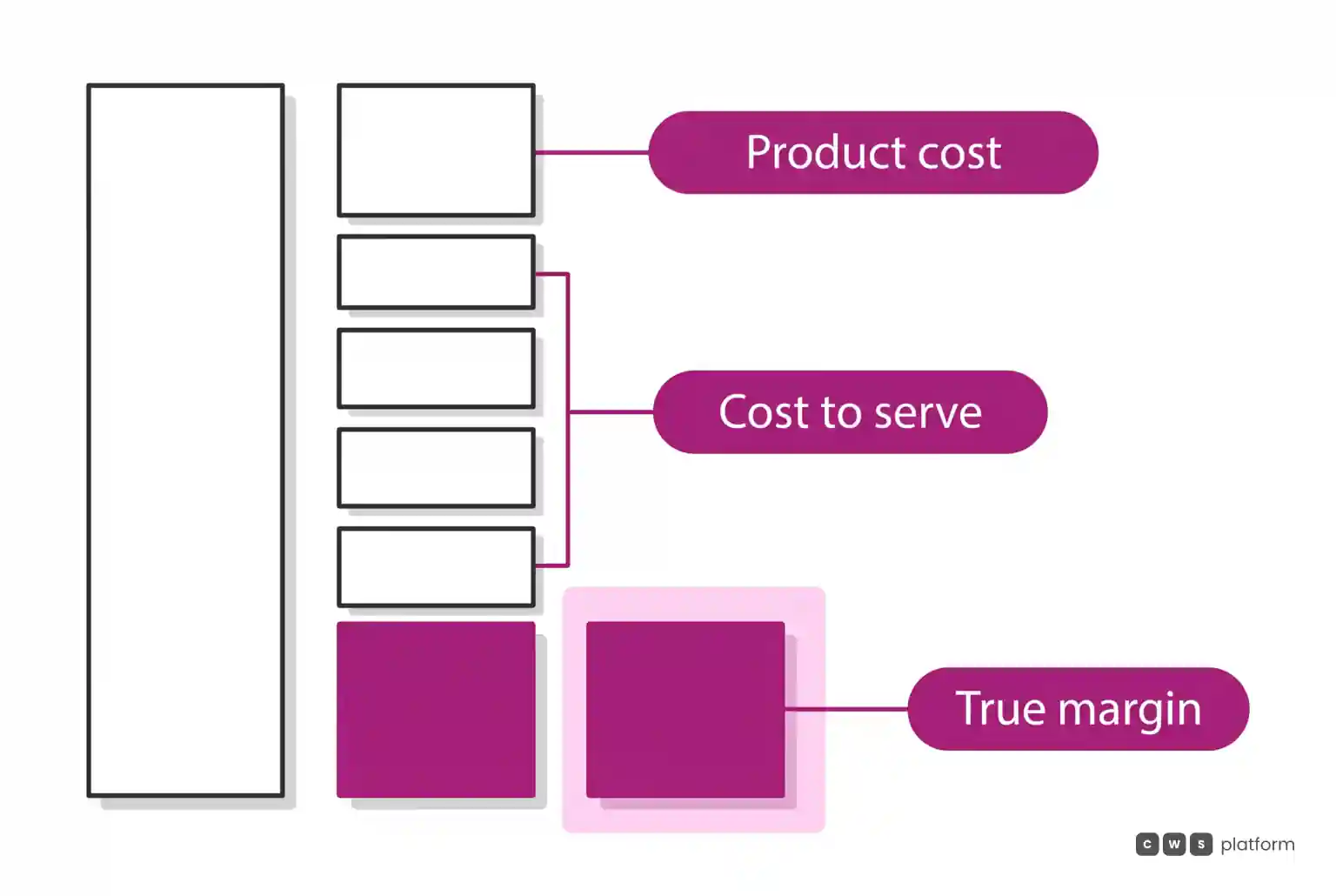
How to Calculate Cost to Serve per Customer
Here is a straightforward formula you can apply using data your business already tracks:
customer cost to serve = (orders in period × average cost to process an order) + (service interactions × average cost per contact) + absorbed freight + financing cost of payment terms + cost of exceptions
To determine the average cost to process a manual order, add up the fully burdened monthly compensation of every employee who touches a PO (inside sales, order verification, billing) and divide that by total monthly order volume. We break down this calculation in detail in our guide on how much each manual order costs to process.
Next, compare that expense against the gross margin generated by the account:
margin after cost to serve = customer gross margin − customer cost to serve
When distributors run this calculation, they frequently discover that a substantial portion of their customer base, typically accounts placing small, frequent orders handled entirely by hand, delivers negative operating margins once all service overhead is factored in.
How to Lower Cost to Serve Without Losing the Customer
1. Shift repeat reorders to self-service. Routine replenishment orders requiring no price negotiation are the most expensive to enter manually and the easiest to automate.
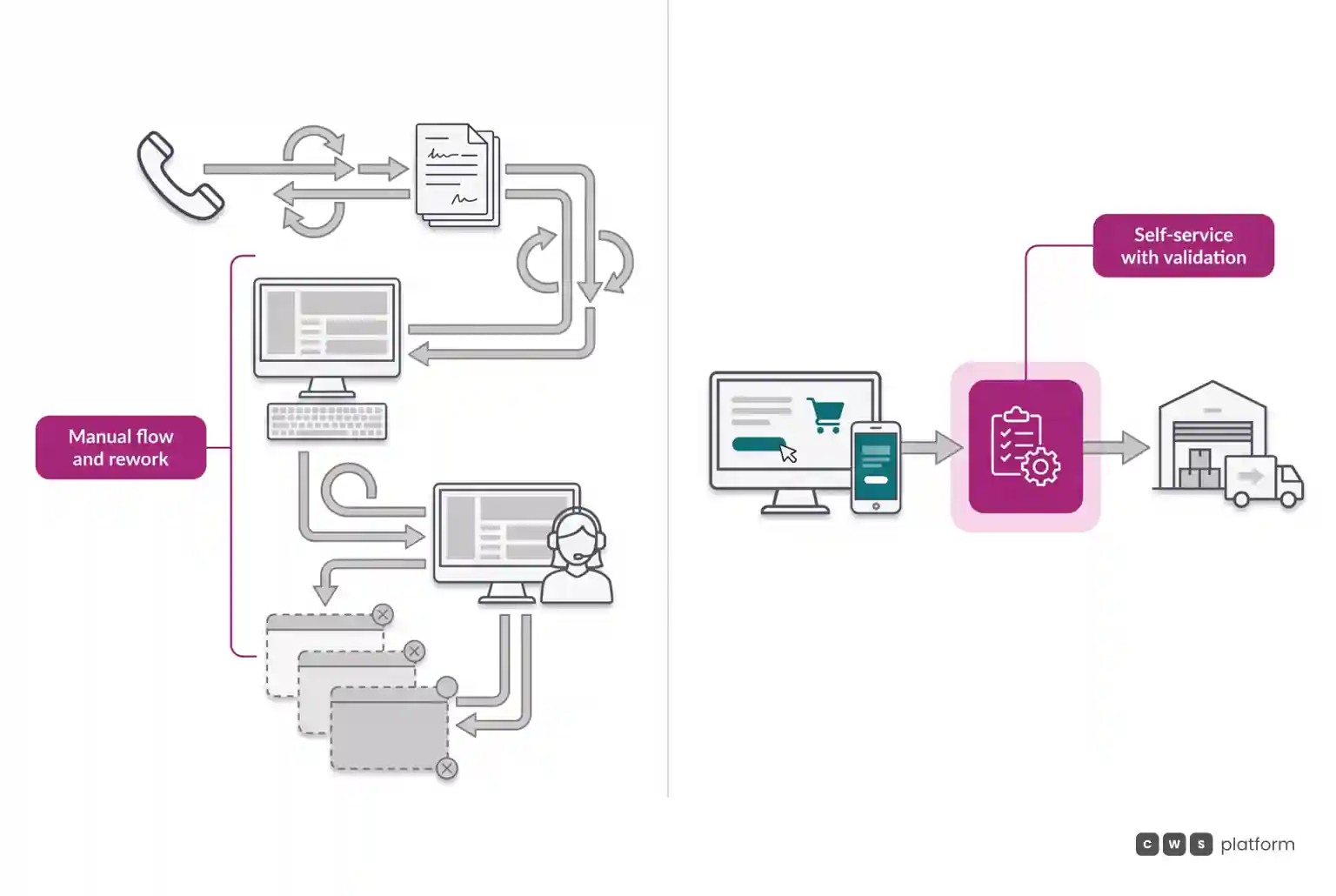
2. Validate order data before acceptance. Checking real-time inventory, contract pricing, credit lines, and sales tax at checkout eliminates downstream order corrections.
3. Enforce systematic rules on freight and terms. Set clear order minimums for prepaid freight and map credit terms directly to account profiles, allowing your system to apply these policies automatically.
4. Focus your sales team on high-value deals. Field and inside sales reps represent your most expensive operational resource. Their time yields far higher returns when activating dormant accounts or closing new business than when manually keying in SKU replenishment. We explore this dynamic in our article on why reps become pure overhead when buyers already know what they want.
A Real-World Example of the Shift
At Imdepa, an industrial parts and automotive distributor, sales reps used to spend roughly 70% of their working hours manually keying and verifying orders rather than providing strategic advice. By launching a dedicated B2B portal, the company onboarded 153 active purchasing accounts within three years, roughly tripling their initial digital base, according to the Imdepa case study. Their fulfillment overhead dropped significantly because routine stock replenishment bypassed manual intervention entirely.
Using CWS Platform, buyers log into a self-service portal showing their specific contract pricing, credit limits, and shipping options, passing clean, validated orders straight to the ERP. Sales reps work within the exact same system, stepping into the customer cart only when custom pricing or complex deal configurations are needed. You can review the architecture directly on our B2B ordering portal page.
Next Steps
Select ten accounts, five high-volume customers and five smaller accounts, and run a cost to serve analysis for each one using your data from the past quarter. The net profitability figures frequently reshape how executive teams define their most valuable accounts.
Frequently Asked Questions
What is cost to serve?
It is the total operational expense incurred to support an account beyond the direct cost of goods sold. This includes commercial support, order entry, freight, payment term financing, and post-sale exceptions, showing the true net margin each customer leaves behind.
How do you calculate cost to serve per customer?
Multiply total orders by your average order-processing cost, add total support interactions multiplied by contact cost, then add absorbed freight, working capital interest for payment terms, and the cost of order rework. Subtract that sum from the customer gross margin.
How does B2B self-service lower fulfillment costs?
By shifting routine repeat purchases to an online portal where buyers view contract terms and submit orders directly. Validating data prior to ERP entry eliminates data-entry labor and frees sales reps to focus on business development.
What is a cost to serve analysis?
A cost to serve analysis evaluates the specific operational expenses associated with serving individual customer tiers or accounts against their gross margin contribution. It helps distributors calibrate freight thresholds, minimum order values, credit terms, and service levels across their base.
Read Also
- Cost to serve and sales operations
- The true cost of B2B self-service, and the real expense of operating without it
- Your B2B revenue is expanding, but margins are falling: the breakdown happens before checkout
About This Publication
Operational metrics referenced in this article reflect documented performance data from Imdepa, a CWS Platform customer, published with permission.
Brands mentioned in this article

Trademarks and logos belong to their respective owners. Mention does not imply partnership or endorsement.
"responsive, technically engaged, and willing to work through complex commercial rules (negotiated pricing, credit, customer-specific conditions) rather than pushing generic answers"
Want to see this in your operation?
Real B2B operations already run on it.