Product Catalog & MDM (Catalog Engine)

Management · CMO
The CMO follows catalog enrichment SKU by SKU.
The Catalog Enrichment Agent runs six steps on its own, from the counter photo to the spec sheet; publishing the SKU waits for a person to confirm.
Illustrative scene with a real CWS Platform screen in a demo version. People, stores and on-screen data are fictitious.

At the counter · Counter sales rep
The customer's car stays saved in the garage, and the search starts from it.
Type, make, model and year go in once; the next search already filters the catalog by that vehicle's fitment.
Illustrative scene with a real CWS Platform screen in a demo version. People, stores and on-screen data are fictitious.

On the phone · Reseller buyer
The buyer picks the car and the catalog shows only the parts that fit it.
The fitment table links each SKU to the vehicle it fits, and each part shows the network stores that carry it.
Illustrative scene with a real CWS Platform screen in a demo version. People, stores and on-screen data are fictitious.

In the stockroom · Parts sales rep
The sales rep searches a term inside the saved car and only sees what fits it.
The term, the saved vehicle's fitment and the network catalog work together in one list, with the stores that carry each part.
Illustrative scene with a real CWS Platform screen in a demo version. People, stores and on-screen data are fictitious.
Deterministic module
The buyer looks for a part, does not find it, and buys from a competitor. In complex B2B that is a catalog problem, not a storefront problem. Missing technical attributes, incomplete application tables and poorly mapped equivalences produce costly returns and lost sales, and no campaign fixes that.
Inside the platform
The catalog that gets the part found
Three screens of the Product Catalog & MDM (Catalog Engine) on CWS Platform: step-by-step search, fitment recorded on the SKU and the attribute that becomes a filter on the phone.
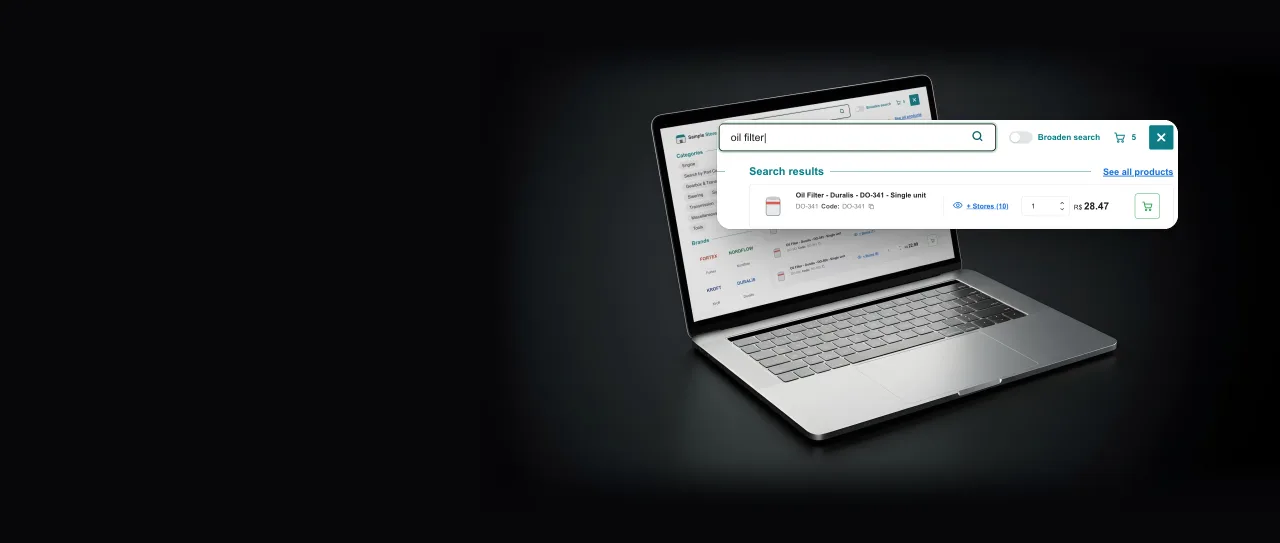
Step-by-step search
Search finds the part by the name the buyer types
Search first matches the code, then looks for every word typed and only then widens. While the buyer types, the products show up, with the price and how many stores sell each one.
Pain it removes: buyers who look for a part, don't find it and buy from a competitor.
CWS Platform demo screen, completed with fictitious data to show the use.
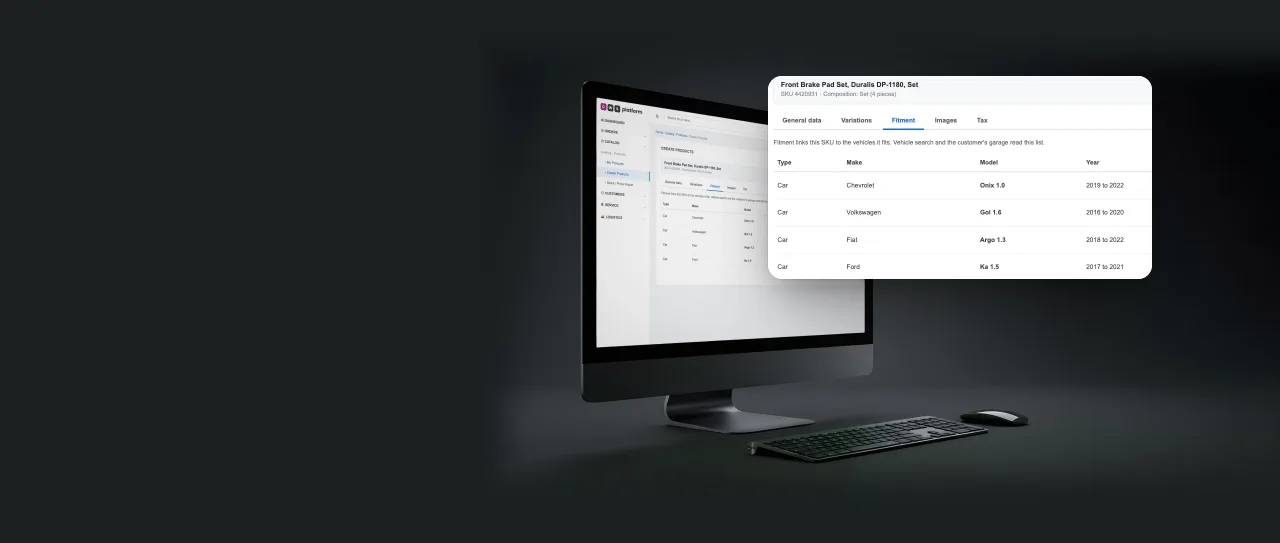
Fitment on the SKU
Fitment is written on the SKU, and vehicle search reads it from there
In the product record, the Fitment tab links the SKU to every vehicle it fits, by type, make, model and year. Vehicle search and the customer's garage read that same list.
Pain it removes: incomplete fitment tables that lead to costly returns.
CWS Platform demo screen, completed with fictitious data to show the use.

Filters on the phone
Every recorded attribute becomes a filter, even on the phone
Once the item gets a name, a spec sheet and filterable attributes, it starts showing up in filters. On the phone, the buyer narrows the result by price and by brand without leaving the category.
Pain it removes: items that only show up on direct lookup, never in a filter.
CWS Platform demo screen, completed with fictitious data to show the use.
What it is
The module that treats catalog data as a critical operational asset. It ties the product into an integrity chain that runs from product to SKU, from SKU to inventory and from inventory to warehouse, and it supports the four selling compositions: unitary, pair, kit and set. Each SKU is identified by manufacturer, part code, composition and origin, and each stock of that SKU in a warehouse gets its own identifier. Variations of the same product are grouped into a size or variant grid, show up as a single search result and keep their own price and stock. An item with no price or no stock can stay in the store as a quote request, and anyone looking for an unavailable item can ask to be notified when it is back: a stockout becomes an opportunity, not an empty page. Price, availability and orders all rest on those records afterwards. A bad catalog does not stay a catalog problem — it becomes a wrong order.
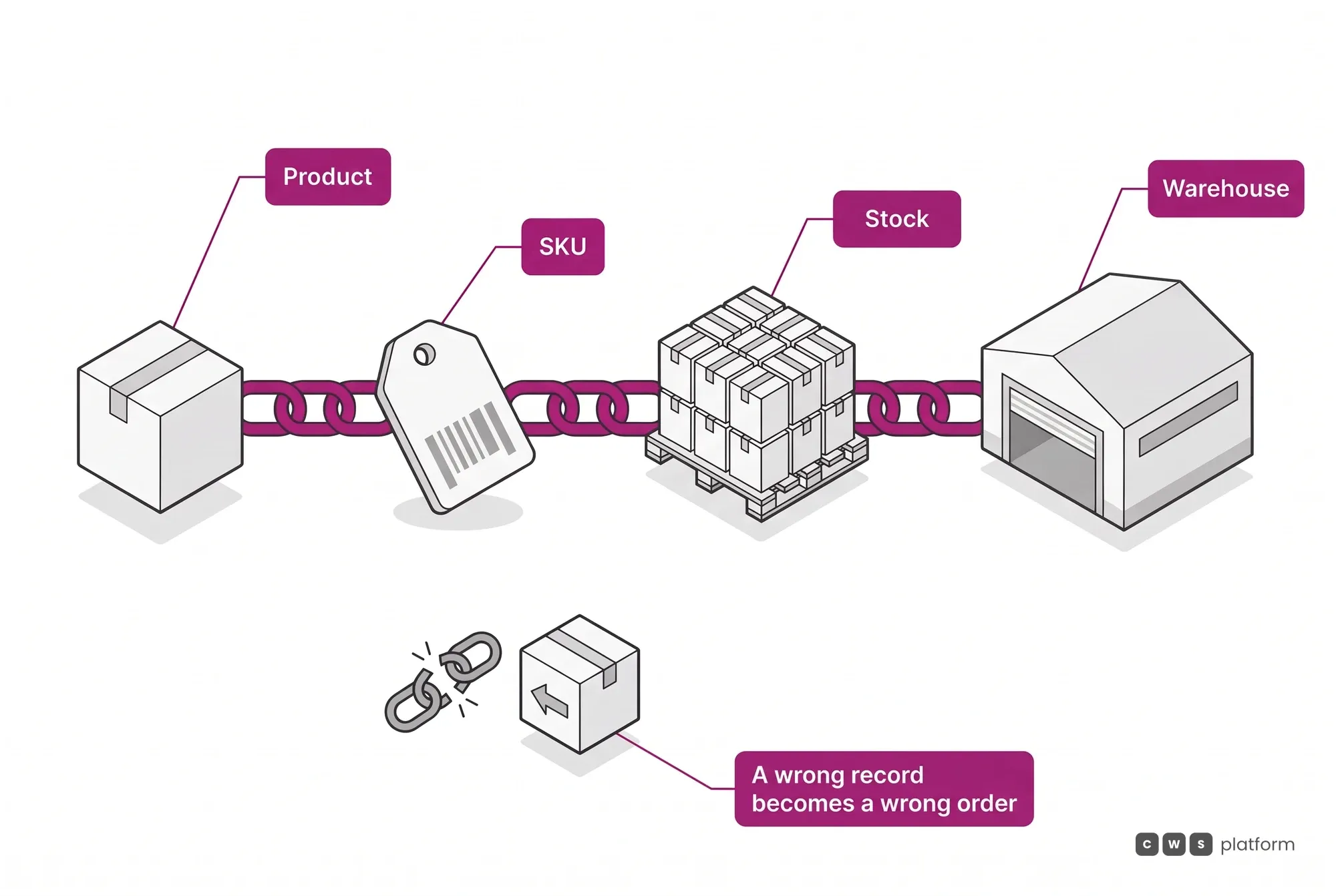
Catalog Engine in 1 minute
The capability nobody replicates
Component-level traceability in compositions
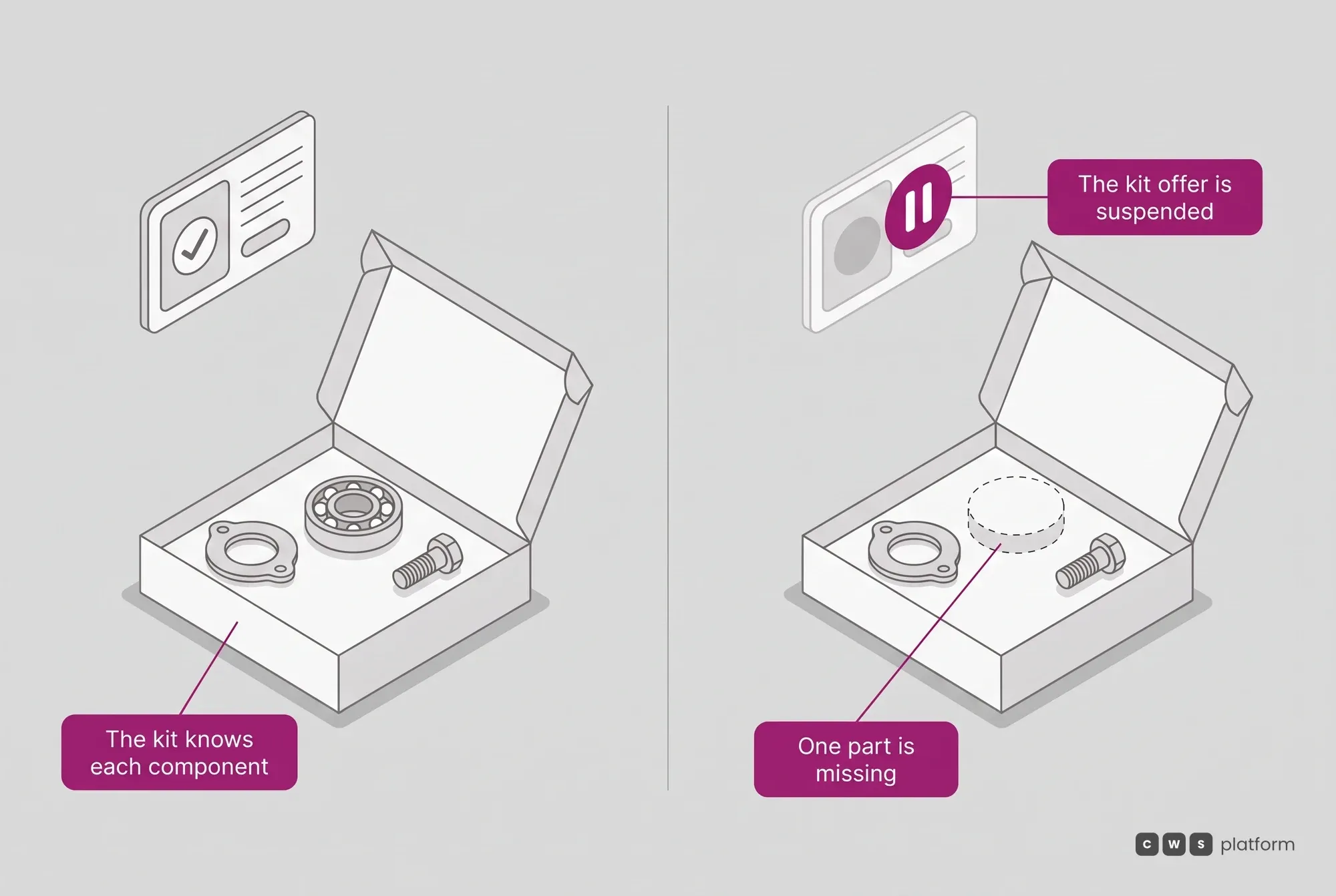
A kit is not a façade SKU.
How does the platform handle the kit?
The platform knows every component in it, with the quantity of each, and the kit balance is not typed in: it is recalculated from the lowest balance among its components. If a part is missing, the kit offer is suspended instead of becoming an order that the warehouse discovers later. Integrity applies at the sale, not at the picking bench.
Cross-brand equivalence and application tables
Cross-reference links competing codes, and the application links the SKU to the vehicle or equipment it fits.
What does a B2C-born storefront not model?
This is what a B2C-origin storefront does not model: it indexes products, and the auto parts aftermarket, from a distributor to a dealer portal, needs to index compatibility. Search works as a ladder: it first matches the code (manufacturer, EAN or internal code), then looks for all the words typed, and only then widens, with the default set per profile for customer, sales rep and buyer.
The catalog ladder, and why it is commercial
Richer records are not a master-data indulgence. They decide whether the item is findable. The ladder below gives the catalog a measurable axis, and moving from one rung to the next is an operational goal with a direct effect on sales.
- N1 The code The item exists and carries the manufacturer code.
And why does no one find it?
This is the floor: it can be ordered, but almost nobody finds it without knowing the code by heart.
- N2 Name and dimensions The item gains a readable name, a spec sheet and filterable attributes.
What changes in search?
It starts showing up in search and in filters, not only in direct lookup.
- N3 Application and image The item gains an image, an application and equivalences.
Who starts finding it?
It becomes findable by people who do not know the code, which is most of the demand.
Where the base starts, and the work of climbing.
In practice a catalog starts concentrated at N1 and thins out toward the top. Lifting the bulk from N1 to N2, and the fast movers to N3, is the catalog work CWS Platform delivers alongside the technology.
Pick the vehicle and the catalog shows only what fits it.
The Product Catalog & MDM (Catalog Engine) stores each part's application. The buyer names the vehicle, and the search returns only what fits it, with stock and price.
See the auto parts solution →Product variants
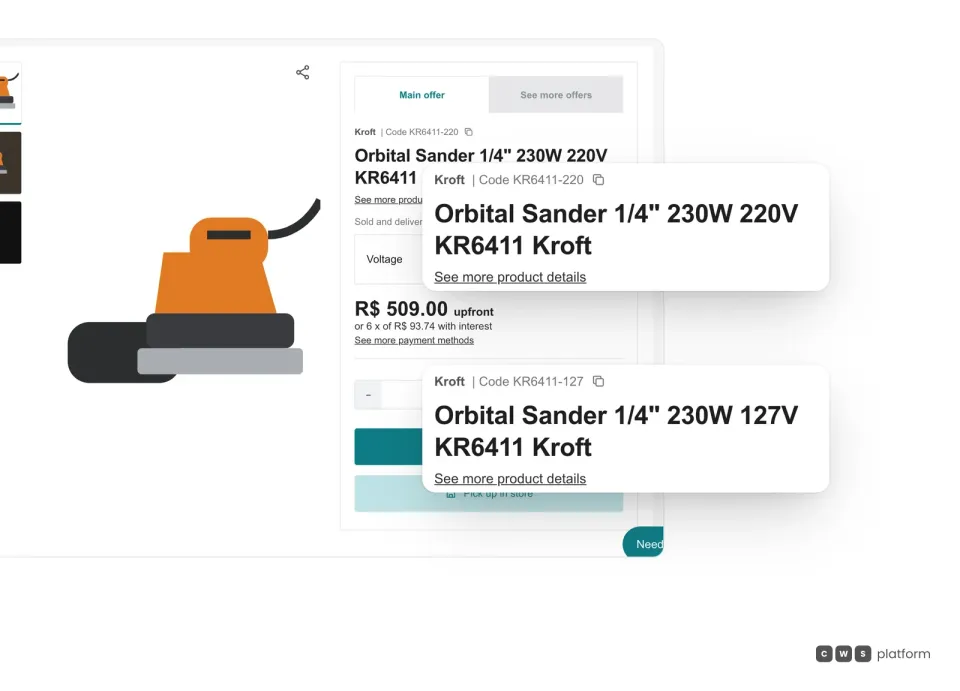
Each voltage is its own SKU, with its own code and stock, in the same buybox.
In Product Catalog & MDM (Catalog Engine), product variants are grouped SKUs: each voltage has its own code, price and stock, and the buyer switches between them in the selector without leaving the page.
Catalog and branch
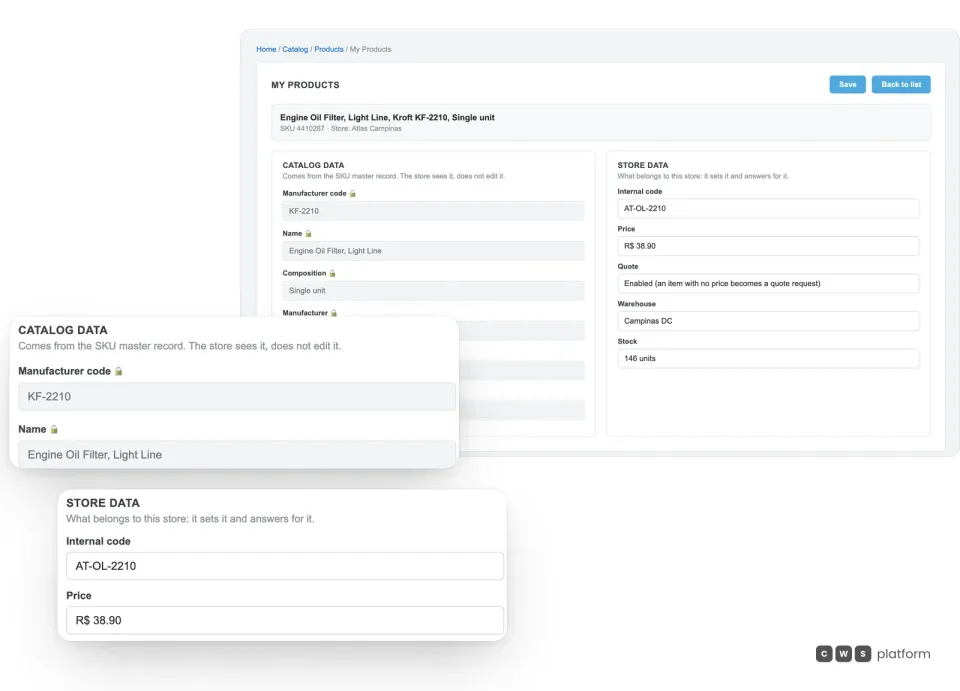
The branch inherits the catalog record and sets only what is its own.
In Product Catalog & MDM (Catalog Engine), the store sees the SKU's master record read-only in My Products (manufacturer code, name, composition, manufacturer, tax code and dimensions) and sets what is its own: internal code, price, quote, warehouse and stock.

Persona · Portal owner
I no longer keep the same catalog twice: branches inherit the master data.
With Product Catalog & MDM (Catalog Engine), branches and sellers inherit the product master data and extend it with their regional offer.

Persona · Parts buyer
I no longer need to know the code by heart: I find the part by vehicle.
Product Catalog & MDM (Catalog Engine) links each SKU to the vehicle through the application table and cross-references equivalent codes across manufacturers.
In operation
Imdepa · auto parts distribution
about 23,000 SKUs
in a portfolio serving roughly 16,000 corporate customers across 9 states, in the agricultural, industrial and automotive segments.
With the catalog intact, the buyer assembles an order of more than 250 SKUs in a single cart, unassisted. What holds that order up is not the screen — it is the records behind it.
Read the Imdepa case →APIs for this module
What this module does in the panel can also be done by your system. These are its groups in the public API reference.
The endpoint groups and events for this module.
SKU Priority
Endpoints to manage the display priority of products (SKUs) in search results.
Frequently asked questions
Our records have missing attributes and inconsistent part names. Can we go live like that?
Yes, and that is how nearly every operation starts. The catalog comes in as it is and improves by level: first the manufacturer code, then name and dimensions, then application and image. Each additional level raises the chance the item is found and bought, so improving the catalog becomes an operational goal with visible progress, not a prerequisite that stalls the project. Inconsistent part names do not have to be fixed in the ERP first either: synonym tables for manufacturer name, product code and composition make the ERP records match the catalog, and name synonyms resolve in search the regional nicknames buyers actually type.
Does the platform know that one brand's part replaces another's?
Yes. Cross-reference links equivalent codes across manufacturers, and the application table links the SKU to the vehicle or equipment it fits. The buyer arrives with the code they already know, with a serial number, or through the exploded view of an assembly, and still lands on the right item. Customers can filter by vehicle (type, make, model and year) and save their own garage, and the product page shows similar items from other brands next to the one they searched for.
Do headquarters and branches have to maintain the same catalog twice?
No. Under global versus local governance, the portal owner chooses the catalog strategy: use the CWS Platform global catalog and enrich it, have the manufacturers in their sector feed that global catalog, keep an exclusive proprietary catalog identified by an internal code, or let each seller list its own items. Headquarters chooses which catalogs the portal displays, and branches and sellers inherit the product master data (manufacturer code, name, composition, tax classification, dimensions) and extend it with what is theirs: internal code, price, quote option, warehouse and stock, in other words the regional offer. A new partner captures the catalog that already exists instead of re-entering it from scratch, which shortens their go-to-market.