What Needs to Flow Between ERP and B2B Commerce, and at What Cadence
How to connect your sales front end to core business systems without breaking logic or overloading back-office ops.

"The integration is complete, but the portal is showing inventory that does not exist." Almost every B2B portal project hits this phrase eventually. The connection to the backend system was delivered, data flows back and forth, yet buyers still see outdated pricing, incorrect stock balances, or credit limits that were exhausted hours ago. The issue is rarely the technical pipe itself. The real problem lies in the rules governing what data moves, in which direction, and at what cadence.
Before debating technology, ask one straightforward question for each data point: who owns it, who needs it, and how long can it sit out of sync before causing business damage?
Why integrations deliver wrong data
Why does the portal show inventory that does not exist? Because stock levels sync once a night via a batch job, meaning morning counter orders remain completely invisible until the next day.
Why is the sync scheduled overnight? Because the integration was designed as a bulk export, mirroring legacy reports already generated by the ERP.
Why did nobody define a better cadence? Because the project treated all records uniformly, ignoring the reality that different operational data points evolve at radically different speeds.
Why does an order bounce back with an error? Because the digital storefront accepted the transaction without checking the parameters the backend rejects: credit limits, tax exemption status, or reserved warehouse stock.
The root cause is clear: the workflow was treated as a simple data copy, rather than an operational agreement defining who governs each data point and when. Successful ecommerce ERP integration depends on establishing those ownership rules upfront.
What needs to flow back and forth
| Data entity | Direction | Proven operational cadence |
|---|---|---|
| Customer master and trade group rules | ERP to platform | Event-driven, on change |
| Product master and technical attributes | ERP or PIM to platform | On change, via scheduled batch |
| Base pricing and standard price books | ERP to platform | On change; negotiation logic stays in the platform |
| Inventory balances by warehouse | ERP to platform | Real time, SKU by SKU |
| Available credit limits | ERP to platform | Real time or verified per order |
| Validated purchase order | Platform to ERP | Instantly at checkout |
| Order status, invoice, and tracking | ERP to platform | Event-driven, on change |
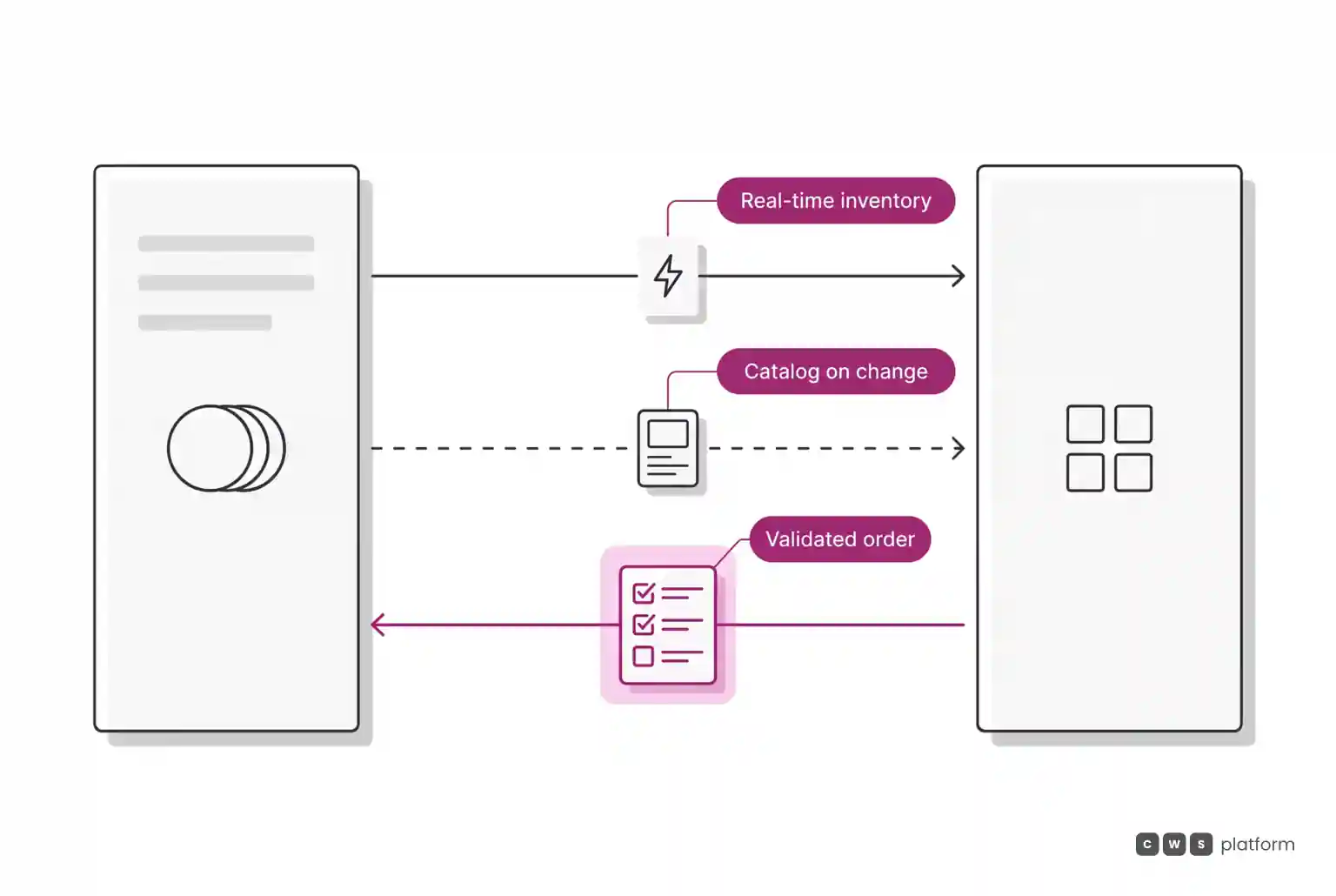
Two practical operational rules emerge from this matrix. First, any metric the professional buyer relies on to make a decision (inventory, credit, contract pricing) must be accurate at the exact moment of checkout. Second, purchase orders should only pass downstream once fully validated, preventing operational rejections.
How to design the architecture
1. One single owner for each record. The ERP owns tax calculations, physical inventory balances, and ledger accounting. The commerce platform owns real-time commercial negotiations: tier discounts, approval limits, exception routing, and custom terms. Any record with two masters creates data drift.
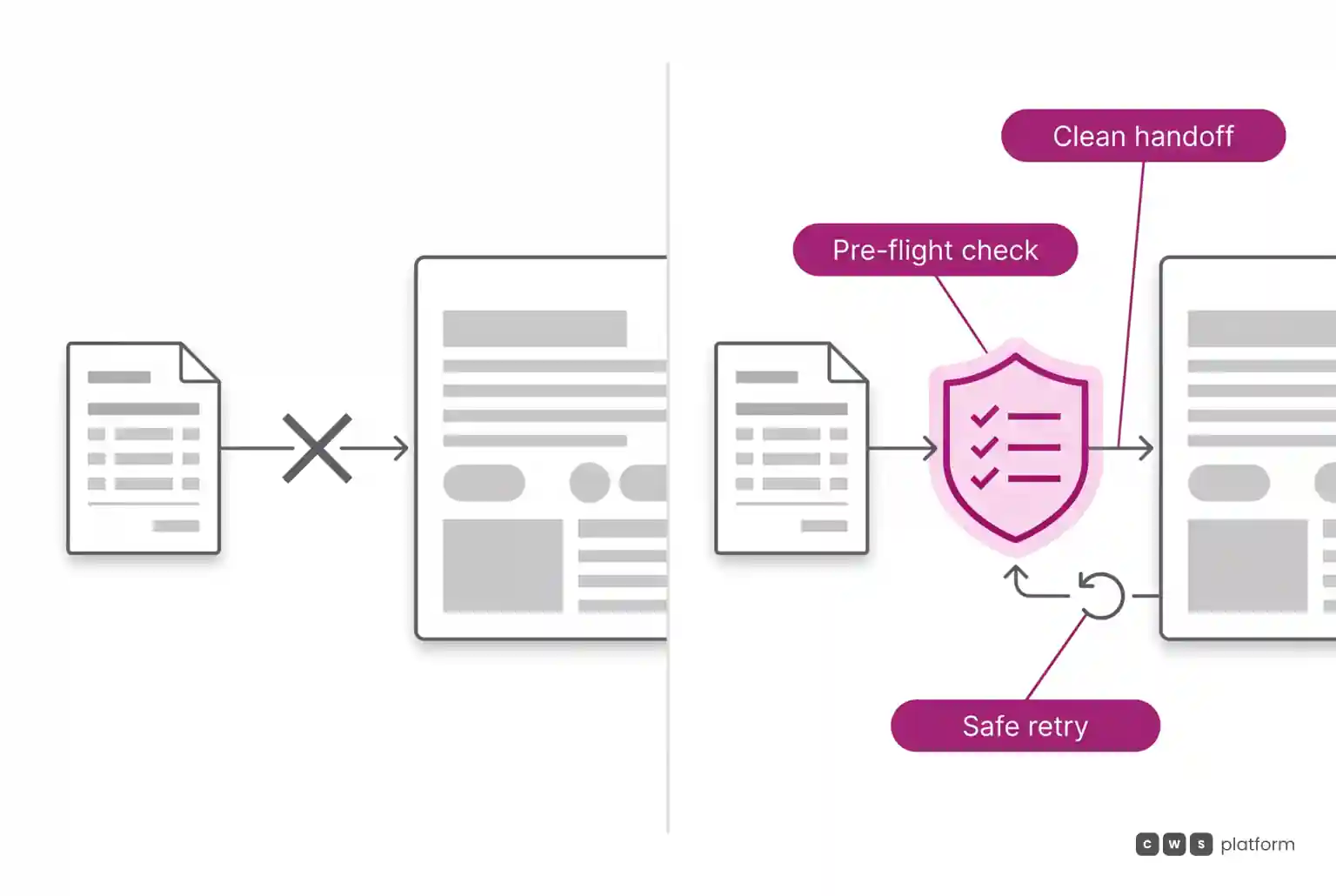
2. Align cadence to data velocity, not project milestones. Keep inventory counts and credit verification real time; push master customer updates on change; run heavy catalog loads through asynchronous queues outside peak business hours.
3. Build for safe retries. If the same inventory adjustment arrives twice, the system must not add the balance twice. This idempotent architecture allows high-frequency syncing without risking duplicate entries.
4. Validate rules before submission. Stock availability, contract pricing, credit balances, and sales tax compliance should be verified directly at checkout, ensuring the backend receives clean orders ready for immediate fulfillment.
5. Plan for ERP downtime. The buyer portal requires clear fallback procedures during backend outages: pause order finalization gracefully, notify buyers, and queue pending orders safely.
We explore the operational impact of neglecting this structure in your ERP is not the problem.
A real-world complex order flow
At auto parts distributor Imdepa, a single enterprise order frequently contains over 250 SKUs, calculating tiered sales taxes, shipping rules, and pre-approved commercial credit lines in seconds, as highlighted in the caso Imdepa. Achieving that performance is only viable when every calculation relies on current operational data at the moment of purchase.
On CWS Platform, ecommerce ERP integration relies on modern REST APIs and webhooks. Stock counts update in real time on an individual SKU basis using idempotent keys to avoid duplicate records, while large spreadsheets and catalogs process through background queues. You can review the architecture directly on our APIs and integrations page.
Next steps
Review the cadence table above alongside your IT and operations teams, mapping out how data moves across your current systems. Any row where system sync speeds lag behind what your buyer needs represents an order waiting to fail.
Frequently asked questions
How do you integrate a B2B ordering portal with an existing ERP?
Start by defining system ownership and update frequency for every data entity. Master records and base price books stream from the ERP whenever modified, while stock and credit balances update in real time. Validated orders return to the ERP only after clearing customer rule checks. Modern API and webhook architectures achieve this without custom ERP core modifications.
How do you connect an ERP to a B2B sales site?
Use APIs and webhooks, establishing the ERP as your system of record and the commerce platform as the frontline sales engine. The portal reads what buyers need to make purchasing decisions and transmits clean orders ready for processing.
How do you integrate self-service B2B portals with legacy infrastructure?
Keep the ERP as the single source of truth for taxes, ledger accounting, and inventory, while managing active negotiation and user permissions on the front-end platform. Align sync speeds to operational reality: decision-critical data must reflect real-time accuracy during buyer checkout.
What is B2B integration?
It is the automated exchange of operational records between enterprise platforms, or between internal backends and customer-facing sales portals. It ensures order details, dynamic pricing, inventory availability, terms, and shipping notices update automatically without manual data entry. In digital wholesale, robust ecommerce ERP integration serves as the backbone of modern operations.
Read also
- When You Run on Several ERPs, Which One Is Right?
- ERP integration
- Where ERP and marketplace integration breaks down
About this publication
Operational metrics and examples cited reference Imdepa, a CWS Platform customer, shared with permission.
Brands mentioned in this article

Trademarks and logos belong to their respective owners. Mention does not imply partnership or endorsement.
"responsive, technically engaged, and willing to work through complex commercial rules (negotiated pricing, credit, customer-specific conditions) rather than pushing generic answers"
Want to see this in your operation?
Real B2B operations already run on it.