Marketplace Management Platform (Marketplace Center)

Management · Sales director
The order of partner stores, profile by profile, set in the panel.
For customer, buyer or sales rep, offers from the stores on the list show first, in the saved order. The other offers stay visible after them.
Illustrative scene with a real CWS Platform screen in a demo version. People, stores and on-screen data are fictitious.

At the workshop · Technician
Two stores sell the same part: one ships right away, the other offers pickup.
The offers compete on the same item under the portal operator's rule, and the technician picks who to buy from without leaving the page.
Illustrative scene with a real CWS Platform screen in a demo version. People, stores and on-screen data are fictitious.

On the portal · Reseller buyer
One cart, one order for each distributor selling in it.
Each store shows with its own block, its own preparation time and the rule that applies to each item.
Illustrative scene with a real CWS Platform screen in a demo version. People, stores and on-screen data are fictitious.

In the Store Channel · Supplier
What comes from the network catalog she sees; what belongs to the store, she sets.
Master catalog data arrives ready and the store does not edit it. The store's own data is hers, and she answers for it.
Illustrative scene with a real CWS Platform screen in a demo version. People, stores and on-screen data are fictitious.
Deterministic module
Opening the portal to third parties looks like a technology problem, and it isn't. The hard part starts afterwards: two sellers list the same part and the buyer sees two prices under your brand, one of them promises a region it cannot actually deliver to, and a third works out that closing the deal off-platform is cheaper. Without rules, the ecosystem that was meant to widen the assortment erodes both price and trust.
What it is
The module that governs the ecosystem of sellers. It answers the questions of whoever runs the network, not those of someone tracking a single order: who is allowed to sell here, what each party may expose, how offers compete with one another, which region each store serves, and how the value of a sale divides between the parties. On the merchant's side, the same machinery is the store channel, with catalog, price, inventory and orders isolated per seller. On the operator's side, it is the console where ecosystem policy becomes a parameter. What happens to an order once it exists belongs to the Order Management System.
Marketplace Center in 1 minute
The capability no one replicates
The ecosystem either competes or complements, and that is a configured decision
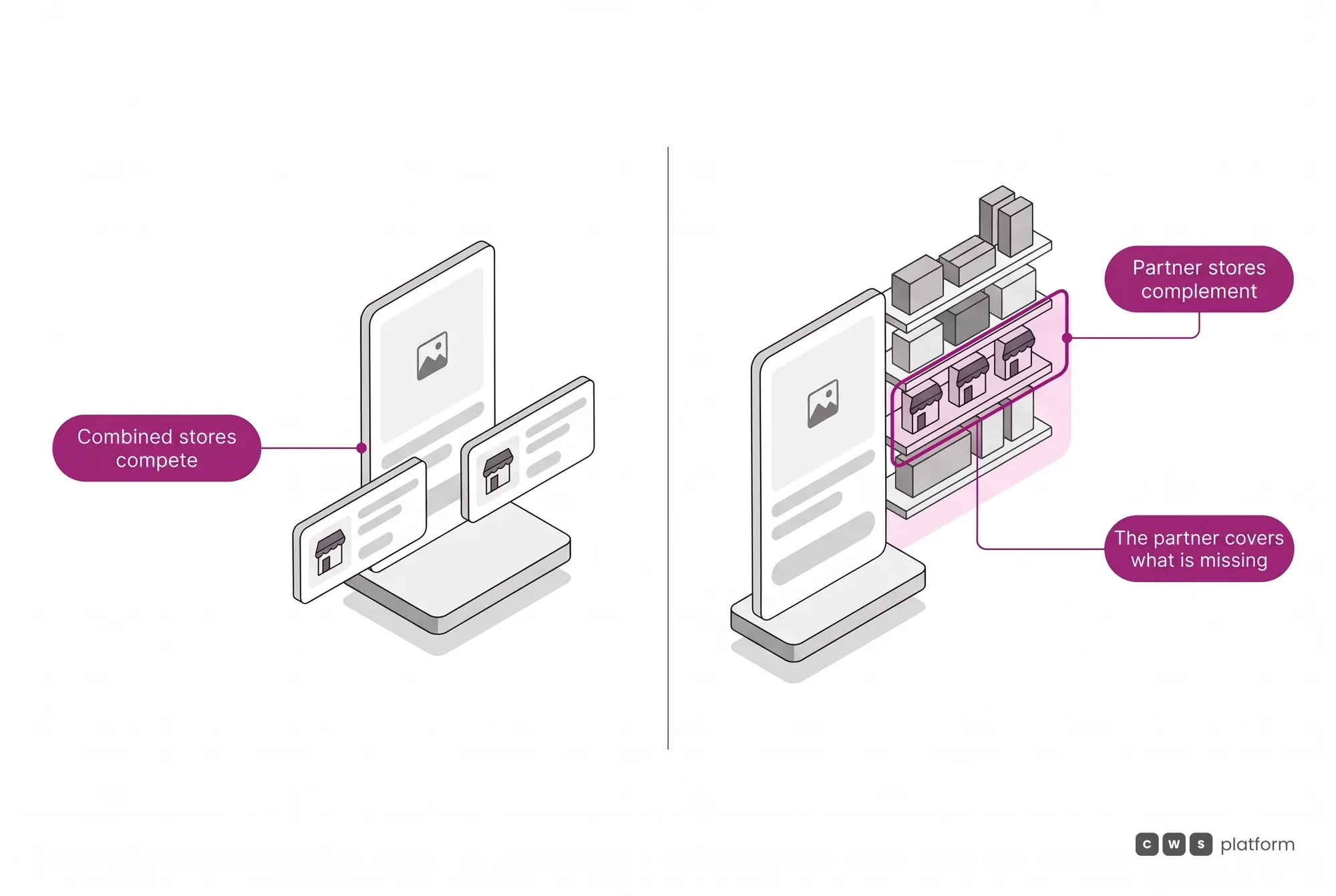
A marketplace runs on combined stores, in a competitive regime, with a featured offer and the remaining offers alongside it. Or it runs on partner stores, in a complementary regime, and then the offer comparison disappears from the entire portal: when the main store's stock runs out, the partner supplies on the same product page, in the priority order you parameterized. These are two different market designs, and a marketplace runs on one or the other. Switching regimes is not a new project, it is configuration.
The storefront governance is the same one that decides price, inventory and credit
In a marketplace assembled from different vendors' parts, the exposure rule lives in one place and the commercial rule in another, and they drift apart. Here both come out of the Commerce Rules Engine (CDL Workspace), so the offer that wins the storefront is already consistent with that customer's price, that warehouse's balance, and the region that store actually serves. A seller cannot advertise what the operator's rule did not authorize, and the operator does not have to audit afterwards what the system never allowed to happen.
Many stores per item
Each part shows how many stores in the network sell it.
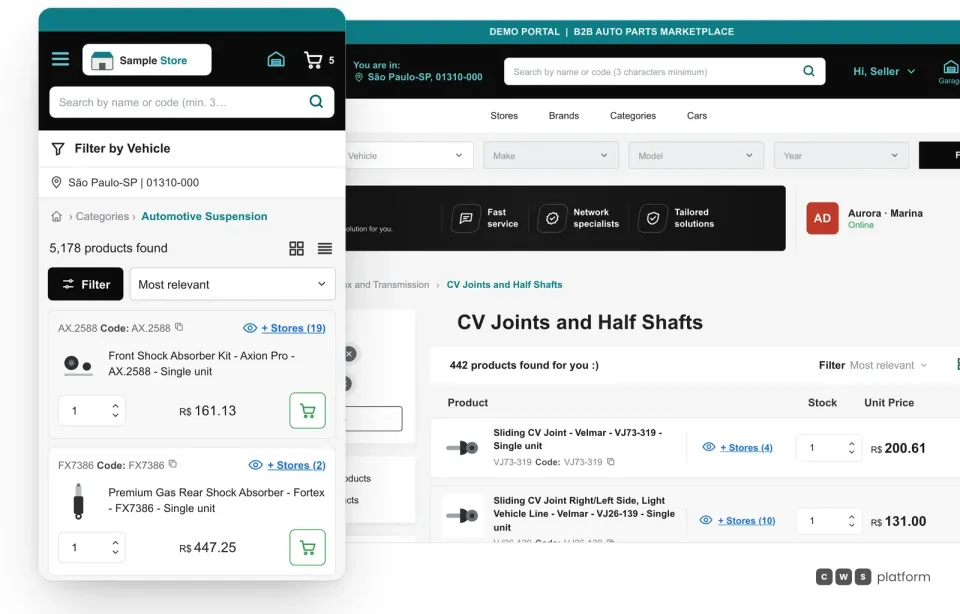
In the Marketplace Management Platform (Marketplace Center), there is one catalog and each item shows how many stores in the network sell it, on desktop and on mobile. The buyer opens + Stores and picks who to buy from.
What the operator decides, and where each decision lands
Governing a network of sellers is less rhetoric and more a set of explicit levers. What follows are the four that define how the ecosystem behaves, and none of them calls for a new software release. They are parameters, and the platform has 1,029 configurable parameters in total.
- Who gets in Store invitation and seller acceptance, with sent and received requests on each side, and a relationship type on every link (headquarters and branch, owned or franchise, or seller and marketplace) that governs access to customer data and the separation between own and third-party products. There is self-service signup from the portal itself for those applying to sell, with logo, payment account, delivery method and warehouse, and a link that only completes once the split contract is configured.
- Who shows up A rules-based smart buybox, which absorbs the business, logistics, payment and catalog rules of each context and serves as the foundation for AI agents: featured-offer criteria by lowest price or nearest seller, with a minimum radius in kilometers for comparing prices across stores, store prioritization by profile (customer, sales rep, buyer) without removing the other offers, curation of the third-party assortment by manufacturer, category and SKU, different display for identified or anonymous visitors with or without location, options for suggested price and for price only after login, and exclusivity on items held in your own stock.
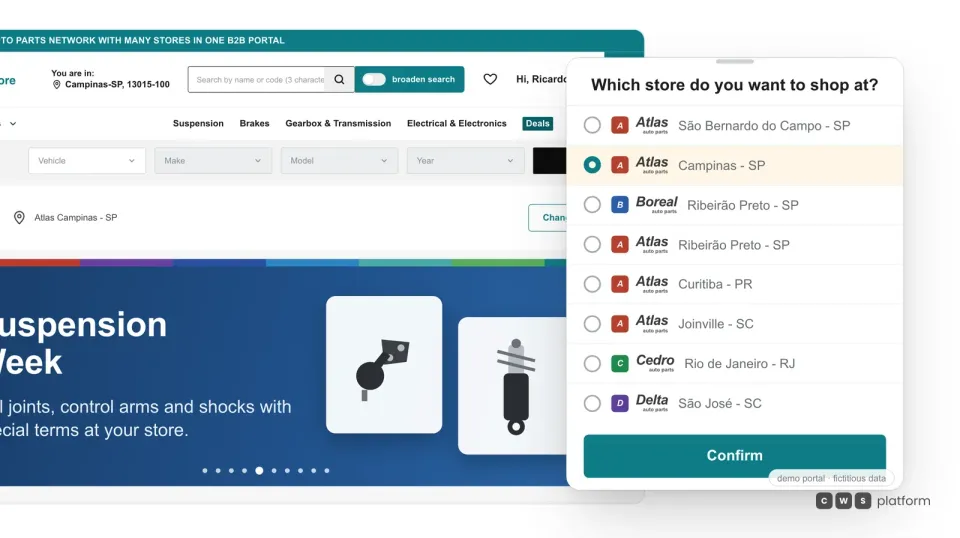
- Who serves where Postal-code range restrictions store by store, with a nickname per region, bulk import of nationwide ranges, and deliberate overlap when more than one store should serve the same area. Customers and sales reps switch stores inside the portal, with priority by the customer's main address or by the sales rep's store, and an option to show only branches.
- Who gets what A marketplace-to-store contract with a take rate per merchant and per sales scenario, a percentage per party, who bears the fees, the primary recipient, whether freight is included in the charge, and a change history for every contract.
Who sells
Buyers see the main offer, who sells and ships it, and where to pick it up.
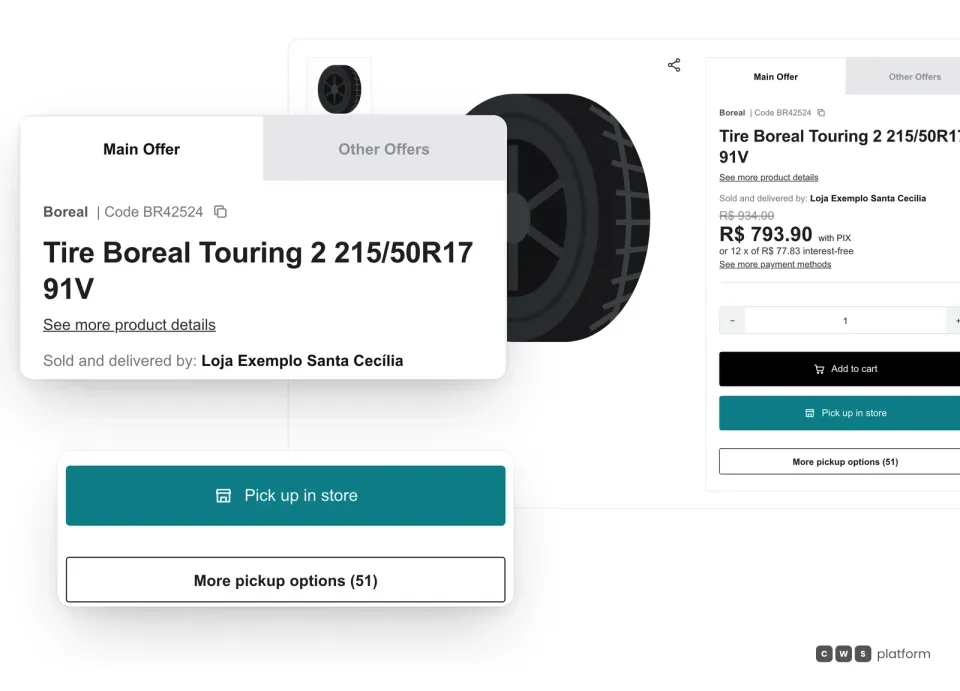
In the Marketplace Management Platform (Marketplace Center), the product page opens on the main offer, shows who sells and ships it and leads to the other offers and the pickup stores, by the portal operator's rule.
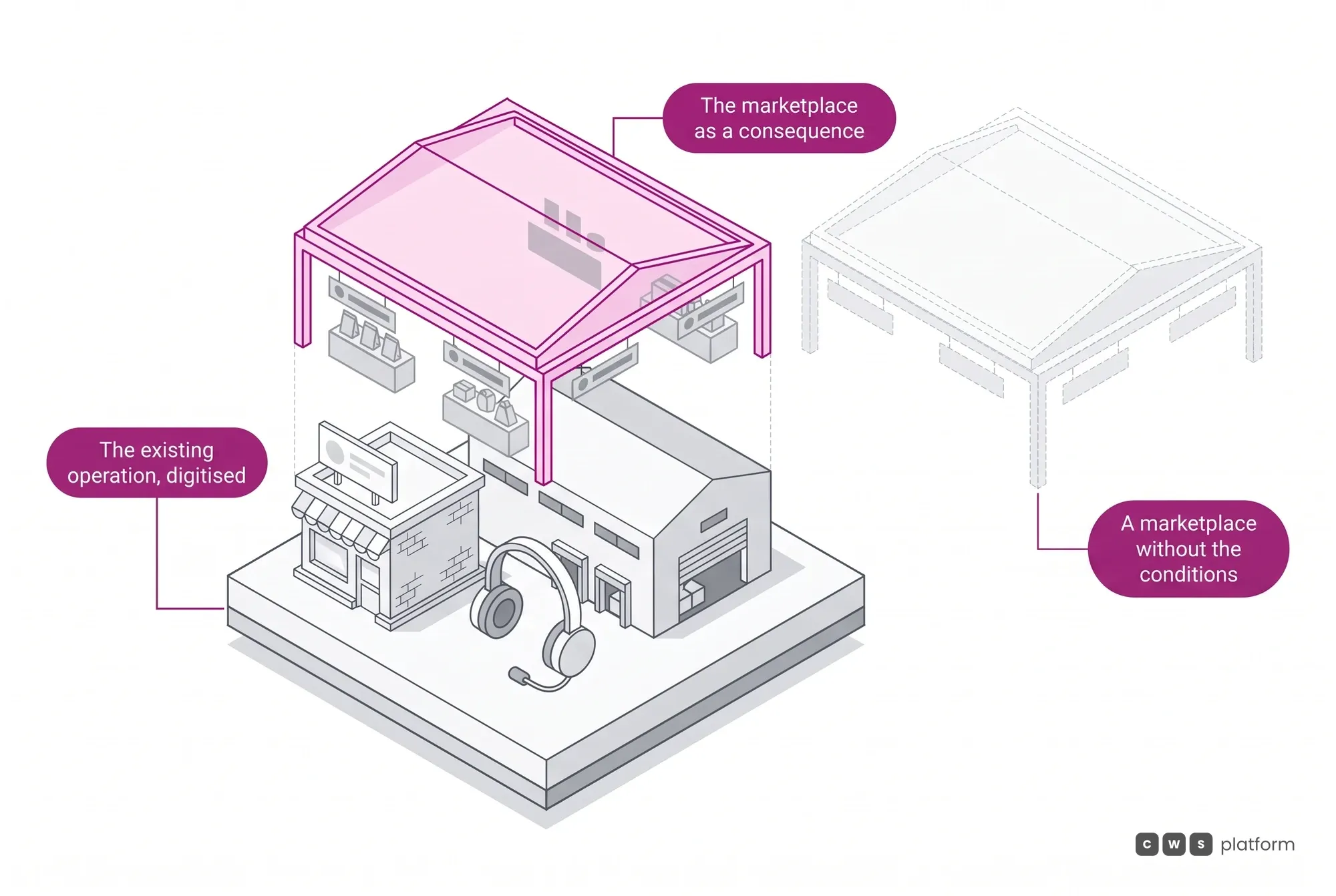
A note on direction rather than on screens: a marketplace is rarely the goal of the company that arrives asking for one. The path that works starts by digitizing the operation that already exists, with the network of customers, sales reps and suppliers the company already has, and the ecosystem shows up as a consequence of that. A marketplace without participant buy-in, without reliable product and lead-time data, without liquidity on both sides and without clear governance is not a late software project — it is a project without the conditions to exist.
In operation
Tracbel · Volvo dealer
a 40-unit network
on a single portal, with roughly US$47 million accumulated since launch (Tracbel, named the world's best Volvo dealer, Volvo Gold 2025).
The same machinery that governs third-party sellers governs a network of owned units: each branch is a distinct product origin, with its own service area and its own stock, and the buyer still sees a single portal. It is ecosystem governance applied inward, before it is ever applied outward.
Read the Tracbel case →Figures converted from Brazilian reais at R$5.00 = US$1.00.
One account, many stores
Several banners and branches in one account.
Branches of different banners in the same network share one list, and the buyer switches store without switching account.
Frequently asked questions
What stops a seller from taking our customer off the platform?
The relationship rule belongs to the marketplace operator, and it is configured. A seller sees the customer records needed to invoice and ship, because without them there is no tax document and no delivery, and the operator decides whether direct contact beyond that is allowed, restricted, or centralized in a single support desk acting on the seller's behalf. In practice, the operator can mask the customer's email and phone from sellers (the network's own branches are exempt from that restriction), restrict each seller to selling only to customers it registered itself, and hide the merchant's location. Every order carries both the store it originated in and the store fulfilling it, so who sold what, in which environment, stays recorded and auditable.
If we hold the item in stock, do we have to show a competitor's offer next to ours?
No. There is an exclusivity setting that suppresses other sellers' offers on the products you keep in stock, and it applies across your whole portfolio at once. If your operation is not built on competition, the decision comes earlier: in the partner-store model the offer comparison simply does not exist on the portal, and the partner comes in as stock backup rather than a rival on the same product page.
How does each seller get paid?
The split comes from a configured contract between marketplace and store, not from manual reconciliation: each party's percentage, who bears the fees, who is the primary recipient, and whether the charge applies to the order with or without freight. The marketplace take rate is set per merchant and per scenario: a sale on the marketplace, an invited store with its own stock, an invited store with third-party stock, and a sale between partner stores. When the cart brings together items from several sellers, each store offers its own shipping or pickup options, the parent order controls the aggregated cart, and each supplier configures its payments independently, within the general criteria set by the portal owner.

Persona · Small shop owner, marketplace seller
I sell on the network's portal with my own price, my own stock and my own region.
In Marketplace Center, the store channel keeps catalog, price, inventory and orders isolated per seller, and each store serves the region the rule defines.

Persona · Portal owner, marketplace operator
I no longer audit seller listings: what the rule doesn't allow never shows up.
In Marketplace Center, who gets in, who shows up and who serves where are operator parameters, and a seller can only list what the rule allows.