Buyers upload their reorder spreadsheet and order hundreds of items at once

For whoever oversees operations
The director tracks orders by status, from in progress to awaiting commercial approval.
An order that comes in by spreadsheet follows the same flow as any portal order, with rules, approval and status.
Illustrative scene with a real CWS Platform screen in a demo version. People, stores and on-screen data are fictitious.

For reps who serve resellers
On a visit, the rep uploads the customer's spreadsheet or types in brand, code and quantity by hand.
Bulk ordering starts from the portal's own spreadsheet template, in the stores the customer chose.
Illustrative scene with a real CWS Platform screen in a demo version. People, stores and on-screen data are fictitious.

For whoever restocks the shelf
On her phone, the buyer sorts out with the distributor's rep whatever was left out of the spreadsheet.
The chat lives in the portal, tied to the distributor, and negotiating the missing item doesn't go back to the phone.
Illustrative scene with a real CWS Platform screen in a demo version. People, stores and on-screen data are fictitious.

For buyers who reorder every month
Checked items land in a cart with one order per distributor, which the retailer saves for the next reorder.
The saved cart keeps the items, and the next purchase starts from it, with no list to redo.
Illustrative scene with a real CWS Platform screen in a demo version. People, stores and on-screen data are fictitious.
By challenge · Bulk reorders
Resellers email their reorder spreadsheet, and someone retypes it line by line into the system. Along the way a code gets swapped, an item is missing and the check goes back to the customer. Reps spend the day keying repeat orders, and a large order costs as much work as a small one.
On CWS Platform, your wholesale order form lives inside the portal. Buyers upload the list they already use, and bulk ordering checks every line against the stock and price of the chosen stores: what is available goes to the cart at once, what sits in more than one store asks for a choice, and what is missing comes back flagged. The order follows the same rules in the Commerce Rules Engine (CDL Workspace) and enters the Order Management System (OMS) like any portal order.
Where large reorders stall today
The spreadsheet gets retyped
Every line goes through someone's hands, and a wrong code only shows up at picking or delivery.
Stock is checked afterwards
The customer only learns what is missing when someone calls back, and the restock slips a cycle.
A hundred items, one by one
A regular portal asks for a search and a click per item, so the reseller goes back to email and the rep.
Bulk ordering
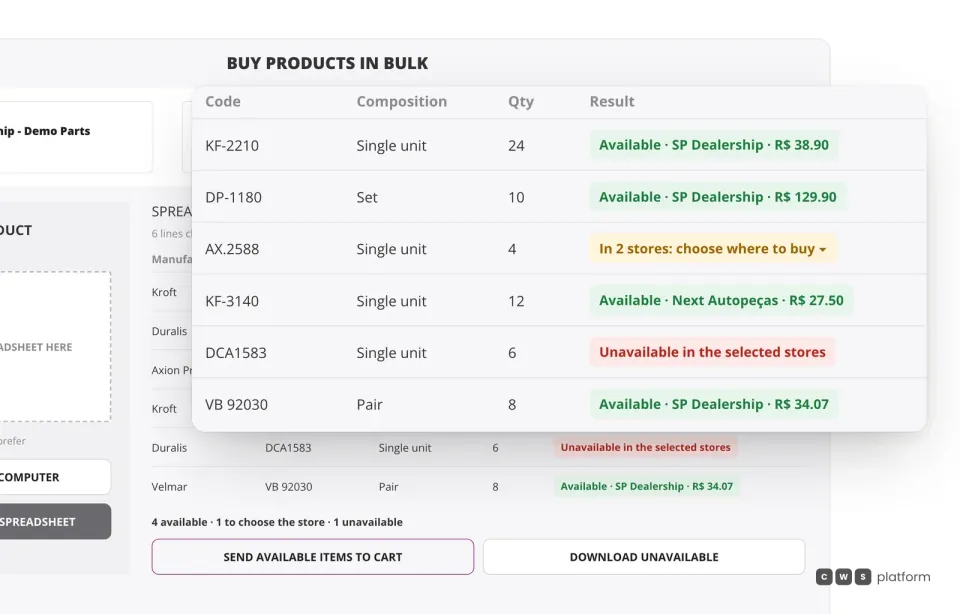
The spreadsheet comes back checked line by line, before it hits the cart.
Each line says whether the item is available, in which store and at what price, whether it sits in two stores and needs a choice, or whether it is unavailable in the selected stores. Available items go to the cart in one click.
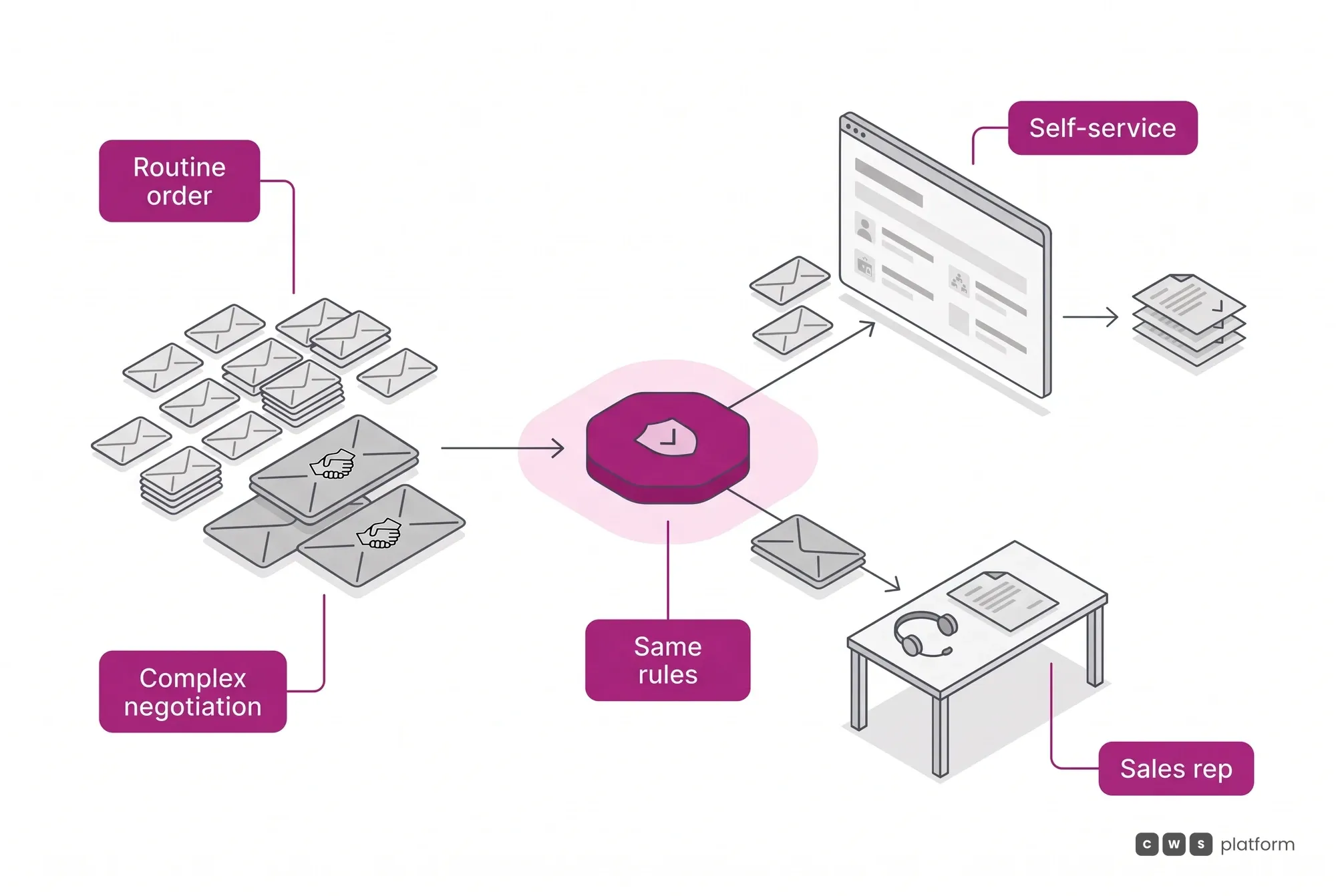
Routine on the portal, negotiation with the rep
The usual reorder goes through self-service, at each customer's price and stock. What needs a person, a missing item or terms outside the rules, reaches the rep with the order's context.
The cart can be saved and reopened for the next purchase, and the rep who handles the account sees the customer's saved carts.
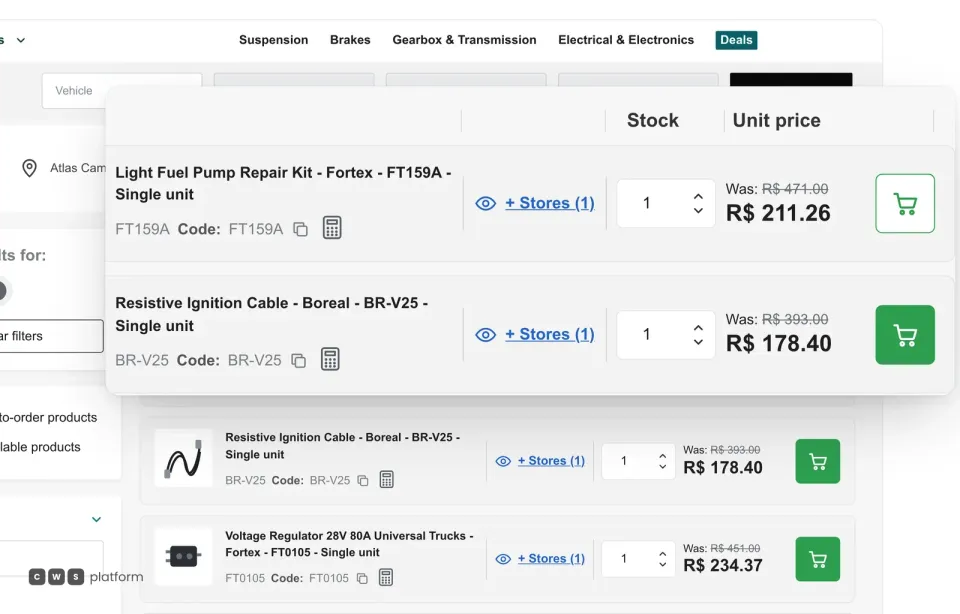
List view
Without a spreadsheet, every row already has quantity, price and the cart button.
In list view, buyers see code, stock and their own price and type the quantity right on the row. The portal owner decides whether the catalog opens as a list or a grid and can leave the switch to the buyer.
Want to see your customers' spreadsheets flowing into the portal?
Send a sample of the list your resellers use today, and a specialist will build the demo with your codes, stores and prices.

Persona · Sales rep, distributor
I stopped retyping the customer's spreadsheet: it goes in whole and comes back checked.
I keep what needs me, the item that was missing and the account negotiation.

Persona · Distributor CEO
Large reorders come in with no retyping, at each customer's price and stock.
Customers upload the list they already use, and the team handles what falls outside the rules.

In production: carts of hundreds of items built by the customer
Even without a spreadsheet, the problem is the same: large orders with no rep keying them in. At Imdepa, an auto parts and aftermarket distributor founded in 1960, an order with more than 250 SKUs is built in a single cart, with taxes, freight and pre-approved credit calculated automatically, in seconds. What used to take hours of a rep's time now takes minutes of a self-sufficient customer. In 3 years, the portal activated 153 customers and processed about 60,000 orders.
Source: Imdepa case study (portal live since 2023, 3 years of operation). Read the Imdepa story →
What usually gets in the way, and how it works
My customers use their own codes
The template asks for brand and part code, and each line's pack type (single, pair or set) avoids packaging mix-ups.
What about taxes on an order that large?
They are calculated in the cart for every item, together with freight and credit, before the order closes.
Can a rep upload on the customer's behalf?
Yes. During a visit or a call, the rep buys on behalf of the identified customer, with the same screen and the same rules.
Frequently asked questions
How does ordering by spreadsheet work on the portal?
The buyer downloads the portal's template, fills in brand, part code, pack type and quantity, and uploads the file by drag and drop or from their computer. The portal checks every line against the stock and price of the chosen stores and sends the available items to the cart at once.
What happens to items that are out of stock?
The line comes back marked as unavailable in the chosen stores, and the buyer can download the list of unavailable items. If an item is in more than one store, they pick which one to buy from.
Can buyers order without a spreadsheet?
Yes. The same screen accepts manual entry, line by line, and list view lets them type the quantity straight into the catalog without opening each product.
Does the upload respect each customer's price?
It does. The price checked is the customer's own terms in the chosen stores, under the same rules as any portal order.
Go deeper
- B2B self-service portal: ordering with credit and rules.
- Order Management System (OMS): the portal order through delivery.
- Distributors and wholesale: the industry that gets the most reorder spreadsheets.
- Wholesale order automation: the guide, on The Cost of Selling blog.
- Why B2B reorders stall: wholesale account activation.
- All challenges: customer price lists, discount approval, payment terms and more.
See the wholesale order form on your portal
Tell us a bit about your operation and a CWS Platform specialist will reach out within one business day, no strings attached.