Campaigns become pages with no IT ticket, at each buyer's own price

For whoever owns the campaign
The marketing director sees, in the same panel, the price rules in force and whether each one stacks.
Campaigns and pricing policy live in the same CDL Workspace, used by marketing, sales and product, with no ticket to the integrator.
Illustrative scene with a real CWS Platform screen in a demo version. People, stores and on-screen data are fictitious.

For the network's consumers
At home, the car owner sees the tires' was/now instant-payment price and the store that serves him.
The displayed price follows the visitor's region and profile, and the storefront only shows what the local store can deliver.
Illustrative scene with a real CWS Platform screen in a demo version. People, stores and on-screen data are fictitious.

For buyers who pay upfront
On the product page, the retailer sees the was/now price, the instant-payment price and the selling store.
Each payment method's discount is a store rule and can skip items that are already on promotion.
Illustrative scene with a real CWS Platform screen in a demo version. People, stores and on-screen data are fictitious.

For resellers with their own pricing
On her phone, the buyer sees the was/now price in the list already at her account's terms, store by store.
The same promotion reaches resellers and consumers, each at the price of their own terms.
Illustrative scene with a real CWS Platform screen in a demo version. People, stores and on-screen data are fictitious.
By challenge · Promotions
To create a new discount rule, sales opens a ticket, the integrator quotes, builds and tests, and the campaign date has already passed. When it finally goes live, it shows resellers and consumers the same price, or stacks a coupon on top of the contract discount and only shows up at month-end close.
On CWS Platform, a promotion is configuration, not a project. In the Merchandising & Promotion Engine (Marketing Suite), an offer campaign becomes a page with dates, products and participating stores, and the displayed price follows each buyer's terms. Coupons, banners by customer group and the lock against discount stacking live in the same module and are configured in the same CDL Workspace that holds the pricing policy, on the B2B portal and on the store that sells to consumers.
Where promotions get lost today
Every campaign needs a ticket
Each new page goes through the IT or integrator queue, and the promotion date arrives before the page does.
One price for everyone
Resellers see the consumer price, or consumers see the reseller price, because the promotion ignores each buyer's terms.
Discount on top of discount
The coupon stacks on the contract or price rule, and the margin hit only shows at month-end close.
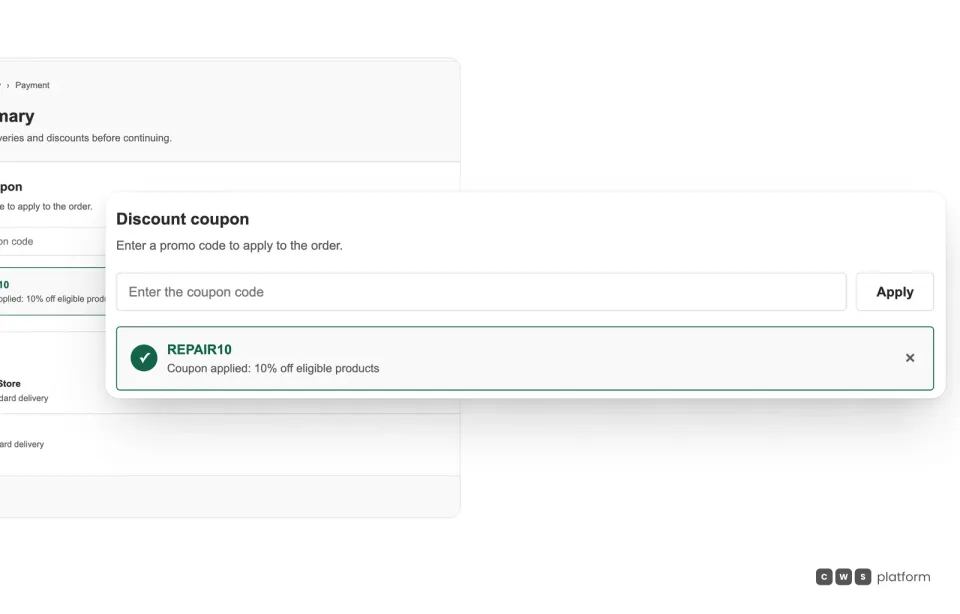
Campaign coupon
The campaign coupon goes into the order summary and says which products it applies to.
The buyer applies the code in the order summary and sees the coupon's rule, such as a discount only on eligible products. The coupon campaign controls the audience, the spending cap and the per-user quantity, and a rep can only apply coupons with that permission.
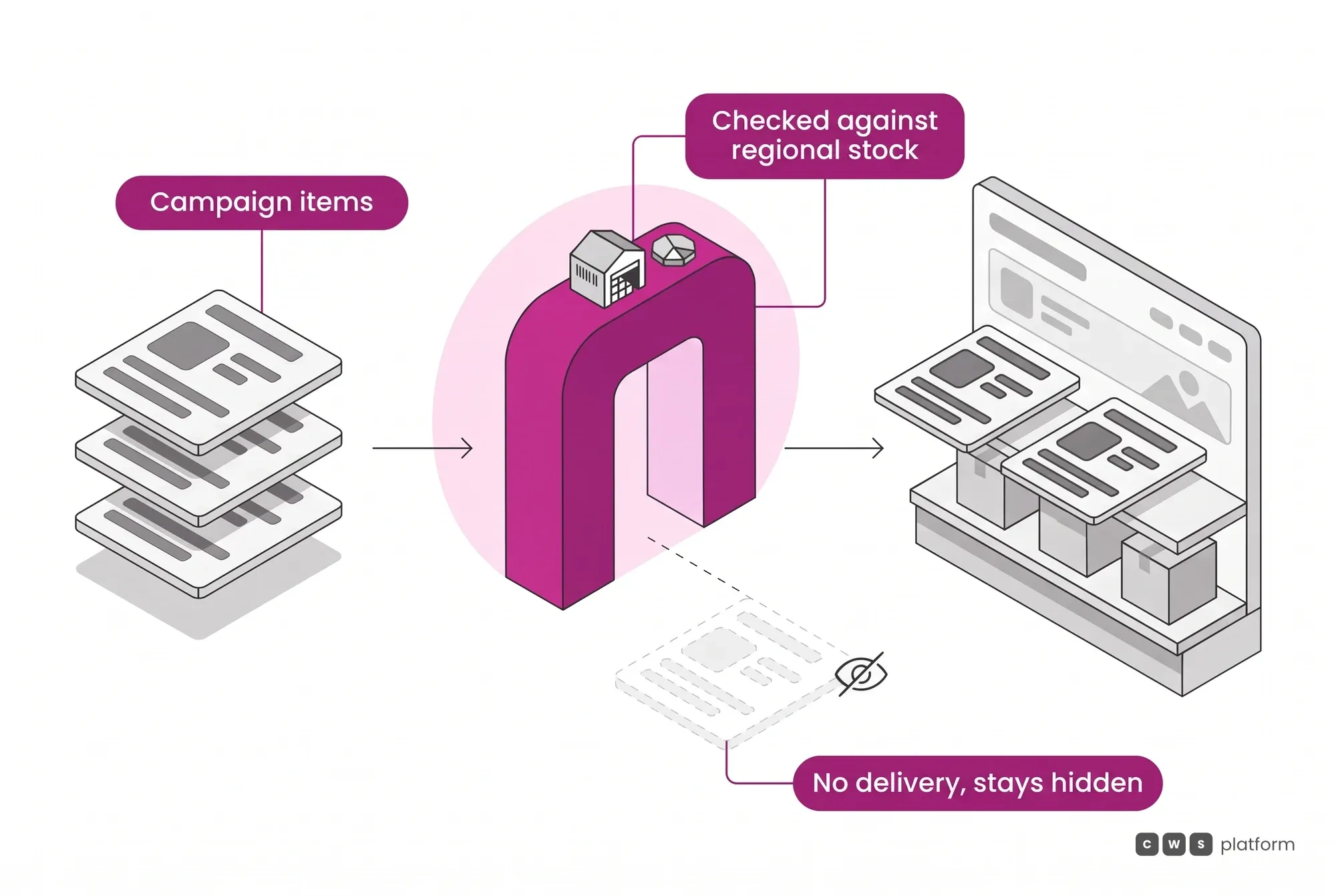
The offer goes through operations before it shows
A campaign only shows what can be delivered in the visitor's region, and a banner can be limited to a customer group: each logged-in buyer sees their own group's promotions.
On a marketplace, a campaign can prioritize partner stores' offers and decide what happens to a product when a store runs out of stock.
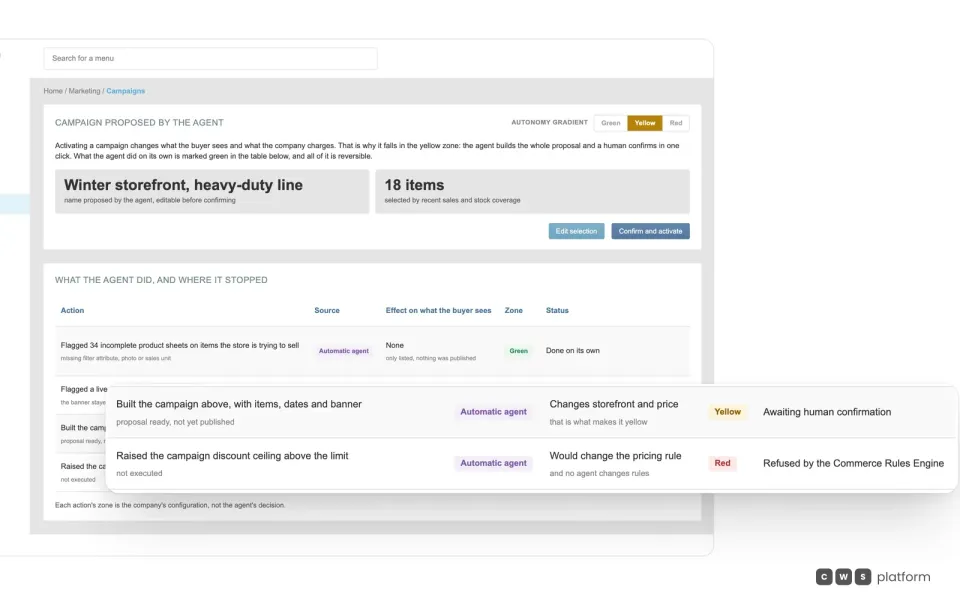
Discount ceiling
If a campaign goes past the discount ceiling, the rule refuses it before the storefront.
The Merchandising Agent can put the campaign together with items, dates and a storefront piece, but activation waits for the decision maker's click, and a discount above the limit is refused by the Commerce Rules Engine. Each price rule also records whether it stacks and whether it shows as a was/now price.
Want to see your next campaign live with no ticket?
Tell us which promotion you want to launch and for whom, resellers, consumers or both, and a specialist will build the demo with your rules.

Persona · Sales director
The campaign goes live on the right day, with no ticket to the integrator.
Resellers and consumers see the same promotion, each at the price of their own terms.

Persona · Chief financial officer
The promotion never goes past the ceiling: the rule says whether it stacks with another discount.
The campaign discount follows the same policy as the order, and I see it before month-end close.

In production: regional campaigns across more than 117 stores
At Campneus, a tire and auto service chain in Brazil, the portal team builds freight, discount and offer campaigns by region, with regional landing pages and offer pages, in a single back office. The ad a consumer sees reflects the price and availability of their own region.
Scale story, with no business-result figures. Source: campneus.com.br (store network). Read the Campneus story →
What usually gets in the way, and how it works
Do I need a developer for every page?
No. The campaign page is configured in the CDL Workspace; only a landing page built elsewhere, as an HTML package, is uploaded as a file.
What if a promotion breaks the margin?
A coupon can be locked when the product is already under a price rule or the customer already has a contract discount, and a proposed campaign above the ceiling is refused before the storefront.
Can several campaigns run at once?
Yes: simultaneous promotions per branch, per store or for the whole portal, with campaigns, rules, coupons and customer groups.
Frequently asked questions
How do you set up a B2B promotion?
In the CDL Workspace, an offer campaign is a page of its own, with its URL, start and end time, banners and meta tags. Products come in by tag, SKU list or manufacturer code list, and the participating stores are chosen in the campaign itself.
Can the same promotion serve resellers and consumers?
Yes, and each sees the price of their own terms: the campaign sets the price shown to logged-in or anonymous visitors, with or without location, such as the lowest price, the nearest store's price or the suggested price.
Can a coupon apply to one customer group only?
Yes. A coupon can be open to everyone or limited by customer group, tax ID, email or account, with a destination-state restriction, a spending cap and a per-user quantity.
How do you stop discounts stacking on discounts?
A coupon can be blocked when the product is already under a price rule or when the customer already has a contract discount. Each price rule also says whether it stacks.
Go deeper
- Merchandising & Promotion Engine (Marketing Suite): campaigns, coupons and storefront.
- No-Code Storefront Builder (CMS Builder): a configurable portal with no front-end project.
- Complex retail: store networks that sell to resellers and consumers.
- Discount management that protects margins: the guide, on The Cost of Selling blog.
- Commercial policy as automated rules: from paper to system.
- All challenges: customer price lists, discount approval, payment terms and more.
See B2B promotions on your portal
Tell us a bit about your operation and a CWS Platform specialist will reach out within one business day, no strings attached.