B2B Catalog Taxonomy: How to Organize by Customer Use Case
Why ERP-driven taxonomies fail B2B buyers and how to design navigation around actual job tasks.

TL;DR
- B2B catalog categories should be organized around buyer use cases (what they are repairing, assembling, or replacing), not the internal structure of your master data.
- The tree inherited from your ERP reflects how your company stores the product. Buyers search for the specific problem they need to solve.
- An item can live in more than one category. Forcing every SKU into a single bucket hides half your catalog.
- The test is simple: can a new buyer reach the item in three clicks without knowing the part number?
To organize B2B catalog categories by use case, name each category after the buyer task ("brake maintenance," "fasteners for structural steel," "combine filter replacement") rather than the accounting group or manufacturing product line. The guiding question for the hierarchy is "what is the buyer trying to accomplish?" not "how do we classify this internally?"
The same mistake happens outside catalogs. Describing software by its architecture ("headless," "API first") explains how it was built, but it does not tell buyers what they can do with it. Catalog categories face the same problem: they describe the house from the inside, while the visitor is standing outside.
Why ERP Categories Fail on the Customer Portal
Because they were designed for someone else. The ERP taxonomy originates from tax codes, inventory accounting, and warehouse management: Harmonized Tariff Schedule (HTS) codes, manufacturing families, and vendor lines. It serves inventory tracking and reporting. It does not serve a buyer who visits the portal to solve a specific job.
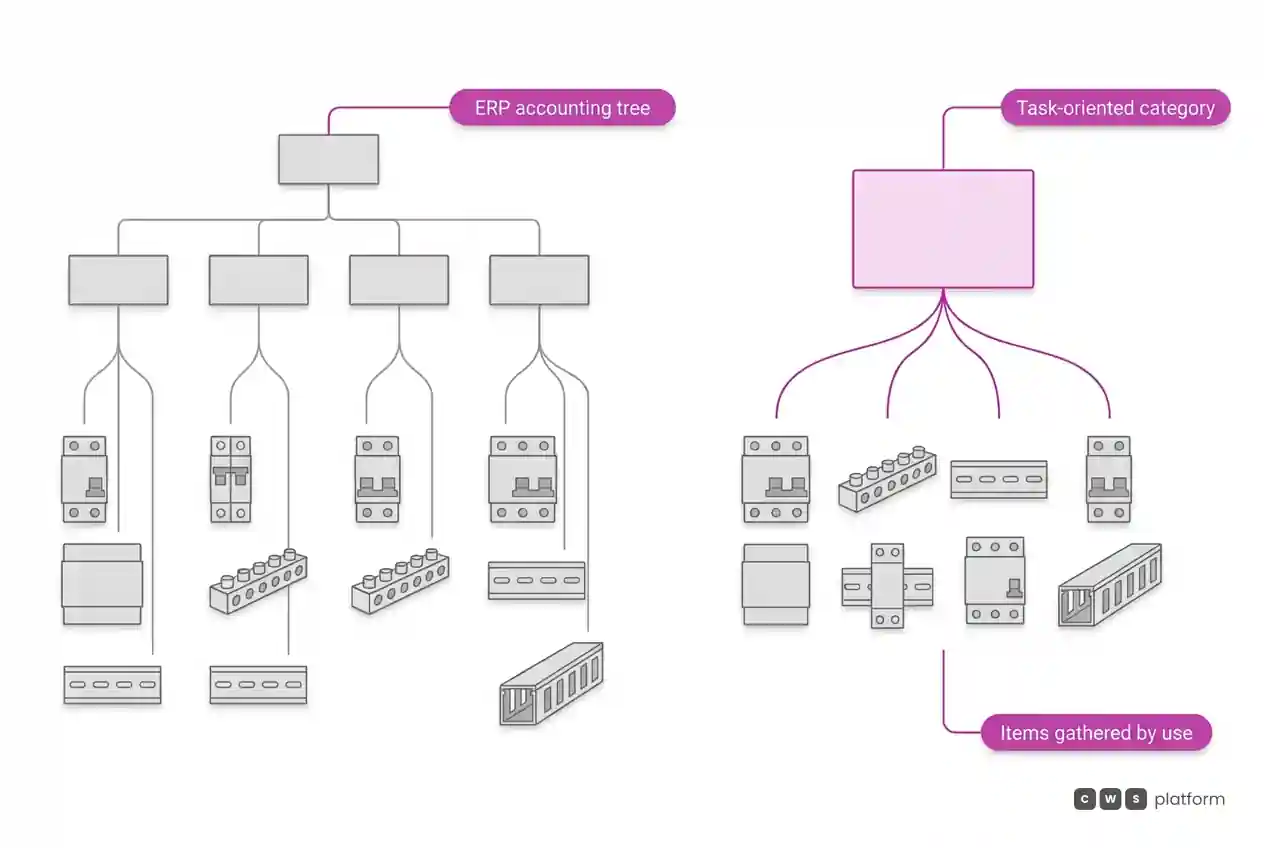
An electrical supply distributor illustrates this gap clearly. In the ERP, a circuit breaker sits under "Protection > Circuit Breakers > Thermal-Magnetic > C-Curve." An electrician assembling a panel looks for "Load Center Assembly" and expects to find the breaker, busbar, DIN rail, and wire duct right there. Four distinct ERP product families, yet a single task for the buyer.
When the category tree mirrors backend records, the buyer must understand your internal warehouse operations just to find a part. They do not, so they pick up the phone.
How to Build a Use-Case Driven Category Tree
1. Start with buyer tasks, not product specs. Map out what customers actually do with your products: maintenance, assembly, replacement, installation, construction. This list shifts across customer profiles (repair shops, contractors, resellers, manufacturers).
2. Speak the customer's language. Name categories using the exact terms buyers search for. Portal search logs, incoming rep questions, and email requests are your primary data sources. If the market calls it a "clutch kit," do not label it "drive actuator assembly."
3. Let items live in multiple locations. A structural bolt used in steel framing and panel assembly belongs in both places. A use-case taxonomy is a web, not a filing cabinet. The catalog still maintains a single underlying SKU; the category is merely the path to it.
4. Keep technical specs as faceted filters. Technical attributes (dimensions, voltage, material, application) still matter within each use category. The buyer enters through their practical problem and refines using technical specs.
5. Limit navigation depth. If a buyer needs more than three or four clicks to see a product list, the navigation was designed for internal recordkeeping, not frictionless purchasing.
Do Use-Case Categories Replace On-Site Search?
No. They serve two different types of buyers. Those who already know the exact part number use search. Those who understand the operational problem, but lack the part number, browse. Search dominates recurring reorders; browsing dominates new purchases, onboarding accounts, or occasional replenishment.
What both channels share is language. The exact synonyms and application tags that power your search engine should also name your categories. That is why taxonomy design and search optimization go hand in hand, running on the same enriched product data. This unified data layer is supported by the Catalog Engine on CWS Platform: one master record, multiple intuitive paths to checkout.
How to Tell If Your Categories Are Working
Watch for three behavioral signals:
- Path to item. Average click count between the homepage and adding to cart for browsing users.
- Search abandonment after browsing. A buyer clicks into a category and immediately resorts to the search bar. Usually, they did not find what the category title promised.
- Sales rep inquiries. "Do you guys carry this?" coming from accounts with active portal logins points directly to items that exist but cannot be found.
Review your category performance quarterly using these metrics. Catalog navigation is like physical merchandising: it must adapt to seasonality, product line expansions, and shifting customer demand.
Next Step
Take your top ten primary categories and ask yourself: would a brand-new customer, who has never spoken with an inside rep, instantly understand what is inside? Wherever the answer is no, rename that category using your customer's own terminology. It is the lowest-cost update you can make to your digital portal, and one that yields immediate adoption gains.
Orders generated from seamless browsing still need to calculate contract pricing, terms, and tax logic accurately, detailed in what is a sales order and what it must include in B2B. To see how self-service browsing and ordering come together, visit the B2B digital sales portal overview.
Frequently Asked Questions
How should product categories be structured in B2B e-commerce?
By the buyer's end use: name categories after the customer's job to be done (maintenance, assembly, replacement) using their everyday vocabulary. Allow items to sit across multiple relevant categories and use technical attributes as filters within them.
Can I use my ERP category tree directly on my B2B portal?
You can use it as a starting reference point, but it reflects internal inventory management rather than external purchasing intent. Keep ERP categories under the hood for backend sync and filtering, while building a customer-facing navigation layer based on real-world use cases.
Can a single product belong to multiple categories in a B2B catalog?
Yes, and it should whenever it supports multiple use cases. The SKU remains unique in your database; categories are simply entry routes. Restricting an item to one location hides it from buyers navigating from a different operational angle.
What is the difference between a category and a filter in an online catalog?
A category directs the buyer to the right cluster of products for their broader problem. A filter narrows that cluster down by specific technical attributes (size, material, operating specs). Used together, they create an efficient buying experience.
Read Also
About This Publication
An article from the blog The Cost of Selling, by CWS Platform, covering catalog management and taxonomy design for B2B distributors and manufacturers. Examples are illustrative and do not reference a specific client.
"responsive, technically engaged, and willing to work through complex commercial rules (negotiated pricing, credit, customer-specific conditions) rather than pushing generic answers"
Is your catalog getting in the way of the sale?
Request an assessment of your operation or talk straight to a specialist, whichever you prefer.
I'd rather get the next articles on catalog management
A weekly roundup of new articles on catalog management, only in weeks when there is one. No spam, and you can leave in one click.