Managing Universal Fit Parts in Auto Catalogs: ACES/PIES Best Practices
Why wiper blades, bulbs, and fluids break vehicle fitment filters and how to fix them with attribute data

TL;DR
- Universal items (bulbs, wiper blades, fluids, clamps, fuses) fit many vehicles and do not fit the "one part, one application" logic of the auto parts catalog.
- Without a dedicated rule, they disappear in two ways: they do not show up in the vehicle search, or they appear everywhere and clutter the results.
- The solution is an explicit rule: classify the universal product by the buying decision attribute (dimensions, connector type, specification) and associate it with relevant categories and fitments without relying on a single application.
- The real test is the technician who filters by the customer vehicle and also needs to find the right wiper blades and replacement bulbs.
To classify universal items in your auto parts catalog, build a dedicated rule for them: instead of tying the SKU directly to a specific vehicle application, classify it by the attribute that drives the purchase decision (dimensions, fitment style, technical specification) and map it to the categories and filters where the buyer actually searches. This way, it displays when the technician filters by Year, Make, Model, and Engine (YMME), without requiring an individual application line for every single model on the road.
Why Universal Items Disappear from the Auto Parts Catalog
The auto parts catalog is engineered around direct fitment: make, model, year, engine. That structure enables the mechanic to filter by the car on the lift and see only what fits. For brake pads and oil filters, this setup works seamlessly.
A universal item breaks this logic. A 20-inch wiper blade fits hundreds of models. An H7 headlight bulb does too. The same goes for an antifreeze specification, a standard hose clamp, or an automotive blade fuse. Mapping each SKU against thousands of vehicles in an ACES database is impractical, and failing to manage them creates two distinct problems:
- It does not show up in the vehicle lookup. The technician selects the truck, searches for wiper blades, and finds zero results. They assume the distributor is out of stock and order elsewhere.
- It shows up everywhere. To patch the first issue, someone tags the item as "fits all vehicles." Now it floods every single vehicle search, including models where it physically does not fit, and the buyer loses confidence in the catalog fitment filter.
Both failures stem from the exact same gap: the catalog lacks an explicit framework for universal inventory, a common hurdle during a broader B2B digital transformation.
The Rule: Classify by Attribute, Not by Fitment
Universal parts demand a clear rule for classification and product discovery. The catalog must link them to relevant categories without depending on a single direct fitment. In practice, this happens across three layers.
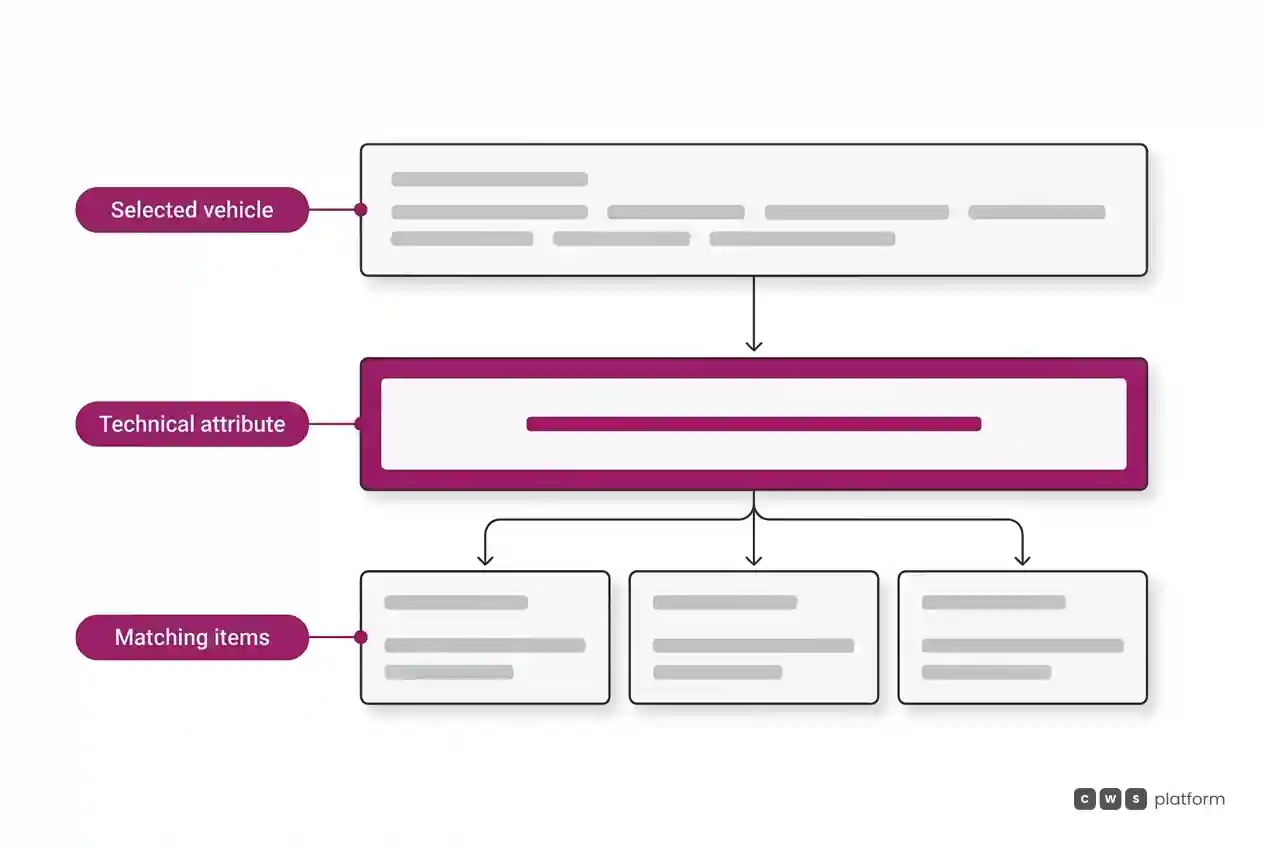
1. Flag the item as universal. A dedicated field in the product master data indicating: "this item is not tied to a single vehicle; it is selected by attribute." It sounds obvious, yet it is what legacy systems lack most.
2. Identify the purchase-driving attribute. For each universal product group, pinpoint the core technical spec the buyer relies on:
- wiper blades: blade length and connector type;
- miniature bulbs and headlamps: bulb size code (H4, H7, H11) and wattage;
- coolants and lubricants: OEM technical performance standard or viscosity;
- fuses: blade format and amperage rating;
- hose clamps and battery terminals: diameter range or post design.
3. Map the attribute to the vehicle, not the SKU. Instead of mapping one wiper blade against thousands of vehicles, store the vehicle blade size directly on the vehicle profile. When the technician selects the vehicle, the system checks the required size and displays all matching blades from every brand in stock. You manage one relationship per vehicle, rather than endless relations per SKU.
Executing this third layer is an essential milestone in any auto parts distributor's B2B digital transformation, separating catalogs that drive revenue from those that merely store inventory records.
Where Universal Products Need to Appear
Beyond the YMME vehicle selector, universal items must live within functional categories where commercial buyers browse without a specific vehicle in mind:
- By maintenance task. "Scheduled Maintenance," "Electrical," "Cooling System." The parts counter rep assembling a stock replenishment order starts here.
- By technical attribute. "H7 Bulbs," "22-Inch Wiper Blades." Technicians who already know the dimensions navigate directly to these lists.
- As complementary add-ons. Suggesting wiper blades alongside routine service kits, or socket connectors with replacement headlamps. This cross-sell mechanism drives the highest volume of unprompted universal sales.
The same underlying SKU populates all three paths, maintaining a single source of truth in your master catalog.
Common Mistakes to Avoid
- Using "universal fit" as a shortcut. It solves quick search visibility while destroying vehicle filter accuracy. Never use blanket fitment flags.
- Copying raw vendor application sheets without validation. Some aftermarket suppliers export massive, error-filled application matrices for universal accessories. Auditing data samples before bulk imports prevents costly returns.
- Relying on free-text attribute fields. Entering "20 in", "20''", and "508 mm" for identical dimensions breaks facet navigation. Standardize product attributes using strict, pre-defined values.
Next Steps
Audit the universal inventory lines in your catalog and determine: what specific attribute drives the buyer selection, and is it stored in a clean, standardized field? Next, select the most common vehicle in your customer base and verify whether the correct wiper blades, headlight bulbs, and engine fluids surface in search. The result immediately reveals where your data architecture falls short. To see how the CWS Platform handles both fitment and attribute data inside a unified schema, explore the Catalog Engine, and review our architecture tailored for distributors on the automotive parts solutions page.
Frequently Asked Questions
What is considered a universal item in an auto parts catalog?
It is any product that fits multiple applications and is purchased primarily by specification rather than direct vehicle fitment: wiper blades, automotive bulbs, fluids, fuses, and hardware clamps. It does not fit the traditional "one part, one application" catalog design.
How do you get universal parts to display accurately in vehicle searches?
Map the technical requirement directly to the vehicle profile (such as required wiper length, bulb code, or fluid spec) and configure the catalog to return all inventory carrying that attribute. This maintains one clean mapping per vehicle instead of redundant links per SKU.
Should I mark universal items as "fits all vehicles"?
No. Marking items as generic universal fits forces them into unrelated search results, showing parts where they physically cannot work, which erodes buyer trust in your digital catalog.
Which attributes work best for classifying universal parts?
Use the exact criteria commercial technicians use to buy: blade length and adapter style for wipers, industry bulb codes for lighting, OEM performance specifications for fluids, and form factor plus amp rating for fuses. Always use standardized, non-free-text values.
Read Also
- Systems Integration in B2B Sales: What to Integrate First and How
- What an ERP Is, What It Does, and What It Cannot Solve in B2B Commerce
- B2B Foundations: Core Concepts and Definitions
About This Publication
Published by the Cost of the Sale blog at CWS Platform, covering digital catalog architecture for automotive aftermarket distributors. Examples are provided for illustrative purposes.
"responsive, technically engaged, and willing to work through complex commercial rules (negotiated pricing, credit, customer-specific conditions) rather than pushing generic answers"
Is your catalog getting in the way of the sale?
Request an assessment of your operation or talk straight to a specialist, whichever you prefer.
I'd rather get the next articles on catalog management
A weekly roundup of new articles on catalog management, only in weeks when there is one. No spam, and you can leave in one click.