Low Inventory on B2B Portals: What to Display So Buyers Don't Call In
Showing exact residual inventory numbers triggers calls and hurts margins. Learn how to govern ATP visibility by warehouse location.

TL;DR
- When inventory is low, showing the exact quantity does not always help. What prevents buyer calls is a clear display rule: availability tiers, low stock alerts, and delivery timelines based on the buyer branch or ZIP code.
- The rule must match operational reality: what appears on screen must be what the fulfilling branch can actually deliver.
- An overlooked cause of stockouts stems from catalog uploads: cleaning up duplicate records can wipe out inventory in a specific region without any system alert.
- Track conversion by SKU and by region, not just overall traffic, to catch these hidden stockouts in time.
When inventory is low, a B2B portal should show buyers exactly what they need to make a decision without picking up the phone: whether the item is available from their assigned fulfilling branch, an availability tier or low stock notice instead of an exact count, and the delivery timeline to their ZIP code. Display rules are a matter of governance, and they must align with what operations can actually deliver.
Why Showing the Exact Quantity Does Not Always Help
Displaying "3 units in stock" sounds transparent. In implementation practice, exact numbers create three major problems when inventory runs low:
- The count changes between browsing and order processing. Another order comes in first, and the buyer who saw 3 ends up receiving 1. From that moment on, they will call every time to confirm.
- The number triggers artificial scarcity for buyers who did not need it. A buyer needing 2 units sees only 3 left and buys all 3 just to be safe, throwing off inventory replenishment cycles.
- The exact number exposes your inventory to competitors. In localized markets, a distributor exact stock level is valuable commercial intelligence.
That is why, during low inventory situations, the platform must control how data is presented without losing operational consistency. Controlling the display does not mean hiding the truth: it means choosing a format that answers the buyer question without making promises operations cannot keep.
Display Rules That Work Best
Availability tiers instead of exact counts. Labels such as "In Stock", "Low Stock", or "Made to Order". The buyer knows what to expect, while exact counts remain reserved for sales reps and inventory planners.
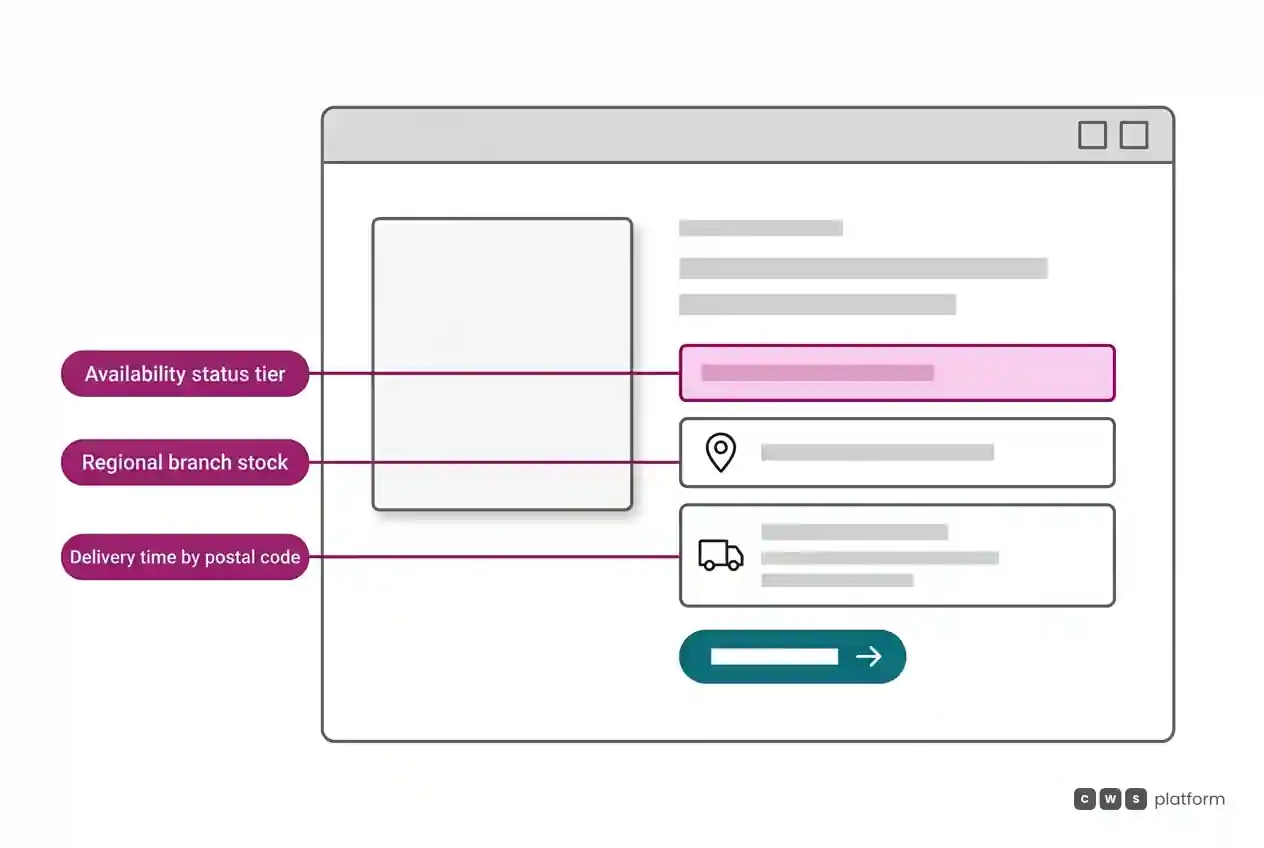
Low stock order limits. Below a defined threshold per SKU or ABC velocity curve, the screen flags "Low Stock" and, if policy dictates, caps the quantity per order so a single customer cannot deplete the entire inventory.
Inventory from the correct branch. A regional buyer does not care about your nationwide inventory. They want to know if the branch or distribution center servicing their ZIP code has the item. Pooling inventory across all locations and displaying "In Stock" is where most order confirmation phone calls originate.
Lead times, not just availability. "In stock, delivers in 2 business days to your ZIP code" answers the real question. When the primary local branch is out of stock but another warehouse has it, showing a longer transit time is far better than showing "Out of Stock".
Substitutes when out of stock. Equivalent items in stock, back-in-stock alerts, and restocking ETAs. Out-of-stock items should remain searchable on the portal, accompanied by a clear path forward.
The Stockout Caused by Catalog Uploads
There is a specific cause of "zero inventory" that has nothing to do with sales volume. In operations with regional fulfillment restricted by branch or ZIP code, a catalog data upload intended to clean up duplicates can trigger localized stockouts.
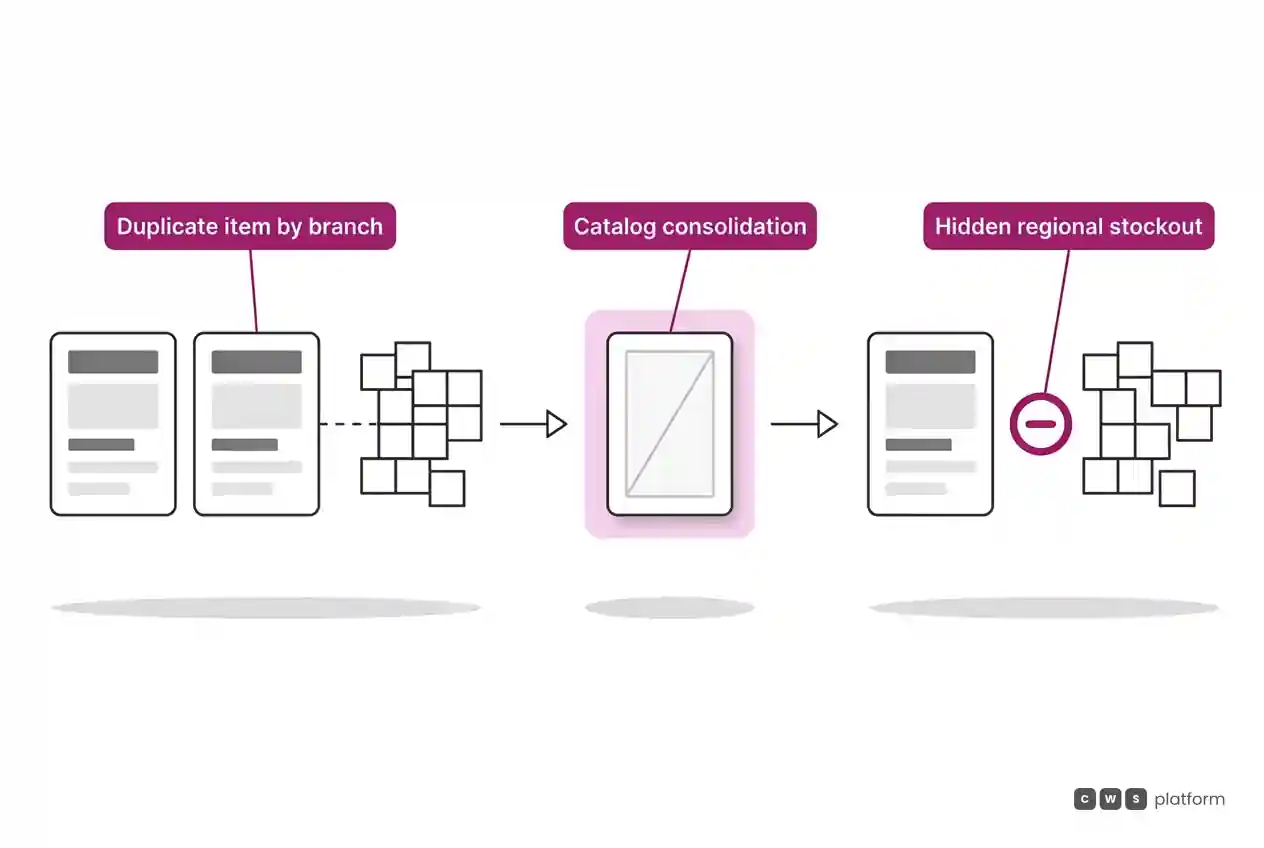
The breakdown happens like this: a product was entered twice under different SKU IDs, with inventory for a specific region mapped to the duplicate SKU. An ERP or catalog sync deletes the duplicate record and keeps the primary SKU, which was never mapped to that regional warehouse. From that point on, the product shows as unavailable for buyers in that territory, and only for them.
Overall portal traffic remains steady. No alerts fire. What changes is that product conversion rate within that specific territory drops off a cliff with no obvious explanation. Affected customers call in, or they simply order from a competitor.
Two operational checks prevent this damage:
- Audit inventory by region before and after every catalog upload. Any SKU that showed available inventory in a region and suddenly dropped to zero without matching sales is a clear sign of an upload error.
- Monitor conversion rates by SKU and by region. A sharp dip in a segmented view uncovers the regional stockout that aggregated averages hide.
Consistency Between the Portal and the Phone
None of these rules deliver results if a sales rep on the phone says something different. When the portal shows "In Stock" and the rep confirms the item is unavailable, the buyer learns that the portal cannot be trusted without a phone call, adding unnecessary friction to every purchase. The display rule must be unified, governing both the portal and customer service using the exact same data source. This is what the Inventory Hub within the CWS Platform manages: multi branch inventory, display rules, and stock reservations in a single architecture.
Next Step
Identify the fifty SKUs generating the most "do you have this in stock?" calls and verify three points: does the portal show inventory for the fulfilling branch assigned to that customer, does it display transit times for their ZIP code, and does it suggest substitutes when stock runs out? Next, compare regional inventory counts before and after your latest catalog data sync. The portal architecture that gives buyers real time stock and delivery estimates is detailed on our B2B digital sales portal page, and the underlying data flow is covered in systems integration in B2B sales.
Frequently Asked Questions
Should I display exact inventory quantities on a B2B portal?
Not always. During low stock situations, availability tiers ("In Stock", "Low Stock", "Made to Order") prevent broken delivery promises caused by race conditions during order processing, while keeping inventory levels private from competitors. Exact counts should be reserved for sales reps and procurement teams.
How should I display branch inventory in B2B ecommerce?
Display inventory for the branch or distribution center that services the buyer ZIP code along with estimated transit times, rather than an aggregate total across all warehouses. If a secondary branch holds stock, present it with an extended delivery window as an available option.
What should I do when an item is out of stock on the portal?
Keep the SKU active and visible, providing in-stock alternatives, restocking dates, or a back-in-stock notification sign-up. Hiding the page leads buyers to believe you no longer carry the product line.
Why does an item show out of stock for customers in only one region?
A frequent cause is a catalog upload that merges duplicate SKUs, leaving regional warehouse inventory attached to the deleted record. Always audit regional stock levels before and after catalog updates.
Related Articles
About This Publication
This article outlines patterns observed during B2B portal implementations by CWS Platform. It contains no customer names or proprietary client metrics.
"responsive, technically engaged, and willing to work through complex commercial rules (negotiated pricing, credit, customer-specific conditions) rather than pushing generic answers"
Is your catalog getting in the way of the sale?
Request an assessment of your operation or talk straight to a specialist, whichever you prefer.
I'd rather get the next articles on catalog management
A weekly roundup of new articles on catalog management, only in weeks when there is one. No spam, and you can leave in one click.