B2B Customer Portal Best Practices: Built for the Real Buyer
Why corporate buyers abandon self-service for email and phone: and how to fix checkout friction

"The buyer logged in once, could not find what they needed, and went right back to texting their sales rep." A B2B customer portal is usually judged at launch and abandoned within weeks. Not because it lacks features, but because the experience was designed around the seller instead of the buyer. A B2B buyer is in a hurry, carries a specific list, and relies on prenegotiated terms. When the screen fails on any of those three fronts, they turn back to the rep who respects them.
Effective practices for a self service customer hub boil down to a simple question: what does the buyer need so they never have to pick up the phone?
Why Buyers Abandon the Customer Portal
Why do they go back to the sales rep? Because a rep resolves in one text message what takes twenty clicks in the portal.
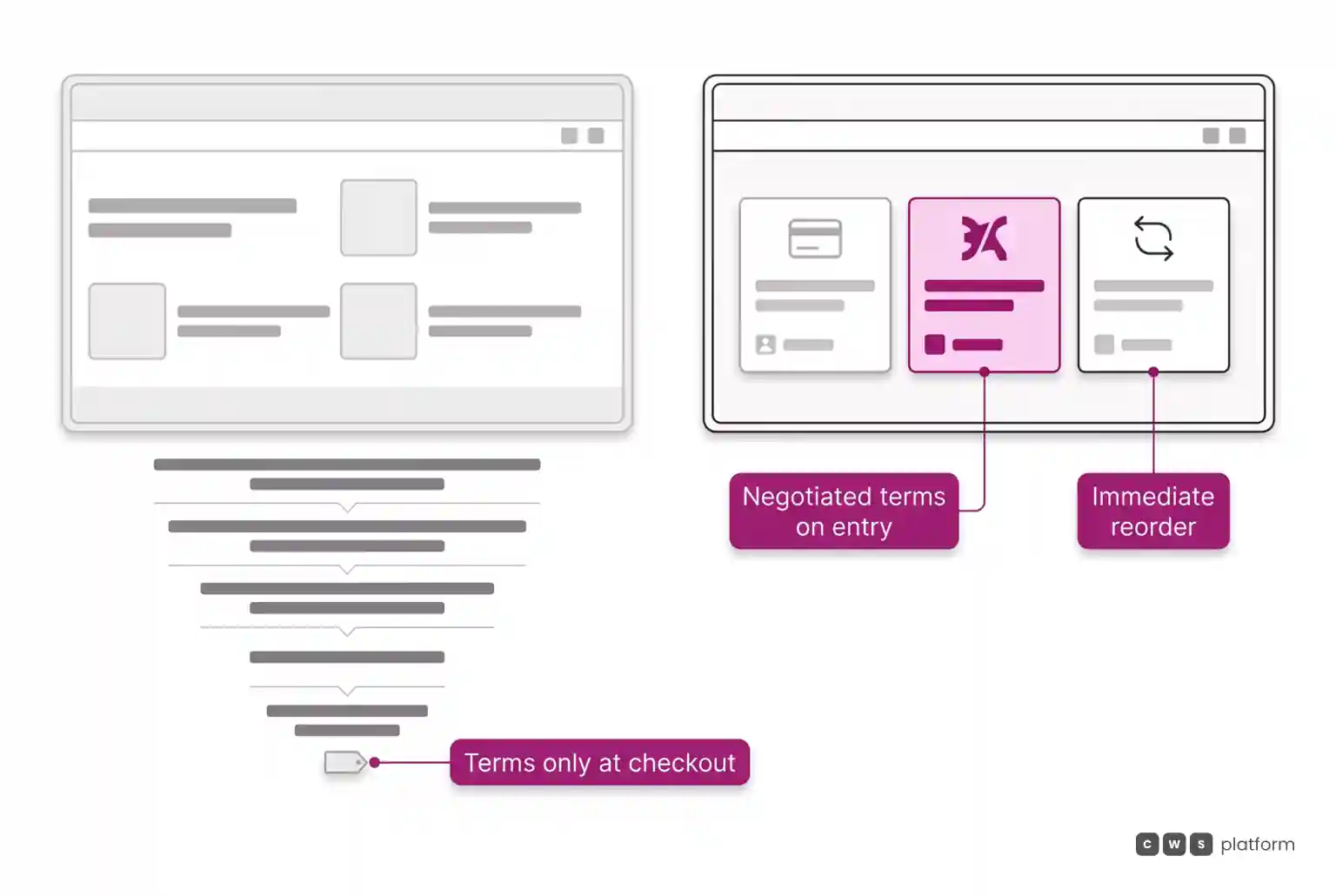
Why does it take twenty clicks? Because the portal forces them to browse by category, hunt down item after item, and only check their negotiated terms at the end.
Why do negotiated terms appear only at the end? Because the portal was built out of a standard product catalog, treating specific customer pricing rules as an afterthought.
Why did nobody notice? Because the project measured pageviews and registrations, not how many orders actually shifted away from the phone.
The root cause: the portal was designed around catalog logic, not purchasing routines. In a buyer routine, step one is seeing their contracted terms, and step two is reordering what they purchased last time.
This disconnect carries a real cost for your brand. According to a Gartner survey of B2B buyers published in 2025, 69% of buyers report inconsistencies between what a supplier website states and what the sales rep says. Every discrepancy teaches the buyer to trust the phone call over the screen.
Best Practices for a B2B Customer Portal
1. The landing screen belongs to the customer, not the storefront. Upon logging in, the buyer sees custom pricing, available credit, and contract terms. A generic product showcase up front is an open invitation to call a rep.
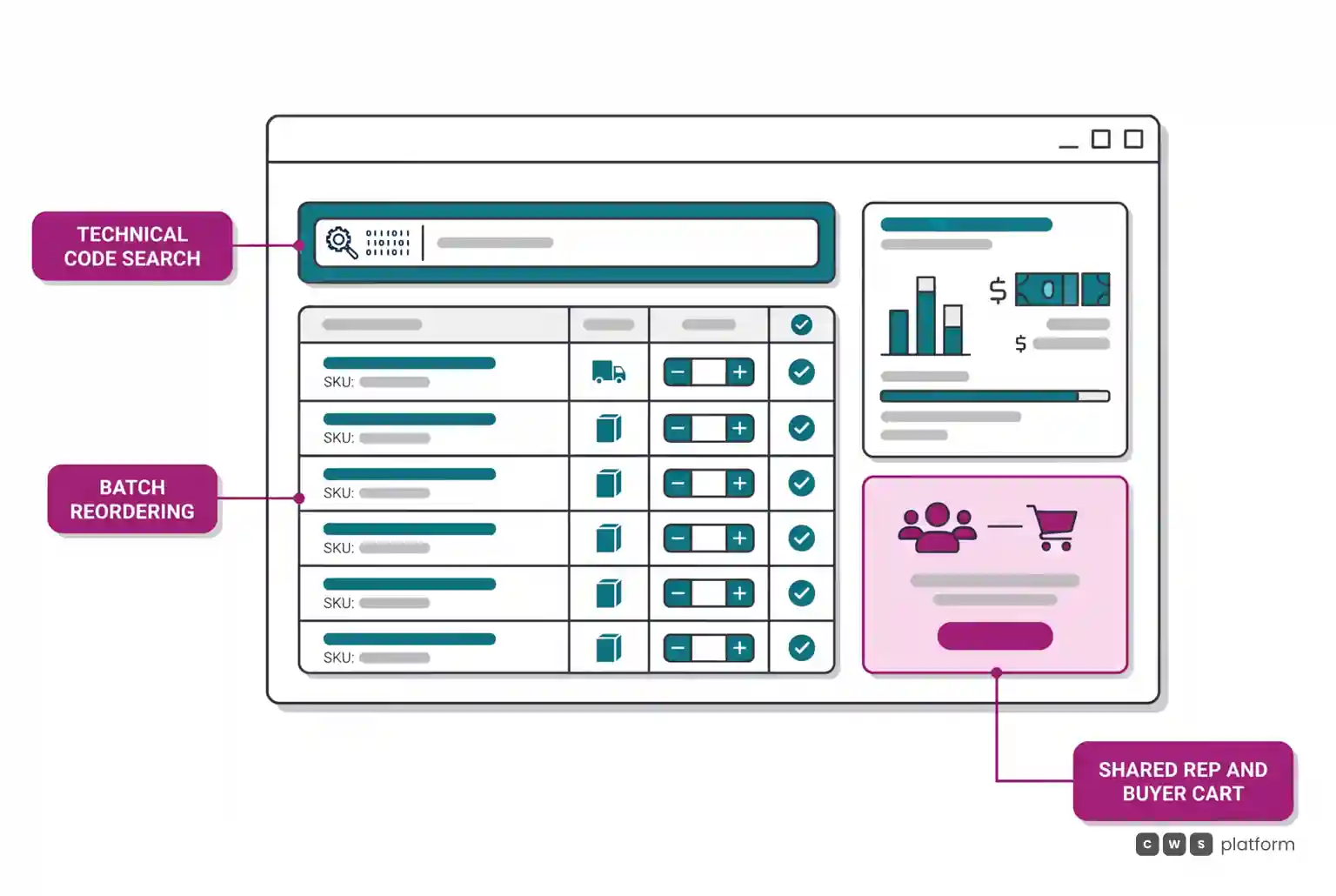
2. Search by the part numbers they already use. Manufacturer part numbers, customer internal SKUs, or technical specifications. Most B2B buyers know exactly what they need before logging in.
3. Streamlined reordering. Duplicate the last order, pull up a saved cart, or paste a list of SKUs. Replenishment drives the bulk of order volume and must always be the shortest path through the system.
4. The exact same terms a rep would offer. Pricing, payment terms, and volume discounts in the portal must match field sales policies. If a rep can offer a better deal offline, buyers will bypass the portal every time.
5. Bring the rep inside the experience. When an order requires approval or custom quoting, the sales rep jumps directly into the buyer cart through the same interface, rather than switching to an internal back office tool. On CWS Platform, sales reps use the buyer interface, adapting to their role to manage their entire account book.
6. Multiple locations under a single login. A central purchasing team must be able to submit orders for multiple branches, each with distinct pricing and tax rules, without juggling separate accounts.
7. Order validation that eliminates kickbacks. Inventory levels, contract pricing, credit limits, and taxes must be validated before the order is placed. An order accepted online only to be blocked later is the fastest way to lose customer trust.
How to Know If Your Portal Is Working
Measure what buyers do, not just site visits. The primary metric is the share of routine replenishment orders that moves off phone calls and text messages into the portal, tracked customer by customer. At Imdepa, an industrial parts distributor, three years of operational data revealed three distinct buyer profiles: customers who made the portal their team daily procurement tool, buyers who research online before completing orders with a 70% conversion rate, and those who log in strictly as needed, converting 63.6% of sessions, according to the Imdepa case study. Each profile demands a different play from the commercial team.
For sales reps, the outcome is transformative: reps stop acting as manual order takers and refocus on customer onboarding and complex enterprise negotiations. This is the operating model detailed in our guide to two-phase sales digitalization.
CWS Platform was designed around these principles: buyers log in directly to their negotiated rates and credit balances, locate items by OEM part numbers, submit bulk reorders in seconds, and checkout with fully verified data, with sales reps collaborating in the same cart whenever needed. Explore the workflow on our B2B customer portal page.
Next Steps
Ask three actual customers to place their latest order through your portal while you time them and observe. Every time they hesitate, get confused, or reach for their phone, you have uncovered a missing best practice.
Frequently Asked Questions
What are the best practices for a B2B customer portal?
Display customer-specific contract terms immediately upon login, support searches by internal and manufacturer part numbers, make reordering the fastest workflow, ensure pricing matches sales rep quotes, allow reps to assist inside the shared cart, and validate stock, credit, and taxes before order confirmation.
How do you implement effective self-service for B2B buyers?
Start with the commercial rules and contracted pricing of each account tier rather than a public product catalog. Roll out access to accounts with high reorder frequency, position sales reps as adoption champions, and track the percentage of routine orders migrating away from phone and email.
How does a digital buying interface improve sales efficiency?
By stripping repetitive replenishment entry from the sales team workload. When buyers handle routine reorders independently under prenegotiated terms, reps can concentrate on account growth, pipeline activation, and complex deals instead of manual data entry.
How can you automate wholesale ordering without rep dependency?
By guaranteeing buyers the identical terms, credit limits, and volume discounts available through their rep, offering bulk reordering tools, and keeping the sales rep accessible within the active cart for exceptions. Routine reorders no longer wait on someone schedule.
Read Also
- B2B ordering portal and self-service
- Why Your B2B Portal Accepts Orders That Never Close
- What Architecture Keeps Branch Stock and Pricing in Sync for B2B Self-Service?
About This Publication
Operational performance figures are sourced from Imdepa, a CWS Platform customer, and published with permission.
Brands mentioned in this article

- Gartner
Trademarks and logos belong to their respective owners. Mention does not imply partnership or endorsement.
"responsive, technically engaged, and willing to work through complex commercial rules (negotiated pricing, credit, customer-specific conditions) rather than pushing generic answers"
Want to see this in your operation?
Real B2B operations already run on it.