Counter Sales Friction: What Reps Face Daily and How Platforms Must Solve It
Before designing your B2B commerce platform, shadow your counter reps: their daily bottlenecks dictate product roadmap and drive user adoption.

TL;DR
- The counter salesperson hears the same questions every day: do you have it at the other branch, what is the price for this account, will it fit my equipment, when does it arrive, can I take it on net terms. Each one represents a business rule that their current system cannot answer on its own.
- Before designing the platform, listen to the front lines: counter friction points serve as the product roadmap and, later, the primary argument for sales reps to adopt the tool.
- Listening effectively means shadowing real interactions, noting every time a rep has to ask someone else or look elsewhere, and measuring how much time that detour costs.
- The practical benchmark is the master list of counter questions, mapped directly to where the answer should live.
Counter friction points are simply the questions a sales rep cannot answer without leaving their screen: multi-branch inventory, account-specific pricing, cross-references, lead times, and available credit terms. The platform that fixes the counter is the one that surfaces these answers right at the point of sale. The only way to identify them is to listen to frontline staff before designing a single screen.
Too many digital transformation initiatives start with the customer-facing portal and ignore the counter. The result is a new system that branch reps only touch when forced, because their old paper notes and a quick phone call to another warehouse still get answers faster.
The Questions the Counter Hears Every Day
"Do you have it at the other branch?" The item is out of stock at this location. The rep calls another branch, waits on hold, and jots down a note while the customer waits across the counter.
"What is my price?" The customer is a regular commercial account with negotiated terms. Their specific pricing tier is not on the shelf tag, and the rep cannot remember their discount structure.
"Will this fit my unit?" The customer brought in a worn part, an equipment model number, or a photo. The ERP displays an obscure part description, not the fitment or application data.
"Do you have an interchangeable alternative?" The primary SKU is backordered, but an equivalent aftermarket or partner brand exists. Only the most senior rep behind the counter knows the interchange.
"When will it get here?" If no branch has it, when is the next purchase order arriving? If placed today, when will it ship?
"Can I put this on my account?" The customer's available credit line lives on another screen, in a separate accounting system, or requires a call to the credit department.
"Can you email me this quote?" The buyer needs approval from their purchasing manager. The quote is printed on paper or typed into a quick email, and no one ever follows up.
Each of these questions carries a tangible cost: minutes added to transaction times, longer counter lines, and lost revenue to the competing distributor down the road.
Why You Must Shadow the Front Line Before Designing the Platform
Designing systems exclusively from an executive conference room results in software built for theoretical workflows. Designing from the counter builds software for day-to-day operational reality. The sales rep's daily roadblocks become the product roadmap: every question they cannot answer on the spot represents a high-priority feature.
There is also a critical second benefit. When the platform rolls out and directly eliminates the rep's daily headaches, management does not have to mandate usage. Adoption happens naturally because the rep immediately feels their friction disappear.
How to Shadow the Counter
1. Observe real transactions. Spend several hours alongside the rep across different days and peak hours. Note every time they have to switch tabs, pick up the phone, walk into the warehouse, or consult a colleague.
2. Document the question and the detour. For every transaction, record what the customer asked, where the rep went to find the answer, how long the detour took, and whether the sale closed.
3. Debrief afterward, not during the rush. Ask the rep what slows down their day the most. Their feedback usually confirms your direct observations while uncovering edge cases you missed.
4. Group and prioritize. Categorize questions by domain (inventory visibility, pricing, fitment and interchanges, lead times, credit, quote tracking) and rank them by frequency and operational cost.
What the Platform Needs to Solve
Once the list is established, system requirements become clear and actionable:
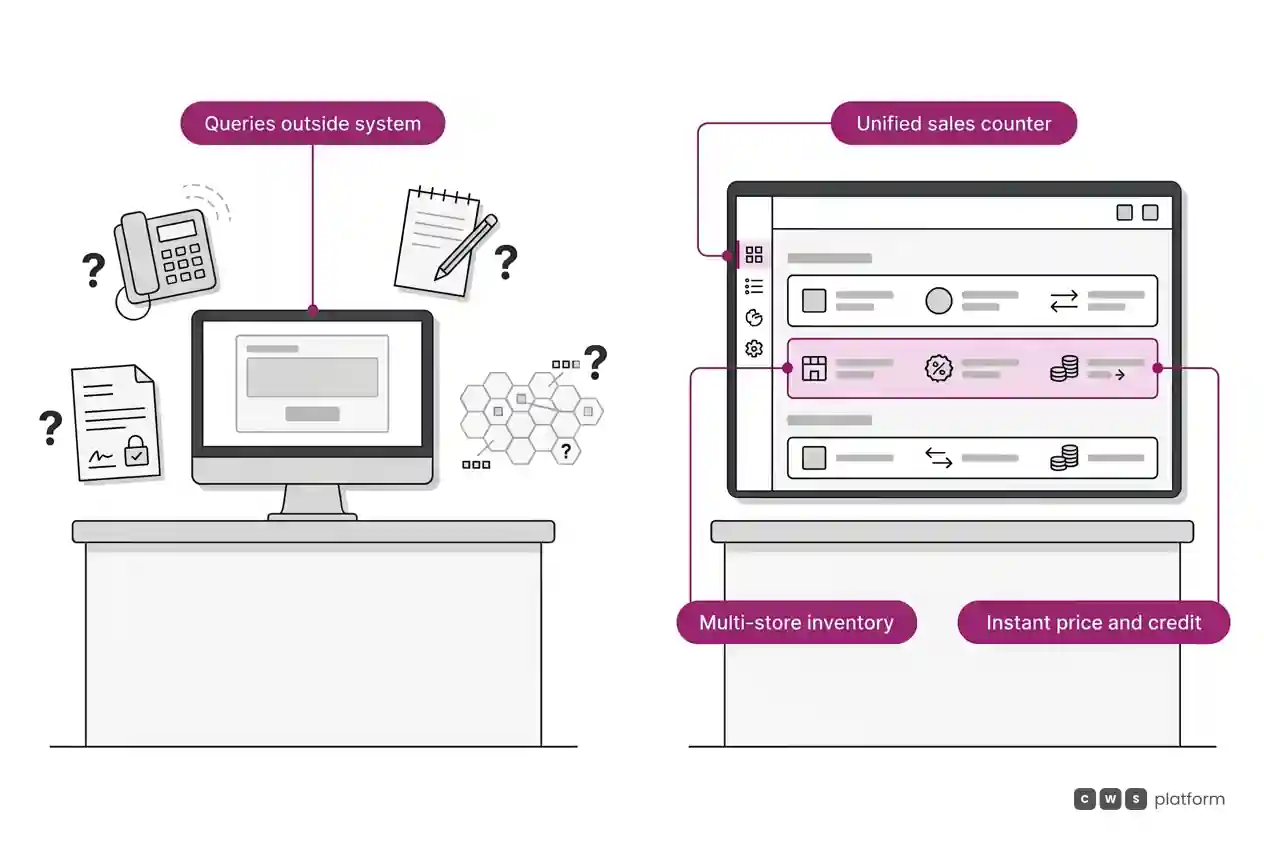
- Multi-branch inventory on the rep's main screen, complete with transfer transit times.
- Customer-specific contract pricing, displaying approved margins and discount limits.
- Fitment search and cross-referencing, linked directly to the product catalog.
- Real-time credit availability, displayed directly inside the checkout screen without system switching.
- Quotes that convert seamlessly to orders, with automated follow-ups and the ability for the buyer to review and approve them online.
During platform rollout, reps who experience faster counter workflows in the first few weeks become internal champions for the rest of the team. This unified workflow is the foundation of the assisted sales model in CWS Platform: the rep and the customer share the same view of the order, with real-time stock, pricing, and terms on one screen. Handling technical terminology and customer search habits is covered in B2B portal search.
Next Step
Select a busy branch location and spend a morning shadowing two counter sales reps. Track every customer question that forces the rep to leave their primary screen, note where the answer lived, and calculate the time spent. After twenty to thirty recorded interactions, your platform's core functional priorities will be unmistakable.
Frequently Asked Questions
What are the biggest friction points for counter sales reps?
Checking stock across multiple branch locations, pulling account-specific contract pricing, locating cross-references and fitment data, quoting accurate delivery windows, verifying credit balances, and tracking outstanding quotes.
How do you gather requirements from frontline sales reps before a system implementation?
By shadowing live transactions, logging every question that requires looking outside the primary interface, debriefing with reps after peak hours, and prioritizing system features based on frequency and business impact.
How do you drive system adoption among branch sales reps?
By ensuring the new system immediately answers the specific questions that slow down their customer interactions. When software eliminates counter friction, reps adopt it willingly for the time savings alone.
What is assisted sales at the branch counter?
Assisted sales is an operational model where the sales rep uses the exact same digital platform as the buyer. Inventory, account pricing, credit limits, and quotes live on a single interface, allowing reps to build an order that the customer can review and approve later via their own portal.
Recommended Reading
- How to Choose a Distribution Platform: Five Tests Using Real Orders
- Wholesale Account Retention: Why Accounts Stop Buying When Reorders Depend on the Sales Rep
- Distribution and Wholesale
About This Publication
An article from the Cost of Sales blog by CWS Platform, covering counter operations and assisted sales workflows. This article does not reference specific clients or quantitative case studies.
"responsive, technically engaged, and willing to work through complex commercial rules (negotiated pricing, credit, customer-specific conditions) rather than pushing generic answers"
Is every order costing your operation more?
Request an assessment of your operation or talk straight to a specialist, whichever you prefer.
I'd rather get the next articles on the cost of each order
A weekly roundup of new articles on the cost of each order, only in weeks when there is one. No spam, and you can leave in one click.