OroCommerce vs Magento B2B: what weighs on order operations?
Two platforms that reached B2B by different paths, read through what happens to the order after it lands.

Editorial note: CWS Platform competes with both OroCommerce and Adobe Commerce. This comparison relies only on each vendor's public documentation, with the address next to each fact and the date of each record cited.
Short answer: OroCommerce fits teams that want customer hierarchies, customer-specific price lists, RFQs, payment terms, and invoices described in the product itself, and that are fine treating the ERP integration as an extension. Adobe Commerce (Magento) fits teams that need B2B and B2C on one platform, turn on B2B through an extension, and want to choose between SaaS, dedicated infrastructure, or operations run by Adobe.
For a COO, the choice comes down to what happens to the order after it lands: where the price comes from, who can touch the invoice, how the ERP batch arrives, and what has to be running on the server. In Adobe Commerce, B2B is an extension installed on top of the store; in OroCommerce, the B2B capabilities are described in the product. The broader map is in the three B2B commerce platform models, and the other vendor readings are in the comparisons hub.
OroCommerce and Adobe Commerce side by side
The table sums up what each vendor's documentation records.
| criterion | OroCommerce | Adobe Commerce (Magento) |
|---|---|---|
| Platform model | OroCloud (managed SaaS), public cloud, private cloud, or on-premise | Cloud Service (SaaS), on Cloud (dedicated PaaS), and Optimizer; Magento Open Source on GitHub |
| Native B2B or extension | B2B capabilities in the product documentation | B2B extension installed and enabled, with B2C on the same platform |
| Customer and contract pricing | Price lists by website, customer group, and customer | Shared catalogs with prices by company or customer group |
| Quotes | RFQ converted into a quote or an order in the back office | Quote negotiated between buyer and seller |
| Credit and net terms | One payment term per customer; invoices with Posted status | Roles control credit; invoices and company credit in the portal |
| ERP integration | SAP, Epicor P21, and JD Edwards as extensions outside the core | REST APIs, App Builder, API Mesh, webhooks, and events |
| Billing model | Enterprise plans with no charge per store, buyer, or SKU | License: not documented; Managed Services with quotas in the Sales Order |
| Implementation | CLI deploys on OroCloud, in three modes | Cloud Service with automatic updates, or operations run by Adobe |
Pricing and commercial rules, from price to invoice
In OroCommerce, the price comes from lists assigned at the config, website, customer group, and customer levels. Per the price storage documentation, lists can be combined or flat, with a single list resolved by customer, group, and website. In Adobe Commerce, customer pricing lives in shared catalogs, which, per the B2B introduction, set product prices for companies or customer groups across one or more websites.
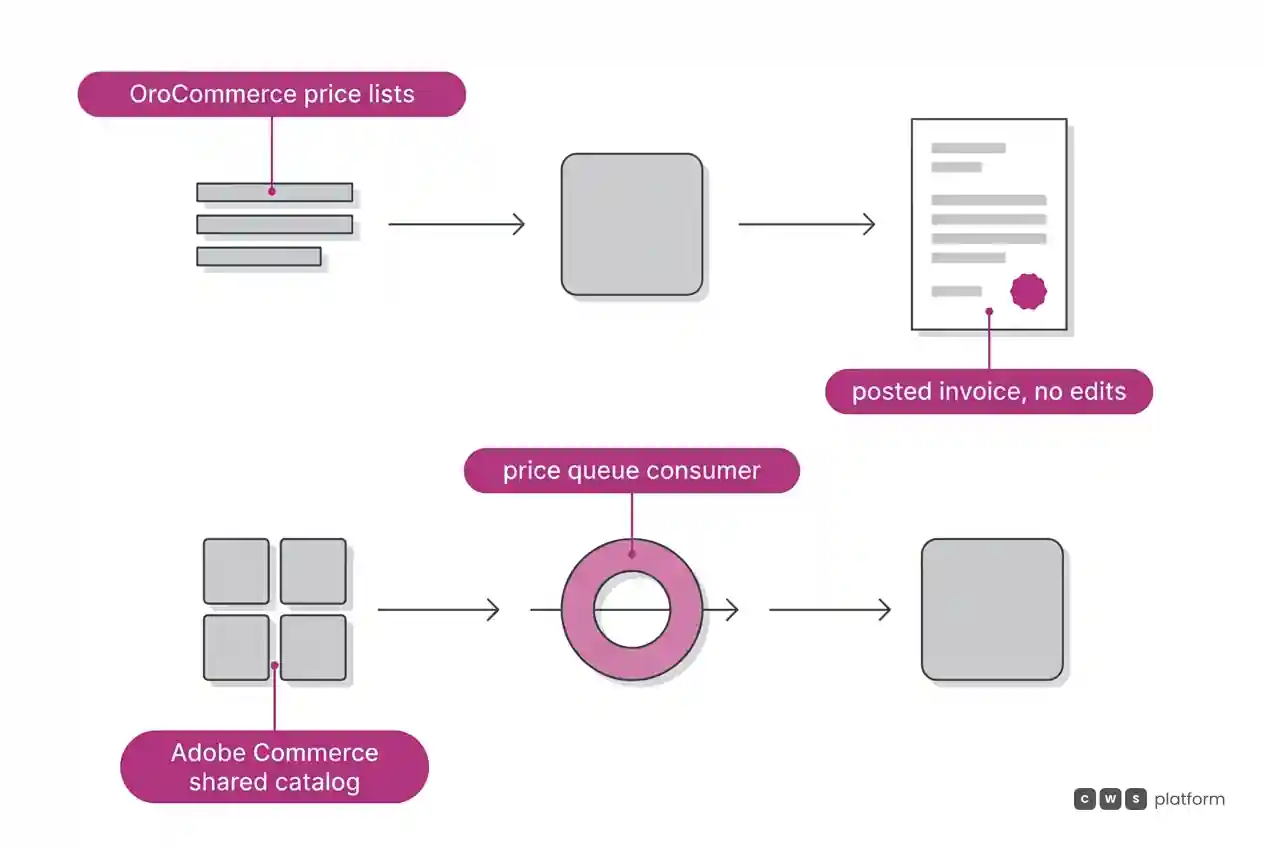
Running that price has a requirement recorded in Adobe's documentation, as of October 8, 2026: after installation, the message queue consumers for the B2B capabilities have to be started ("start the message consumers for the B2B capabilities", B2B installation guide), and one of them updates shared catalog prices. Worth asking in the demo: who monitors those consumers, and what does the buyer see if one stops?
On terms, OroCommerce's payment term sets conditions such as prepayment or net 30, with a single payment term per customer, and its invoice configuration accepts imported invoices.
That flow has an effect recorded in OroCommerce's documentation, accessed on October 16, 2026: once posted, an invoice can no longer be modified ("Keep in mind that once posted, the invoice can no longer be modified.", OroCommerce invoice documentation). Worth asking: how does the team correct an invoice that has already been posted, and in which system is the correction recorded?
In Adobe Commerce, the B2B page describes self-service: customers access invoices, monitor company credit, and request returns. Payment Services brings payments and orders from every storefront into one view, with refunds and voids.
Quotes and assisted selling
In OroCommerce, buyers open an RFQ from the product page, their account, a shopping list, or the quick order form. Per the RFQ and quotes guide, the back office can convert it into a quote, convert it straight into an order, or decline it. For assisted selling, Login as Customer User lets a back-office user work the storefront as a specific buyer; it is an Enterprise edition feature and is off by default.
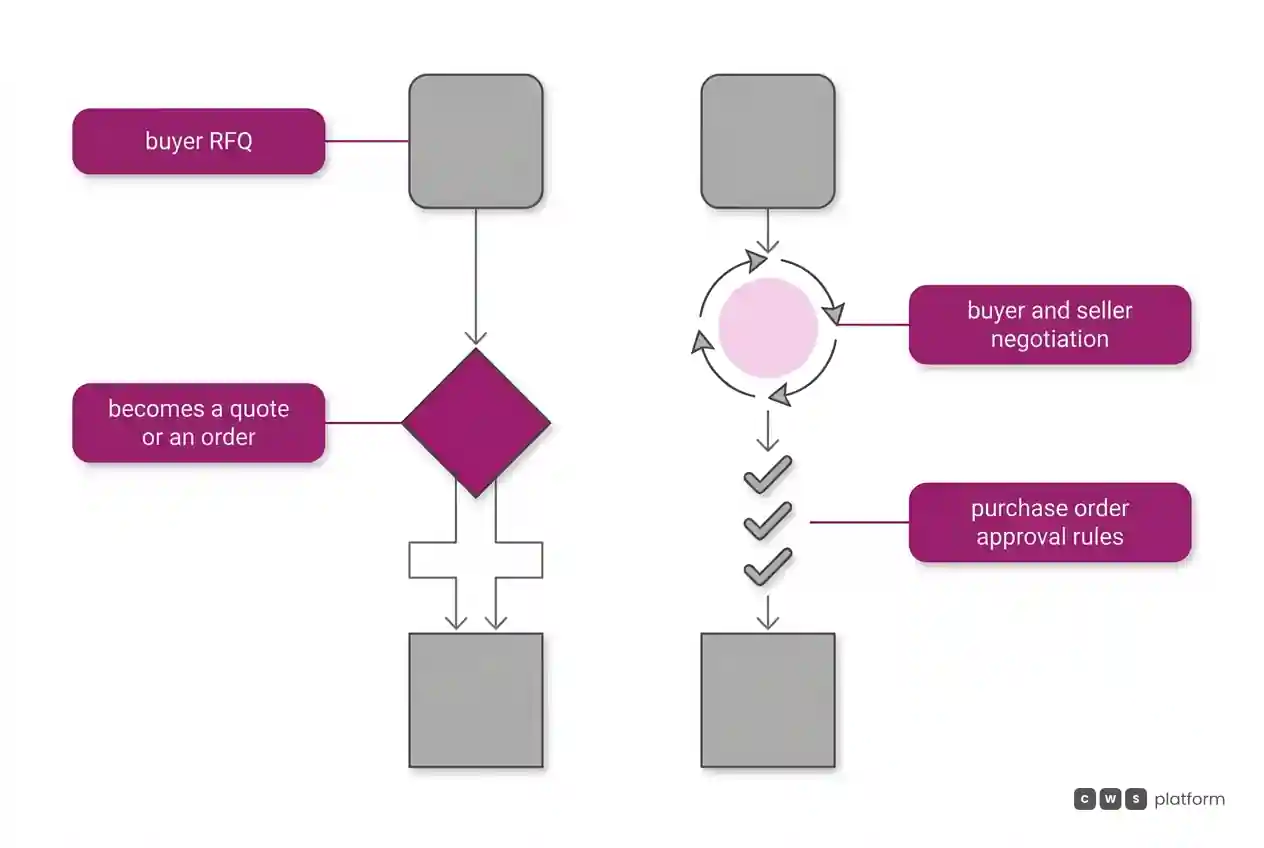
In Adobe Commerce, a quote starts from the buyer's cart or from the Admin, by the seller. Per the B2B introduction, both sides change items and quantities, apply discounts, and exchange messages until they agree. With purchase orders enabled, every order becomes a PO and can go through several approval rules.
On both, it is worth counting how many human touches sit between an accepted quote and an invoiced order.
ERP integration and order loads
In OroCommerce, the listed ERP integrations (SAP B1 and ECC, Epicor Prophet 21, Oracle JD Edwards) are custom extensions, outside the product core and the standard license agreement.
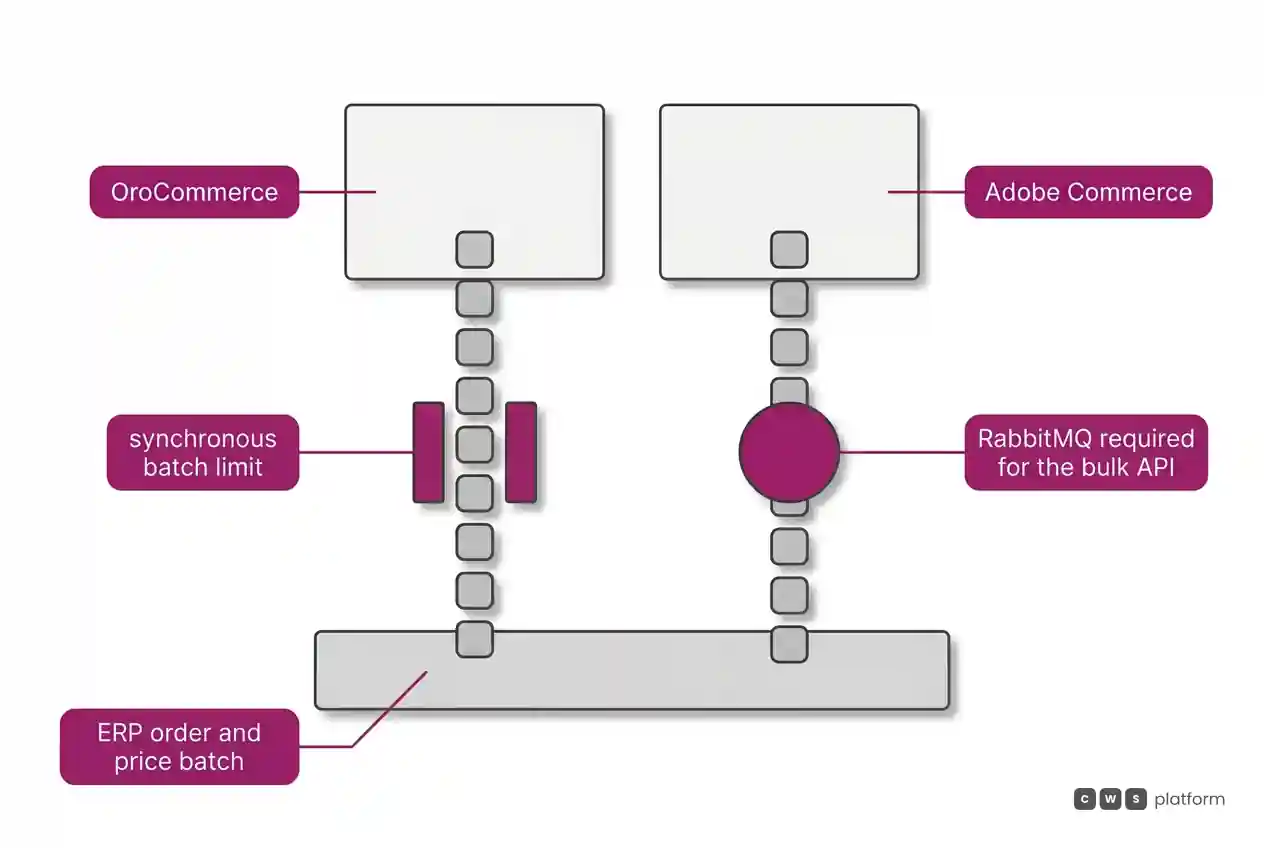
For batch loads, the Batch API updates lists of entities in one request, and synchronous requests that run past 25 seconds switch to asynchronous processing. The synchronous limit is recorded in OroCommerce's API documentation, accessed on October 16, 2026: synchronous processing caps at 100 primary and 50 included entities ("The maximum number of entities that can be processed synchronously is limited to 100 for primary and 50 for included entities.", synchronous Batch API documentation). Worth asking how the daily ERP batch is split to fit that limit.
In Adobe Commerce, GraphQL serves the storefront and the REST APIs integrate third-party software; the pricing page cites App Builder, API Mesh, webhooks, and events, with starter kits for back office, payments, tax, and shipping.
Batch loads have a requirement recorded in Adobe's documentation, page last updated October 6, 2026: using the bulk API requires installing and configuring RabbitMQ ("you must install and configure RabbitMQ", bulk endpoints documentation). Worth asking who runs that service in the deployment model you pick.
Cost and billing model
For OroCommerce, the pricing page says Enterprise plans include 25 internal admin users and carry no extra charge per store, B2B portal, buyer, SKU, or catalog. The listed ERP integrations sit outside the standard license agreement; ask for their price separately.
For Adobe Commerce, the sources in this comparison do not document the license basis; ask for the proposal in writing. Under Managed Services, the contract starts from a Base Package, consumption quotas are set in the Sales Order, add-ons are priced per unit, and the observability quota rises by GMV tier.
On both, ask in writing what makes the contract value change as operations grow.
Implementation and ongoing operations
OroCommerce runs on OroCloud, public cloud, private cloud, or on-premise, per the infrastructure documentation. The edition comparison says Enterprise Edition adds PostgreSQL, Elasticsearch, and asynchronous queues with RabbitMQ. The upgrade guide describes three deploy modes: with maintenance mode, rolling upgrade when the database structure does not change, and source upgrade.
Adobe Commerce offers Cloud Service, a SaaS model with automatic updates. Under Managed Services, Adobe owns provisioning, network, CDN, monitoring, scaling, and backup, and the customer owns custom code and SSO, with a 99.99% infrastructure SLA and a 99.9% application SLA.
Both documentations mention RabbitMQ: OroCommerce in Enterprise Edition, Adobe Commerce in the bulk API. So the operations question is the same: under the contracted model, who gets paged when a queue stops?
When to choose OroCommerce
Layered customer pricing. Choose OroCommerce when your pricing policy is already organized by website, group, and customer, and you want to pick between combined lists and a single list, as described in the price storage documentation.
Quotes from many points in the journey. Choose OroCommerce when buyers request quotes from the product, a shopping list, or quick order, and the back office decides whether that becomes a quote or an order, per the RFQ and quotes guide.
Terms and invoices on the platform. Choose OroCommerce when you want payment terms per customer and invoice payment through the storefront, a link, or a guest page, with webhook notifications, as shown in the invoice payment documentation.
Billing that does not count buyers. Choose OroCommerce when you plan to open several portals and onboard many buyers, since Enterprise plans do not charge per store, buyer, or SKU, per the pricing page.
When to choose Adobe Commerce
B2B and B2C on one platform. Choose Adobe Commerce when you sell to businesses and consumers and want both operations together, as the B2B extension allows per the B2B introduction.
Company accounts with purchase approvals. Choose Adobe Commerce when customers have divisions and roles that control orders, quotes, and credit, and each purchase order goes through approval rules, per the same B2B introduction.
Operations handed to the vendor. Choose Adobe Commerce when you would rather have Adobe own infrastructure, backup, and scaling, as described in Managed Services.
An extension ecosystem. Choose Adobe Commerce when your strategy relies on App Builder and API Mesh, from the composable commerce page, and on a marketplace with thousands of extensions, cited on the Magento Open Source page.
When neither fits
The two start from different models, B2B described in the product and B2B as an extension of the store, but in both, order operations depend on configuration, extensions, and queued processes. There is a third model, laid out in the three B2B commerce platform models: bring the commercial rules into the platform as parameters.
That is the CWS Platform model. In CDL Workspace, the Commerce Rules Engine keeps commercial policy in parameters, configuration instead of code, and price tables, rules, and contracts can be configured on the platform or come from the ERP and CRM through APIs. Net-terms payment supports split, scheduled delivery to multiple addresses, the customer's credit limit lives on the platform as a running account, and a single order accepts more than one payment method. Integration runs on REST APIs and webhooks, every customer runs the same version, and the platform brings together 11 modules, 6 AI Agents, and 1,029 parameters.
How each vendor reads against that model is covered in OroCommerce vs CWS Platform: order operations after checkout and Adobe Commerce vs CWS Platform: end of life and architecture. If your order operations fit neither, it is worth talking to a CWS Platform specialist.
Frequently asked questions
OroCommerce or Magento: which is better for B2B?
OroCommerce fits teams that want customer hierarchies, price lists, RFQs, terms, and invoices described in the product, with billing that does not count buyers. Adobe Commerce fits teams that want B2B and B2C together, purchase approvals on company accounts, and the option to hand operations to Adobe.
Which one was built for B2B?
The documentation does not tell each product's origin story; it records how B2B is turned on. In Adobe Commerce, B2B is activated by installing and enabling the B2B extension, and the same store keeps serving B2C. In OroCommerce, customer hierarchies, price lists, RFQs, and payment terms are described in the product's own documentation.
How does each handle invoices and payment terms?
OroCommerce assigns one payment term per customer, accepts imported invoices, and records that a posted invoice can no longer be modified. Adobe Commerce gives customers access to invoices and company credit in the portal, with roles that control credit, and Payment Services brings payments, refunds, and voids into one view.
Which one needs more infrastructure?
OroCommerce Enterprise adds PostgreSQL, Elasticsearch, and RabbitMQ queues, and can run on managed OroCloud. Adobe Commerce requires queue consumers for B2B and RabbitMQ for the bulk API, and offers Cloud Service as SaaS and Managed Services.
Related reading
Brands mentioned in this article
 Magento


- OroCommerce
- Adobe Commerce
Trademarks and logos belong to their respective owners. Mention does not imply partnership or endorsement.
"responsive, technically engaged, and willing to work through complex commercial rules (negotiated pricing, credit, customer-specific conditions) rather than pushing generic answers"
Is every order costing your operation more?
Request an assessment of your operation or talk straight to a specialist, whichever you prefer.
I'd rather get the next articles on the cost of each order
A weekly roundup of new articles on the cost of each order, only in weeks when there is one. No spam, and you can leave in one click.