B2B Product Pages: The Fields That Stop Buyers from Calling Sales
Connecting engineering specifications with commercial discovery to enable self-service without burdening reps

TL;DR
- A B2B product page sells on its own when it answers the three questions that prompt a buyer to call: will this fit my application, what is the interchangeable part, and what else do I need with it?
- The fields that do this are fitment application, cross-references, and complementary items, alongside customer-specific pricing, inventory, and terms identical to what a sales rep would confirm.
- A polished product page with outdated data is worse than a basic one: the buyer learns not to trust it and goes back to calling.
- The work does not stop at deployment. Product data is a living asset, and it requires dedicated ownership.
A B2B product detail page needs to provide the same answers an inside sales rep would give over the phone: which application the item fits, which part numbers are interchangeable, what is typically purchased alongside it, and that specific account's pricing, inventory, and payment terms. When these fields are accurate and up to date, the buyer completes the order independently. When they are missing, the order starts on the portal and ends on a phone call.
Retail product pages are designed to persuade. B2B product pages exist to eliminate technical and commercial doubt before it turns into support costs.
Why Do Sales Reps Still Correct Orders Over the Phone?
Because the product page answers the wrong question. It displays a photo, a marketing description, and generic boilerplate copy, while the professional buyer needs to know something else entirely: will this part fit their machinery, is this part number equivalent to what they used to buy from another brand, and is the price on screen their contracted price?
Across real-world deployments, the pattern repeats itself. The portal goes live using raw master data straight from the ERP. The buyer finds the item, runs into uncertainty, and sends an email or text to their sales rep. The rep checks the details, corrects the quantity, swaps in an interchangeable part, or adjusts the pricing, and the order is rebuilt manually. The portal turns into a digital showcase, while manual customer service continues unchanged.
The true cost never appears on the software invoice. It shows up in the hours spent manually reviewing and validating every purchase order before it can be processed.
The Fields That Resolve Buyer Uncertainty
Across implementations carried out by CWS Platform, three key groups of fields bridge technical master data and purchasing decisions.
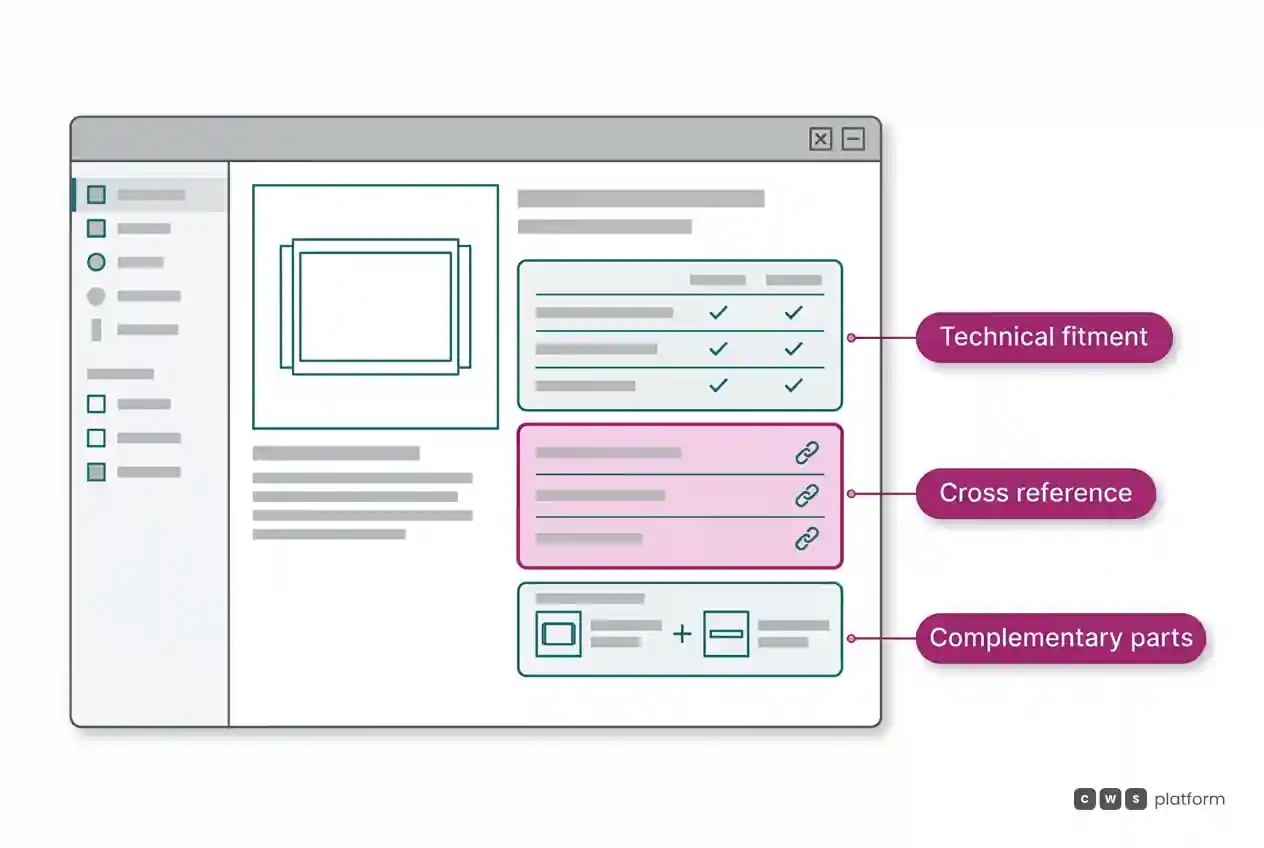
Application and Fitment. Which equipment, vehicle, production line, or job site the item fits. This single field cuts down phone inquiries more than any other, because it answers the question "will this fit mine?" without forcing anyone to flip through a PDF catalog. It can be a compatibility matrix, an equipment lookup filter, or a structured model list.
Cross-References. Competitor part numbers, OEM interchange codes, and legacy superseded numbers that match that SKU. This serves two vital purposes: buyers can search using the part numbers they already know, and the portal can recommend an in-stock alternative when the requested item is backordered.
Complementary Items (Cross-Selling and Frequently Bought Together). What belongs on the same purchase order: the gasket that goes with the pump, the mounting hardware kit, or the operational consumables. This field fulfills two roles. It keeps the buyer from forgetting critical components, preventing split shipments and costly second freight bills. It also expands average order value organically, without pushy sales tactics.
Connecting raw technical specifications to commercial discovery is precisely what the Catalog Engine from CWS Platform delivers: ERP master data on one side, sales-enabling attributes on the other, seamlessly bound to the same SKU.
Pricing, Inventory, and Terms: One Truth Everywhere
A complete product page still fails if the price and inventory on the screen do not match what the sales rep would confirm. This is the costliest flaw of all, because it trains the buyer to distrust the portal.
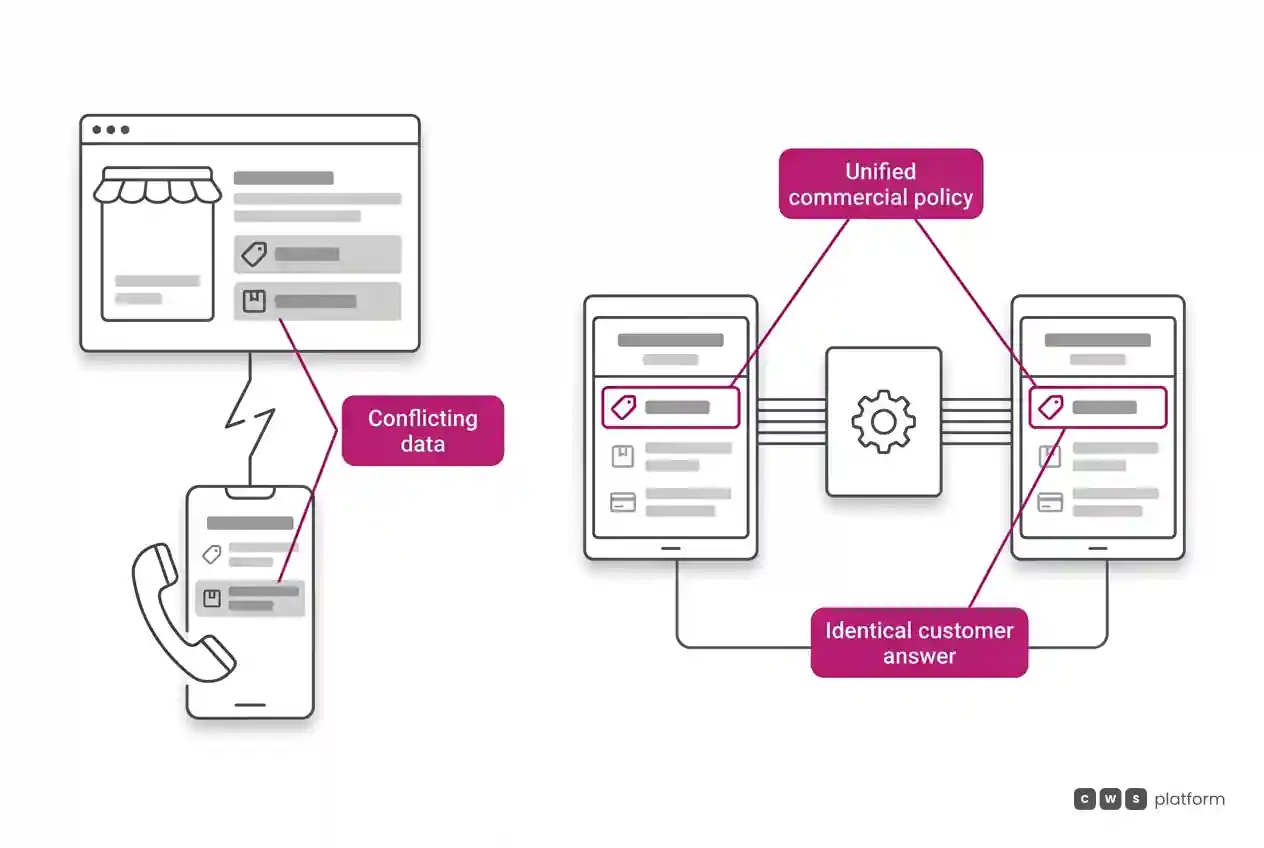
If the buyer sees "in stock" online and the rep says it will not arrive until next week, the buyer learns that the website is merely a starting point for a conversation. From that moment on, every single order gets backed up by a confirmation phone call, even when the screen is completely accurate.
That is why a B2B product page should never show a generic "product list price." It must display that specific customer's contracted pricing, custom tier discounts, terms, and live inventory from the fulfillment center or branch assigned to them. Business rules must be governed by your commercial policy, not the portal interface. The portal simply needs to execute the exact same rules the sales rep uses. For a deeper breakdown of system architecture, see system integration in B2B sales.
Great Pages with Outdated Data: The Maintenance Trap
Catalog quality hinges on keeping this information fresh, and that is where many digital initiatives stall out. Cross-references expire when a manufacturer releases new part revisions. Fitment data falls behind when new machinery models enter the market. Complementary product widgets recommend discontinued SKUs.
Three operational habits keep product detail pages dependable:
- One data owner per product line. A designated category manager or specialist who owns data accuracy for that family, rather than an abstract responsibility left to "the IT team."
- Customer inquiries as an update roadmap. Every technical question fielded by an inside sales rep signals a missing data field. Logging these recurring questions reveals which SKUs need enrichment first.
- Auditing by sales volume. High-velocity items and the SKUs generating the most support inquiries receive catalog enrichment priority over the long tail.
Where to Begin
You do not need to overhaul your entire product catalog overnight. Take the top fifty items that generate the highest volume of calls or support emails and check them, one by one: does the page clearly show what it fits, what it replaces, what needs to be ordered with it, and do the price and stock match the rep's system? Whatever is missing becomes your data cleanup priority for the coming weeks.
An order generated from this page must capture everything required for downstream invoicing and fulfillment, as detailed in what is a sales order and what it requires in B2B. The environment where buyers complete self-service orders with customer-specific pricing and local inventory is detailed on our B2B digital sales portal page.
Frequently Asked Questions
What does a B2B product detail page need to include?
Application and fitment data (where the item fits), cross-references and interchange part numbers, complementary items, key technical specifications that drive purchasing decisions, and account-specific pricing, inventory, and payment terms. High-res photos and marketing copy help, but they cannot replace these functional fields.
What is a cross-reference in a B2B catalog?
It is a structured mapping of competitor part numbers, OEM codes, and superseded part numbers that are functionally equivalent to a given SKU. It allows buyers to locate parts using familiar reference numbers and enables the portal to suggest an in-stock alternative when the requested item is unavailable.
How do you determine which product pages to fix first?
Look at the questions coming into your inside sales team. The items that trigger the highest volume of phone calls or emails prior to order placement are the ones missing critical data attributes or displaying numbers that conflict with your rep's system.
Why do B2B customers verify orders over the phone even when a portal exists?
Because at some point, the price or stock status shown on the screen did not match what the sales representative confirmed. Once burned, buyers verify everything manually. The only solution is ensuring the portal enforces the exact same pricing logic and inventory availability that your sales team relies on.
About This Publication
This article outlines real-world implementation patterns observed during B2B portal rollouts by CWS Platform. It does not disclose specific client names or confidential performance metrics.
"responsive, technically engaged, and willing to work through complex commercial rules (negotiated pricing, credit, customer-specific conditions) rather than pushing generic answers"
Is your catalog getting in the way of the sale?
Request an assessment of your operation or talk straight to a specialist, whichever you prefer.
I'd rather get the next articles on catalog management
A weekly roundup of new articles on catalog management, only in weeks when there is one. No spam, and you can leave in one click.