Do Complex Pricing Rules Slow Down B2B E-Commerce? What to Do Before Disabling Them
How to eliminate latency and synchronous ERP roundtrips without serving inaccurate custom contract pricing.

TL;DR
- Complex pricing rules slow down B2B e-commerce when the entire price is recalculated, rule by rule, on every page load, for every customer.
- Turning off the rule restores speed but delivers the wrong price. Before taking that step, there are four alternatives: precompute and store, recalculate only what changed, separate the catalog from the cart, and measure the execution cost of each rule.
- The rule that creates the bottleneck is rarely the most complex one. It is usually the one running across all catalog items when it should only evaluate a few.
- The practical benchmark is the execution time per rule and per page, measured before and after every pricing policy update.
Complex pricing rules slow down B2B e-commerce when the platform recalculates prices from scratch, evaluating every rule for every product, every time a buyer loads a page. The solution, before disabling any rule, is to compute buyer-specific prices ahead of time and store the result, recalculate only when the rule or the underlying data changes, and reserve full evaluation for the cart. Disabling the rule resolves the latency but creates another issue: buyers see prices that do not match their agreed terms.
The emergency call usually sounds like this: the portal slowed to a crawl right after rolling out a new discount policy, sales reps are complaining, and someone suggests disabling the rule "just until we fix it." As a temporary containment measure during an outage, that is understandable. As an ongoing solution, it strips away the very business logic that delivers customer-specific pricing in the digital channel.
Why Pricing Rules Cause Latency
B2B pricing is the output of a function: base price sheets, customer tiers, account segments, shipping zones, volume tiers, payment terms, active promotions, and custom contract terms. Each rule is straightforward on its own. The performance hit comes from the combinatorial explosion:
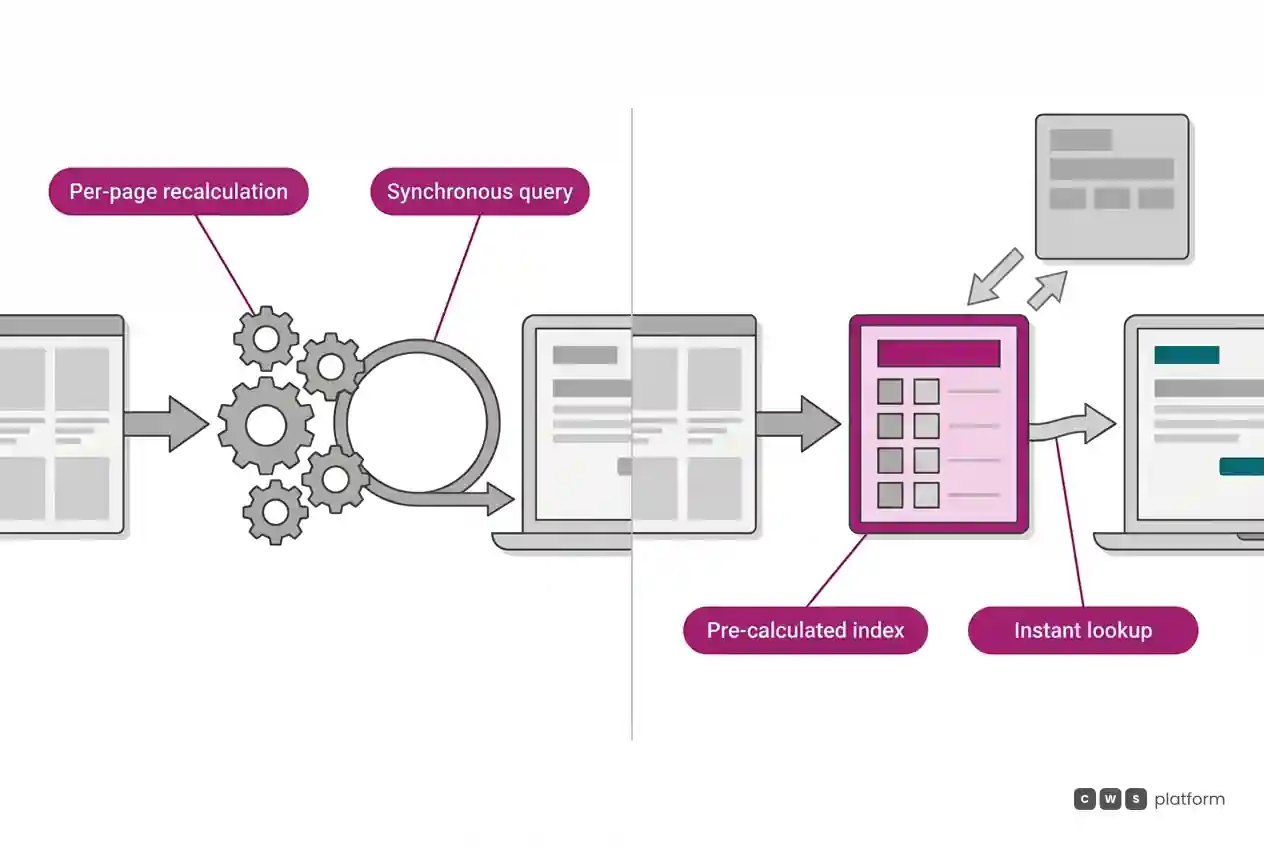
- High item counts per page. A category page displaying 50 products triggers 50 distinct pricing evaluations.
- Dozens of rules per product. Each calculation iterates through numerous conditional rules to determine applicability.
- High account variance. The exact same item carries a different price for different buyers, which makes generic edge caching ineffective.
- Synchronous external lookups. If a pricing rule queries the ERP in real time to check remaining credit limits or current unit cost, ERP response latency directly delays page rendering.
Across real-world implementations, the diagnostic pattern remains identical: the bottleneck rarely comes from the most sophisticated logic, but rather from a basic rule running across all catalog items and all accounts, when it only applies to a small subset.
What to Do Before Disabling Rules
1. Precompute and store. For most of the catalog, buyer pricing rarely changes throughout the day. It can be computed in advance, by account or by account group sharing identical terms, and persisted in an index. The page simply reads a pre-calculated value.
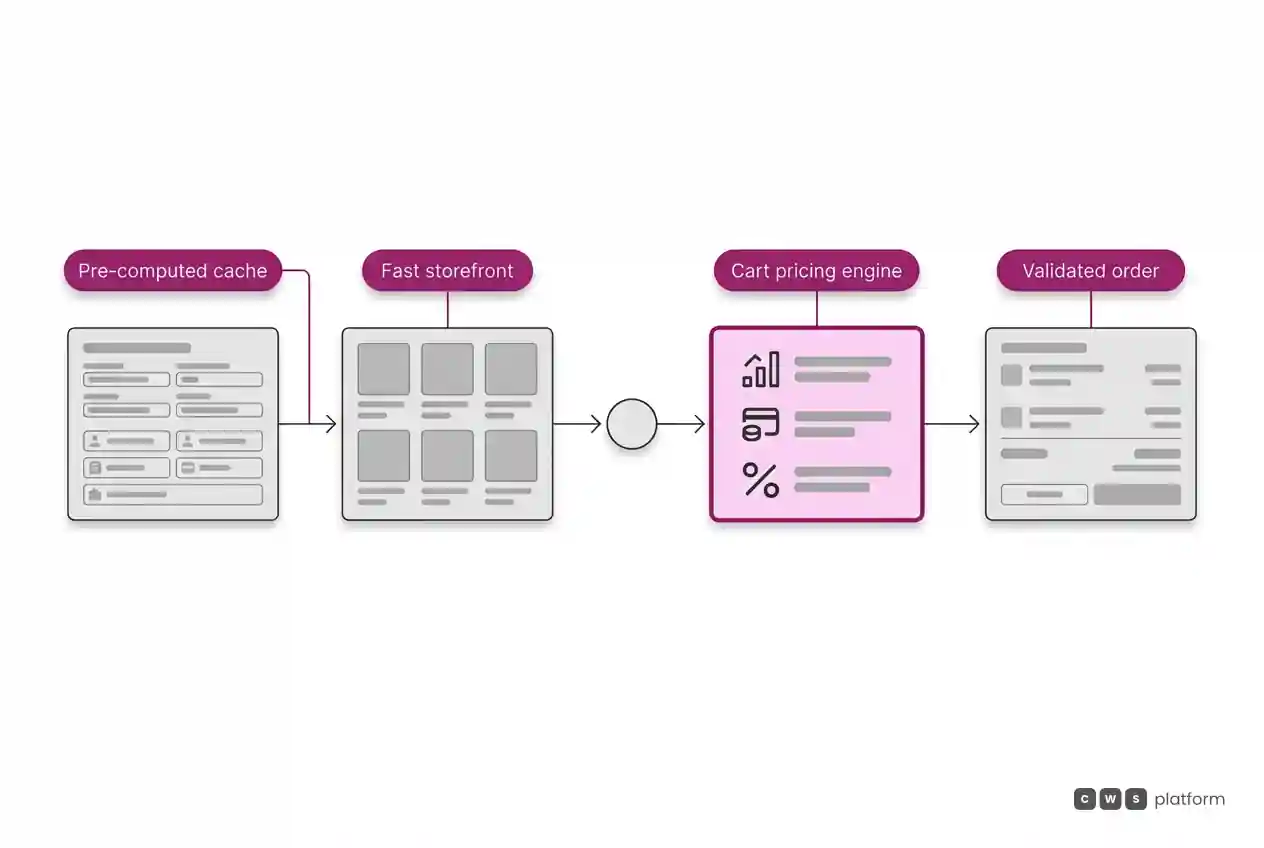
2. Recalculate only what changed. When a pricing policy, tier, or cost index changes, recalculate only the affected lines. Adjusting a promotional discount on a specific product category does not require a full rebuild of the entire catalog index.
3. Separate catalog browsing from cart checkout. Product listing pages should display precomputed prices. The shopping cart, which contains a smaller set of items and exact order quantities, performs full dynamic evaluation, applying quantity breaks, freight terms, and payment discounts. Precision matters most in the cart, where the computational load is significantly lighter.
4. Remove external lookups from the request path. Data sourced from the ERP (costs, inventory tiers, credit status) should sync asynchronously and be read locally. The ERP remains the single source of truth, but it no longer sits in the synchronous critical path of page loads.
How to Identify Bottleneck Rules
Before redesigning platform architecture, gather concrete metrics:
- Execution time per rule. How many milliseconds each rule adds to a standard catalog listing request.
- Rule reach. The number of products and accounts where the rule actually applies, compared to how many it evaluates against.
- Evaluation sequence. Rules that disqualify a large volume of cases should run first to short-circuit the execution tree.
This audit routinely reveals one or two rules consuming the vast majority of compute time. Narrowing their scope (evaluating them only for targeted customer segments) resolves the bottleneck without altering the final price.
When Disabling a Rule Is Acceptable
Turning off a pricing rule as an emergency stopgap is acceptable only when three conditions are met concurrently: buyers are notified that final pricing requires order review, the order route includes manual verification prior to invoicing, and an engineering deadline is established to restore the logic. Without these guardrails, temporary containment turns into standard practice, and buyers lose trust in portal pricing. When prices on the site are unreliable, buyers revert back to phone and email orders, as detailed in channel conflict in B2B.
Structuring B2B pricing as a rules-based function, combining account-level precomputation with deep cart-level execution, forms the architectural foundation of the Pricing Engine within the CWS Platform. Additional design decisions regarding speed and reliability can be explored in architecture and security.
Next Step
Ask your engineering or platform team for response times on catalog listings and cart views before and after your latest pricing policy update, alongside a breakdown of pricing rules ranked by compute duration. If one or two rules account for most of the latency, focus on restricting their evaluation scope rather than shutting down custom pricing logic.
Frequently Asked Questions
Why does B2B e-commerce slow down under complex pricing rules?
Because prices are calculated on the fly for every product, customer account, and page view, evaluating dozens of business rules and frequently waiting on synchronous ERP API calls in the request path.
Does disabling a pricing rule solve site latency?
It resolves latency while exposing incorrect prices to the buyer. It is only defensible as an emergency stopgap with an explicit buyer notice, manual order review before billing, and a firm deadline to restore the rule.
What is price precomputation?
It is the process of calculating prices for each customer account or pricing group before the user visits the portal, indexing the result, and invalidating that index only when rules, price sheets, or underlying costs change.
How do you identify which pricing rule is slowing down the portal?
By profiling the execution duration each rule adds to a typical category page view and measuring how many total items it evaluates against compared to how many it actually impacts.
Read More
- How to test a B2B platform before signing: sandbox testing with real data and business rules
- B2B E-Commerce Platform vs ERP
About This Publication
Article from the blog The Cost of Selling, published by CWS Platform, covering pricing rule performance within B2B e-commerce. It does not reference specific clients or actual performance figures.
"responsive, technically engaged, and willing to work through complex commercial rules (negotiated pricing, credit, customer-specific conditions) rather than pushing generic answers"
Is integration holding your operation back?
Request an assessment of your operation or talk straight to a specialist, whichever you prefer.
I'd rather get the next articles on ERP integration
A weekly roundup of new articles on ERP integration, only in weeks when there is one. No spam, and you can leave in one click.