OroCommerce vs Salesforce Commerce Cloud: which price applies in B2B?
Price lists by channel and customer, quotes, and checkout: how each vendor documents B2B channel pricing, through the Director of Commerce lens.

Editor's note: CWS Platform competes with Oro and with Salesforce. This comparison relies only on each vendor's public documentation, with the address next to each fact and the date of each record cited.
Short answer: OroCommerce fits companies that want the B2B channel with price lists by website, customer group, and customer, quotes that become orders in the back office, and payment terms per customer; only one quote workflow can be active per application. Salesforce Commerce Cloud fits companies that want B2B and D2C in the same Salesforce org, with price lists and entitlements loaded by CSV and buyers in accounts and groups; B2B checkout is always custom.
In the B2B channel, the Director of Commerce decides which list each buyer's price comes from and where negotiation turns into an order. With lists by distributor, reseller, and key account, the question is which one applies to each account, and what happens when a product is missing from that account's list.
OroCommerce and Salesforce Commerce Cloud answer from different places. OroCommerce documents chains of price lists and a quote flow from the request for quote to the order. Salesforce Commerce Cloud places the B2B store inside the Salesforce org, next to D2C, with price lists, entitlements, and checkout built in the project. The overall map is in the three B2B commerce platform models, and the other vendor-by-vendor readings are in the comparisons hub.
OroCommerce and Salesforce Commerce Cloud side by side
Where the source does not cover a point, the cell says "not documented".
| criterion | OroCommerce | Salesforce Commerce Cloud |
|---|---|---|
| Platform model | B2B platform on OroCloud, public cloud, private cloud, or on-premises | Store created from templates in a Salesforce org, customized in Experience Builder |
| B2B native or by extension | Native: customer hierarchy, price lists, requests for quote and quotes, payment terms | B2B Commerce; B2B and D2C in the same org, with shared data |
| Customer and contract pricing | Lists by website, customer group, and customer, combined (Combined Price Lists) or flat (Flat) | Price lists and entitlements, loaded by CSV with accounts and products |
| Quotes | Request for quote converted into a quote or an order in the back office | Not documented |
| Credit and payment terms | Payment terms assigned to the customer and offered at checkout | Not documented |
| ERP integration | Integrations listed for Epicor Prophet 21 and Oracle JD Edwards, among others; REST API | Not documented as a connector; custom B2B checkout with third-party services |
| Pricing model | Base not covered here; Enterprise plans with no separate charge per store, B2B portal, customer, SKU, or catalog | Not documented |
| Implementation | Four deployment models; OroCloud deployment through orocloud-cli | Templates, Experience Builder, and Lightning features |
Pricing and commercial rules: which list applies to each buyer
In OroCommerce, the price comes from lists assigned at several levels. Per the price storage documentation, there are two modes. In the default mode, Combined Price Lists, the lists assigned to the configuration, the website, the customer group, and the customer form a chain, merged by strategies such as the lowest price per quantity tier. In Flat mode, a single list applies, resolved in this order: customer on the site, group on the site, website, and higher scopes.
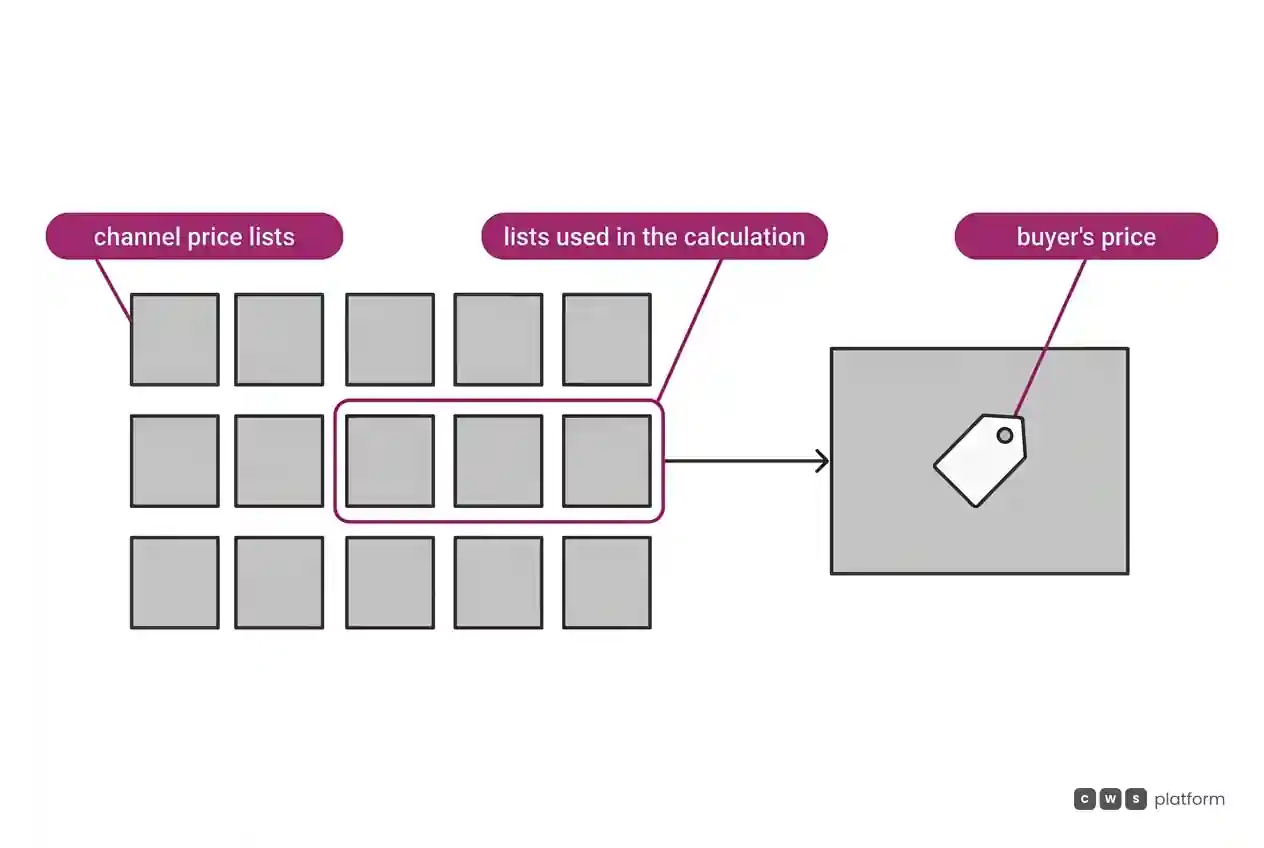
Flat mode has its own record. It is recorded in Oro's documentation, accessed on October 16, 2026, that with flat pricing a price absent from the assigned price list is also absent from the storefront, with no fallback to a higher-level list ("If prices are absent for a certain product in the assigned price list, they will also be absent in the storefront without falling back to another higher level price list.", OroCommerce pricing guide). In the demo, it is worth asking how the sales team finds a product with no price in a customer's list.
In Salesforce Commerce Cloud, pricing comes in through the store's data structure. Per the B2B Commerce introduction, accounts, products, price lists, and entitlements are loaded by CSV, in an asynchronous import of up to 10,000 products per session, and buyers sit in accounts and groups. It is recorded in Salesforce's documentation, accessed on October 9, 2026, that each pricing call evaluates at most 25 price books and that a store accepts 5 assigned price books ("Price books above the 25 limit are not included in the price evaluation.", price book limits). It is worth asking how many price books a buyer with several conditions accumulates in the project.
Quotes and assisted selling
In OroCommerce, the buyer opens a request for quote from the product page, the account menu, the shopping list, or the quick order form, according to the back-office RFQ documentation. The back office receives the request and can convert it into a quote, convert it straight into an order, or decline it. Per the CPQ and RFQ page, quoting applies pricing rules and customer catalogs, with approvals routed by region, brand, opportunity value, or segment. For service, Login as Customer User, in the Enterprise edition, lets a back-office user operate the store as a specific buyer.
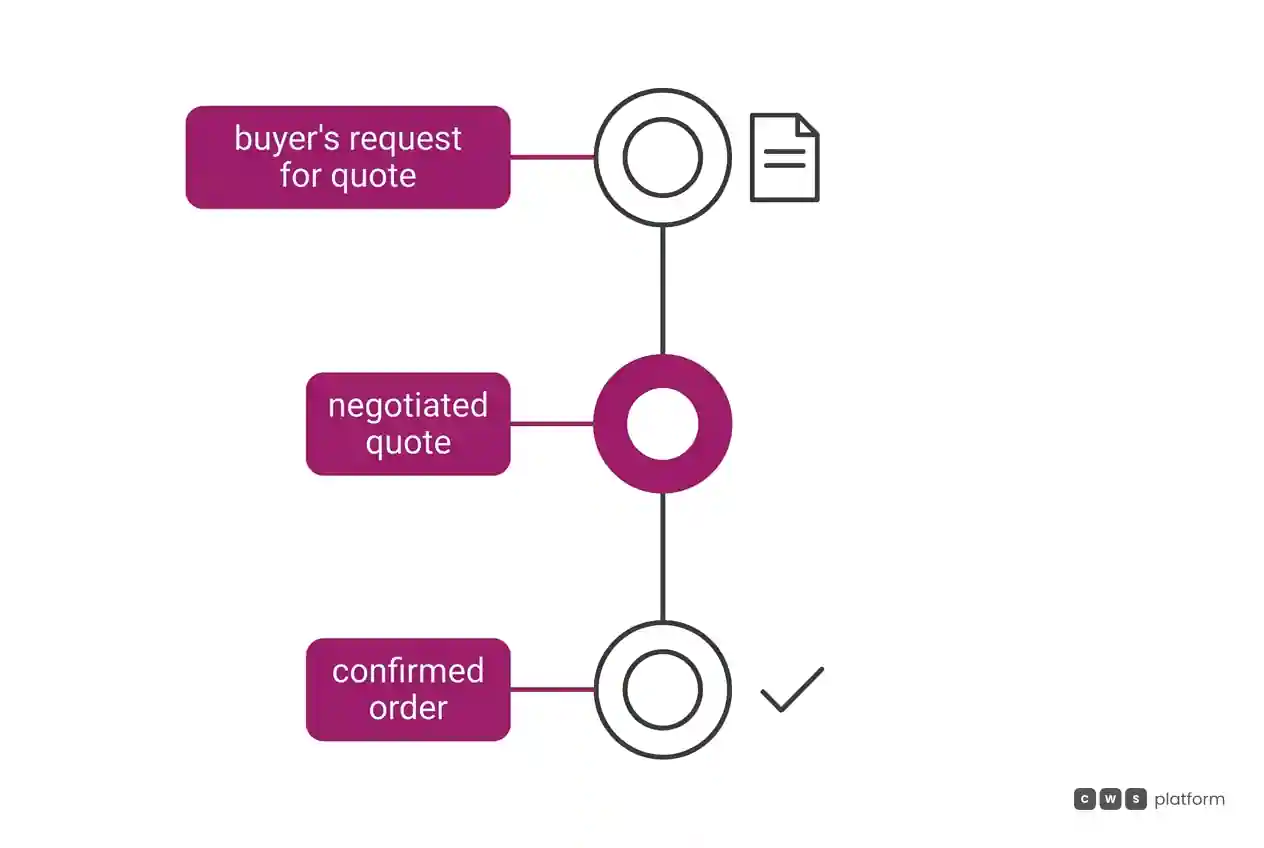
The flow has its own record. It is recorded in Oro's documentation, accessed on October 16, 2026, that quote workflows are mutually exclusive and only one can be activated in the application ("the Quote-related workflows are mutually exclusive, meaning that only one workflow can be activated for your application.", RFQ and quotes guide). It is worth asking whether the quote flow for the distributor channel and the one for the reseller channel fit in the same workflow.
In Salesforce Commerce Cloud, the Commerce Cloud pages used here do not describe quotes or sales rep service inside the store; both stay "not documented". What the B2B Commerce introduction describes is access: profiles and permission sets, buyers in accounts and groups, self-registration, or browsing as a guest.
ERP integration and checkout
In OroCommerce, the ERP integrations list names, among others, Epicor Prophet 21 and Oracle JD Edwards. With Epicor P21, the platform sends customers, addresses, orders, and paid invoices, and receives quotes, product-specific prices, promotions, inventory, and tax rates, with scheduled or real-time sync. With Oracle JD Edwards, the platform receives the price tables maintained in the ERP. At checkout, payment terms are an integration tied to payment rules, with terms such as prepayment, cash on delivery, or net 30, assigned to the customer.
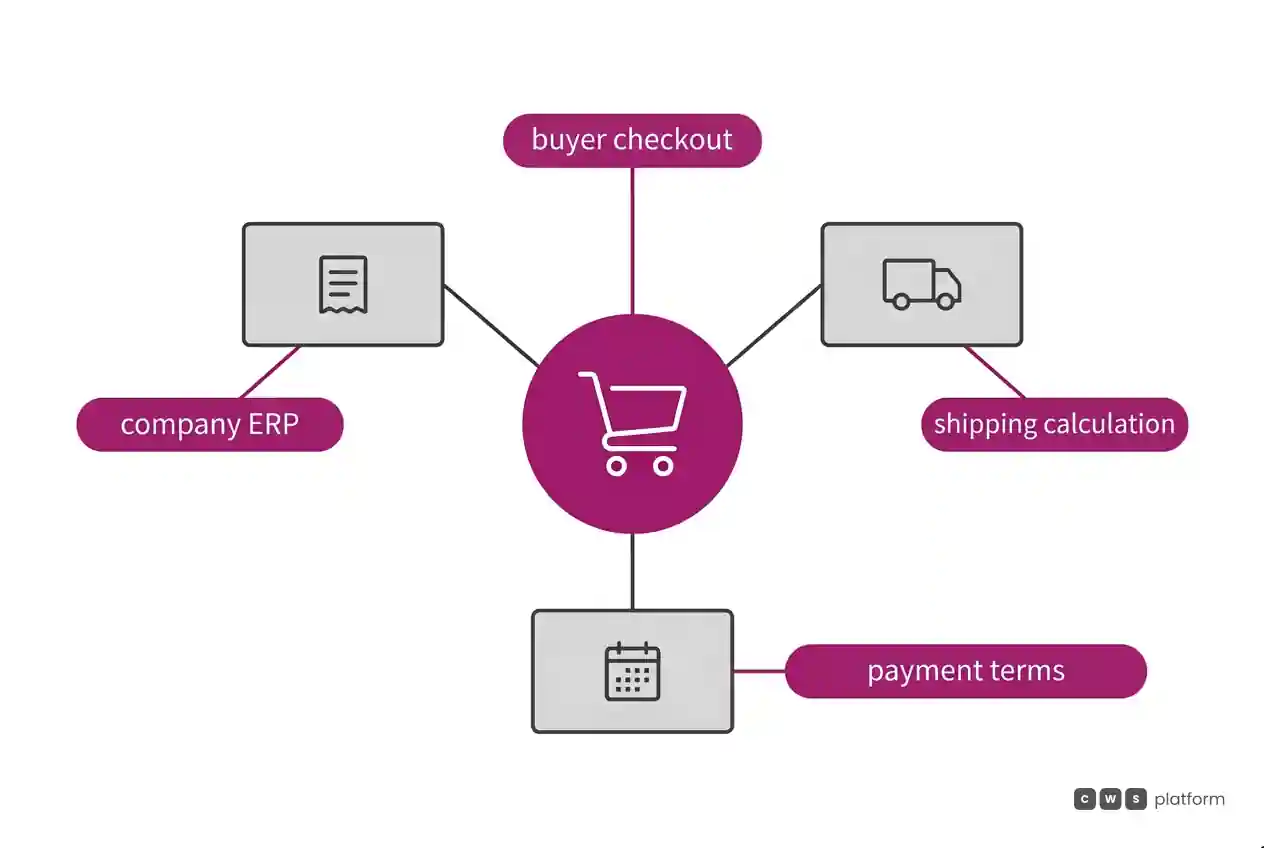
In Salesforce Commerce Cloud, the sources do not describe an ERP connector: data comes in by CSV or Data Loader, and B2B stores use only custom checkout, with services from third-party providers, per the B2B Commerce introduction. One of those services has its own record. It is recorded in Salesforce's documentation, accessed on October 9, 2026, that by default shipping carries no charge, and calculating it requires extending an Apex class ("By default, there's no charge for shipping", available extensions). It is worth asking who writes the shipping extension and whether the B2B rule matches the D2C one.
Cost and pricing model
The OroCommerce pricing page records that Enterprise plans include 25 internal admin users and do not charge separately for the number of stores, B2B portals, buyer customers, SKUs, or catalogs.
In Salesforce Commerce Cloud, the documentation consulted does not state the pricing model. On both sides, the billing base and what goes into it are questions for the proposal.
It is also worth asking what opening a new channel costs: a website with its own lists, in OroCommerce; a B2B store next to D2C, in Salesforce.
Implementation and ongoing support
In OroCommerce, the infrastructure documentation describes four models: OroCloud, public cloud, private cloud, or on-premises. On OroCloud, the upgrade guide describes packaging through orocloud-cli and three deployment modes: with maintenance mode, rolling upgrade when the database does not change, and code-only update.
In Salesforce Commerce Cloud, the store starts from templates and is customized in Experience Builder, with Lightning features, per the B2B Commerce introduction.
On both sides, it is worth asking who maintains, after go-live, what the project writes.
When to choose OroCommerce
Pricing by website, group, and customer. When each channel and each book of business needs its own lists, combined by rule, as the price storage documentation describes.
Quotes that become orders in the back office. When buyers request quotes from several points in the store and the team converts them into quotes or orders, through the back-office RFQ documentation.
Payment terms per customer. When each account's commercial terms need to show up at checkout, through payment terms.
A choice of where to host. When IT wants to decide between OroCloud, public cloud, private cloud, or on-premises, per the infrastructure documentation.
When to choose Salesforce Commerce Cloud
B2B and D2C in the same org. When the company wants both channels with shared data and processes in the same Salesforce org, as the B2B Commerce introduction describes.
A store built from templates. When the team prefers to start from templates and customize in Experience Builder, per the B2B Commerce introduction.
Checkout with chosen providers. When the company wants to build the B2B checkout with the providers it picks, in a customizable interface.
Several storefronts in retail. When the consumer business needs several storefronts by brand, locale, or channel, managed in Business Manager, according to the Get Started with B2C Commerce guide.
When neither fits
Sometimes the B2B channel does not need one more price list, but a place for the whole commercial rule set. For that there is a third model, moving the rules into the platform, which is the CWS Platform model. Price tables, rules, and contracts are configurable in the platform and can come from the ERP or the CRM through APIs, and thousands of promotions can run at the same time. The sales rep builds a cart with the items and the source of each one and sends the link for the customer to close; customer and rep use the same interface, and the order records who built the cart and who chose the payment. Sales rep discounts go through multi-level approval. There are 11 modules, 6 AI Agents, and 1,029 parameters.
The comparisons OroCommerce vs. CWS Platform: how does sales rep quoting work? and Salesforce or CWS Platform: who governs commercial execution without vendor lock-in? read each vendor against that model, and the post on the three B2B commerce platform models shows when each one fits. If the question is which of them serves your channels, it is worth talking to a CWS Platform specialist with your price lists and your quote flow on the table.
Frequently asked questions
OroCommerce vs Salesforce Commerce Cloud: which is better for B2B?
It depends on how the channels are designed. OroCommerce documents price lists by website, group, and customer, quotes that become orders, and payment terms per customer, with one quote workflow active per application. Salesforce Commerce Cloud documents B2B and D2C in the same org, with price lists and entitlements loaded by CSV, buyers in accounts and groups, and a B2B checkout that is always custom.
How does each one handle quotes?
In OroCommerce, the buyer opens a request for quote from several points in the store, and the back office converts it into a quote or an order; Oro records that only one quote workflow can be activated in the application. In Salesforce Commerce Cloud, the Commerce Cloud pages used here do not describe quotes, so the topic stays "not documented". On both sides, it is worth bringing a real quote to the demo.
How does each one organize customer price lists?
OroCommerce combines lists assigned to the configuration, the website, the group, and the customer, or uses a single list in Flat mode, where a missing price stays missing in the store. Salesforce Commerce Cloud loads price lists and entitlements by CSV and records that each pricing call evaluates at most 25 price books, with 5 assigned per store.
Which requires more checkout development?
In Salesforce, B2B stores use only custom checkout, and the documentation records that calculating shipping requires extending an Apex class. In OroCommerce, the sources used here describe payment terms as an integration tied to payment rules at checkout and do not address development effort. On both sides, it is worth asking for the list of what the project will write in the checkout.
Read next
Brands mentioned in this article

- Salesforce
- OroCommerce
Trademarks and logos belong to their respective owners. Mention does not imply partnership or endorsement.
"responsive, technically engaged, and willing to work through complex commercial rules (negotiated pricing, credit, customer-specific conditions) rather than pushing generic answers"
Are your channels competing for the same customer?
Request an assessment of your operation or talk straight to a specialist, whichever you prefer.
I'd rather get the next articles on channel conflict
A weekly roundup of new articles on channel conflict, only in weeks when there is one. No spam, and you can leave in one click.