SAP Commerce Cloud vs Salesforce Commerce Cloud: who talks to the ERP?
Contract pricing, quotes, checkout, and integration paths: how each vendor documents the conversation with the ERP, through the CIO and CTO lens.

Editorial note: CWS Platform competes with both SAP and Salesforce. This comparison uses only each vendor's public documentation, with the address next to each fact and the date of each record cited.
Short answer: SAP Commerce Cloud fits companies that already run SAP as their ERP and want B2B commerce reading contract pricing, inventory, and orders from SAP itself, with quotes through SAP CPQ and SAP-managed connectivity in the Cloud ERP edition. Salesforce Commerce Cloud fits companies that want the B2B store in the same Salesforce org, with B2B and D2C sharing data, and are comfortable designing the ERP integration in the project, with CSV loads and a customized B2B checkout.
The question a CIO or CTO has to answer between SAP Commerce Cloud and Salesforce Commerce Cloud is who talks to the ERP: where contract pricing, inventory, and order status come from, who maintains that conversation when the vendor changes the integration path, and how much project code sits in the middle.
The two answer from different places. SAP ties commerce to its own ERP: in the Cloud ERP edition, connectivity to SAP Cloud ERP is managed by SAP. Salesforce places the store inside the Salesforce org, and the Commerce Cloud sources do not describe an ERP connector: the integration is designed by the project, with CSV or Data Loader loads and an always customized B2B checkout, with third-party services. The broader map is in the three B2B commerce platform models, and the other vendor reads are in the comparisons hub.
SAP Commerce Cloud and Salesforce Commerce Cloud side by side
Where the source does not address a point, the cell says "not documented."
| criterion | SAP Commerce Cloud | Salesforce Commerce Cloud |
|---|---|---|
| Platform model | Modular platform on public cloud (version 2211), extended through extensions and AddOns, built from a Git repository | Store built from templates in a Salesforce org, customized in Experience Builder |
| Native B2B or by extension | Native: customer-specific catalogs, quote to order, buying against contracts, and multi-step approvals | B2B Commerce; B2B and D2C in the same org, with shared data |
| Customer and contract pricing | Contract pricing synced from SAP Cloud ERP; price and discount replication from SAP S/4HANA | Price lists and entitlements, loaded by CSV along with accounts and products |
| Quotes | Request for quote in the storefront, handled in SAP CPQ through SAP Cloud Integration | Not documented |
| Credit and net terms | Not documented | Not documented |
| ERP integration | SAP-managed connectivity in the Cloud ERP edition; ERP integration package in SAP Cloud Integration | Not documented as a connector; customized B2B checkout with third-party services |
| Pricing model | Blocks of 50,000 orders per year or GMV | Not documented |
| Implementation | Cloud ERP edition with an announced standard implementation of about 12 weeks | Templates, Experience Builder, and Lightning features |
Pricing and commercial rules
On SAP, pricing has two paths. In the Cloud ERP edition, prices, inventory availability, and order status are retrieved by querying SAP Cloud ERP as the source of truth, and SAP's blog on the edition lists synchronization of master data, contract terms, contract pricing, entitlements, and invoices. The other path is replicating price and discount tables from SAP ERP or SAP CRM to operate disconnected from the back end; the integration documentation records that this requires turning off Synchronous Pricing for Catalog and uploading deltas after every change.
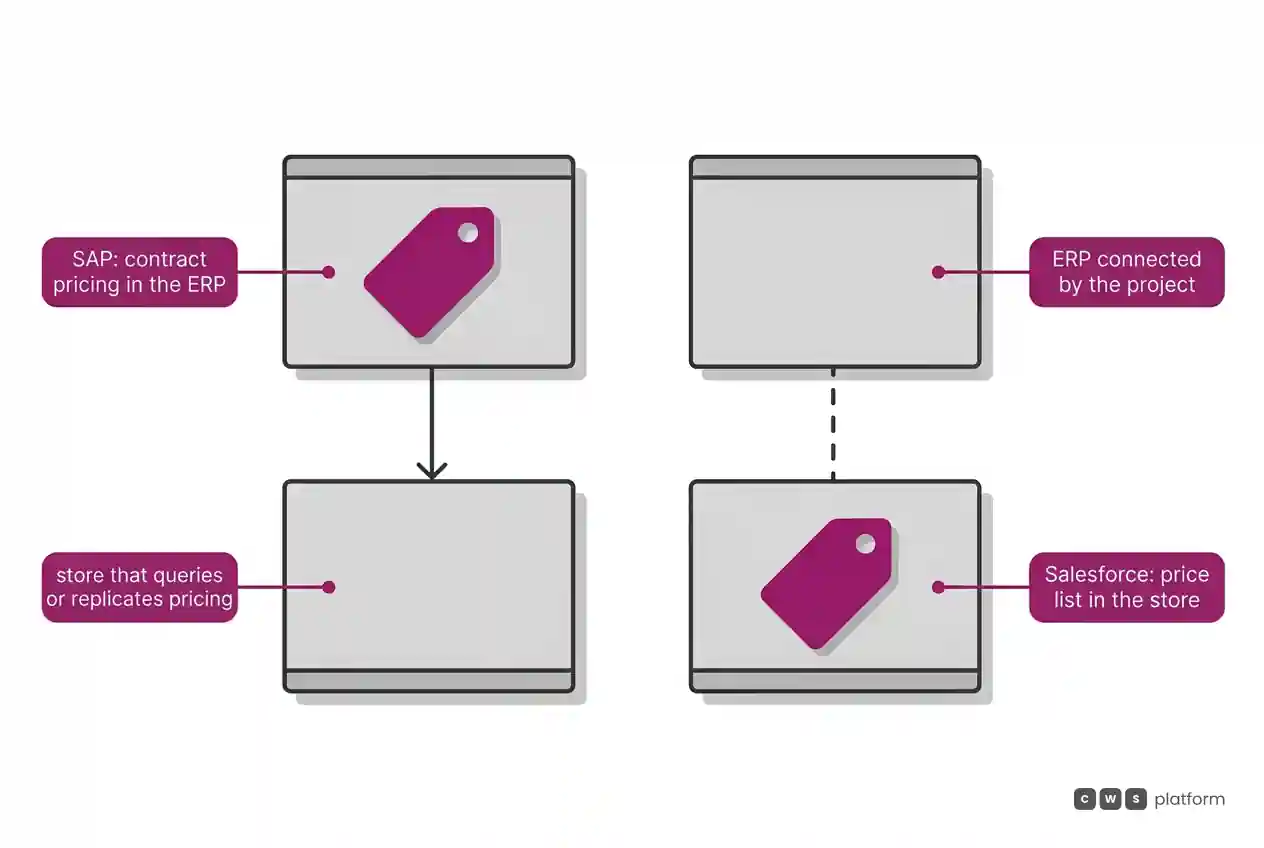
On Salesforce, commercial rules come in through the store's data structure. Per the B2B Commerce introduction, accounts, products, price lists, and entitlements are imported by CSV, in an asynchronous import of up to 10,000 products per session, with Data Loader recommended for large loads.
For the CIO, the difference is the origin: on SAP, the platform queries or replicates pricing from the SAP ERP; on Salesforce, the price list lives in the store, and the project decides how it arrives from the ERP.
Quotes, checkout, and assisted selling
On SAP, B2B quotes run through SAP CPQ. According to the quote-to-cash integration course, the buyer opens a request for quote in the storefront, the cart is locked and sent to SAP Cloud Integration, which calls the SAP CPQ API with the customer, price list, and discounts. After the sales rep edits it, the quote returns to Commerce; once accepted, it becomes an order and moves on to SAP S/4HANA. The SAP CPQ page states support for quotes of more than 10,000 lines. For service, the Assisted Service Module lets an agent work in the same storefront interface the customer uses.
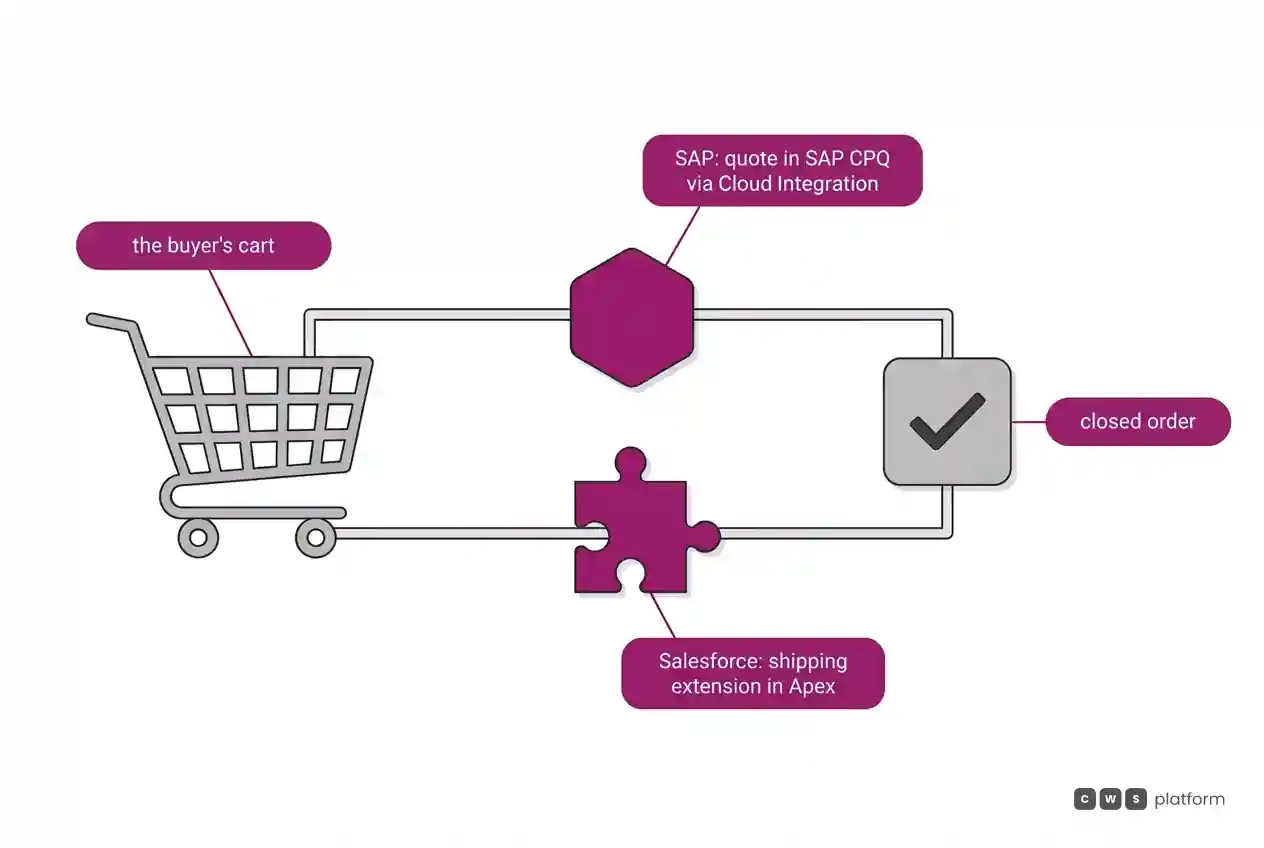
On Salesforce, the Commerce Cloud pages used here do not describe quotes or a sales rep working inside the store; both are marked "not documented." The B2B Commerce introduction records that B2B stores use only a customized checkout, with services from third-party providers. One of those services has its own record. It is recorded in Salesforce's documentation, accessed on October 9, 2026, that by default shipping carries no charge, and calculating it requires extending an Apex class ("By default, there's no charge for shipping", available extensions). It is worth asking in the demo who writes and maintains the shipping extension.
ERP integration
On SAP, integration has two documented designs. In the Cloud ERP edition, the product page describes native connectivity managed by SAP itself. With SAP S/4HANA or SAP ERP, the ERP integration documentation records price and discount replication through SAP Cloud Integration flows, with the SAP Commerce Cloud Integration with ERP package and inbound OData endpoints.
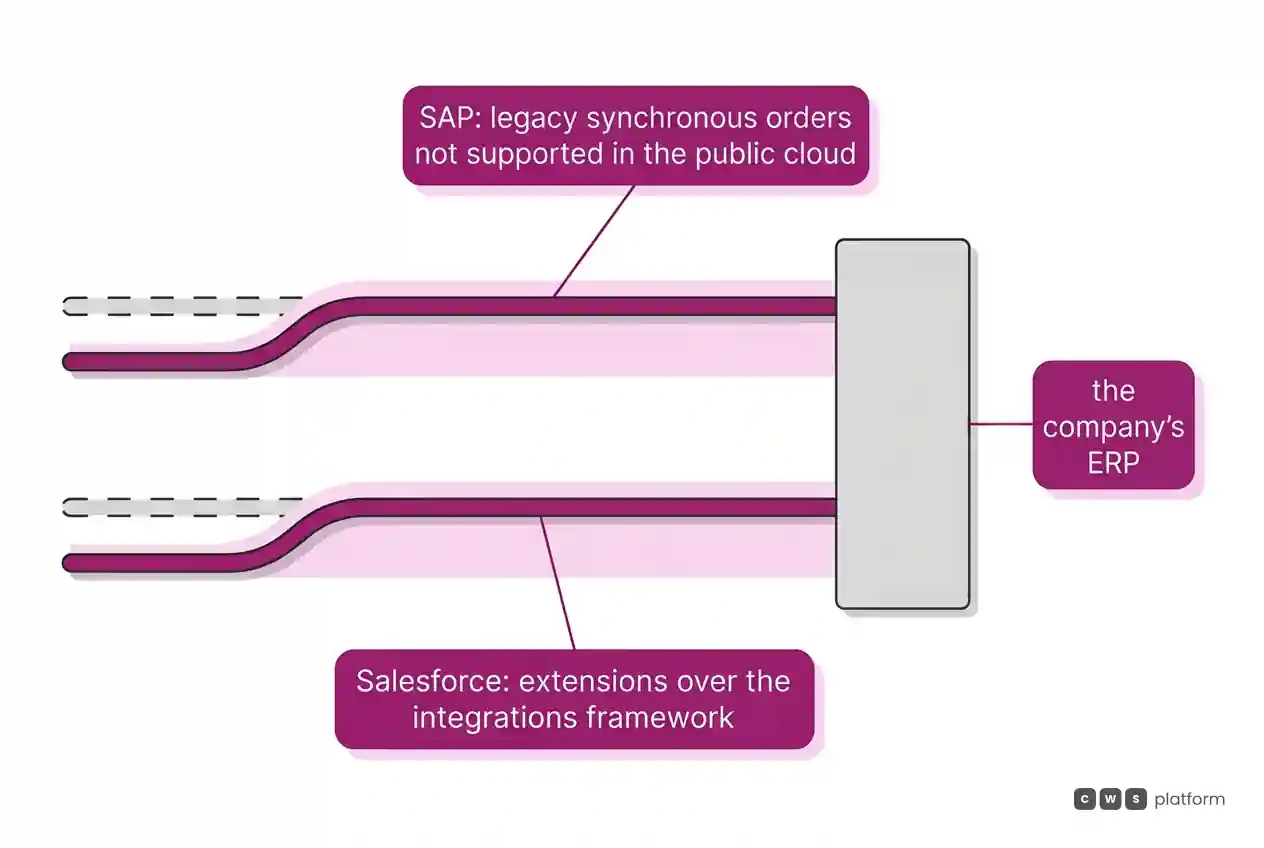
It is recorded in SAP's documentation, on a page dated September 29, 2026, that the legacy synchronous order module (sap-synchronous-order-management) is not supported for use with SAP Commerce Cloud in the public cloud ("not supported for use with SAP Commerce Cloud in the Public Cloud", SAP Commerce integrations documentation). For teams coming from an older installation, it is worth asking how orders reach the ERP in the current design and what changes in the existing integration code.
On Salesforce, the Commerce Cloud sources do not describe an ERP connector: the integration is designed by the project, with CSV or Data Loader loads and an always customized B2B checkout, with third-party services. In checkout, the recommended path has also changed. It is recorded in Salesforce's documentation, accessed on October 9, 2026, that Salesforce recommends extensions over the checkout integrations framework, which remains supported ("we recommend extensions over integrations", shipping and tax integration). It is worth asking whether the project's integration starts as an extension and what the plan is for anything already built on the earlier framework.
Cost and pricing model
The SAP Commerce Cloud pricing page records billing in blocks of 50,000 orders per year or GMV.
On Salesforce, the Commerce Cloud documentation consulted does not include the pricing model; the question goes to the proposal: what the billing base is and what counts toward it.
On both sides, it is worth asking the proposal to show how the middleware flows that carry quotes and pricing to the ERP, on SAP, and the checkout extensions written by the project, on Salesforce, enter the bill.
Implementation and ongoing operations
On SAP, the platform documentation describes version 2211 deployed only on public cloud, with business logic in extensions and builds from a Git repository. The Cloud ERP edition follows the clean core model and announces a standard implementation of about 12 weeks, per SAP's blog. Upkeep has its own record. It is recorded in SAP's documentation, on a page dated September 9, 2026, that SAP reserves the right to ship a release with a major change that is not backwards compatible, giving six months' notice where possible ("is not backwards compatible", SAP Commerce Cloud public cloud documentation). It is worth asking for the release calendar and how much of the project's extensions is covered by tests in the build.
On Salesforce, the store starts from templates, is customized in Experience Builder, and is configured with Lightning features, per the B2B Commerce introduction. Upkeep follows the extensions the project wrote.
When to choose SAP Commerce Cloud
SAP ERP as the source of truth. When the company already runs SAP Cloud ERP and wants pricing, inventory, and orders queried from the ERP, with SAP-managed connectivity, as the Cloud ERP edition describes.
Complex quotes in SAP CPQ. When quotes include configurable products or subscriptions and must become orders in SAP S/4HANA, per the quote-to-cash flow.
Self-service against contracts. When buyers need customer-specific catalogs, buying against contracts, bulk upload, and multi-step approvals, per SAP's blog.
Agents in the customer's interface. When a service center will operate the store on the buyer's behalf, through the Assisted Service Module.
When to choose Salesforce Commerce Cloud
B2B and D2C in the same org. When the company wants both channels with shared data and processes in one Salesforce org, as the B2B Commerce introduction describes.
A store built from templates. When the team prefers to start from templates and customize in Experience Builder.
Checkout with chosen providers. When the company wants to assemble the B2B checkout with the service providers it chooses, in a customizable interface.
Multiple consumer storefronts. When the consumer business needs several storefronts by brand, locale, or channel, managed in Business Manager, per the Get Started with B2C Commerce guide.
When neither fits
There is a third model: moving commercial rules into the platform. That is the CWS Platform model. On it, price tables, rules, and contracts are configurable in the platform and can come from the ERP or CRM through APIs. Tax calculation can be delegated to the tax engine the customer already uses, and tax comes from the ERP. The customer's credit limit is maintained in the platform, granted in CDL Workspace or through the API, and sales rep discounts go through tiered approval. The architecture is API-first and headless, with REST APIs and webhooks, and all customers run the same version. CWS brings together 11 modules, 6 AI Agents, and 1,029 parameters.
The comparisons integration maintenance costs: SAP Commerce Cloud vs CWS Platform and Salesforce or CWS Platform: who governs commercial execution without vendor lock-in read each vendor against that model, and the post on the three B2B commerce platform models shows when each fits. If the question is which one fits your operation, it is worth talking to a CWS Platform specialist with your ERP and your rules on the table.
Frequently asked questions
SAP Hybris or Salesforce Commerce Cloud: which integrates better with the ERP?
It depends on the company's ERP. With SAP Cloud ERP, SAP documents connectivity it manages and pricing, inventory, and orders queried from the ERP; with SAP S/4HANA, replication runs through SAP Cloud Integration. On Salesforce, the Commerce Cloud sources do not describe an ERP connector: the integration is designed by the project, with CSV or Data Loader loads and an always customized B2B checkout, with third-party services.
Should a company already on SAP S/4HANA stay with SAP Commerce Cloud?
It is the scenario for which SAP documents the most ready-made path: price and discount replication, quotes in SAP CPQ that become orders in SAP S/4HANA, and, in the Cloud ERP edition, managed connectivity. The decision still depends on the cost in order blocks and on how well the company's commercial rules fit that design.
Which requires more development in the B2B checkout?
On Salesforce, B2B stores use only a customized checkout, and the documentation records that calculating shipping requires extending an Apex class. On SAP, quotes and pricing have documented flows to the ERP, but the project's business logic also lives in extensions. In both cases, it is worth asking for the list of what the project will write.
Which one changes versions more?
Both record changes of path. SAP reserves the right to ship a release that is not backwards compatible, with six months' notice where possible, and the legacy synchronous order module is not supported in the public cloud. Salesforce recommends extensions over the checkout integrations framework, which remains supported.
Brands mentioned in this article
- Salesforce
- SAP Commerce Cloud
Trademarks and logos belong to their respective owners. Mention does not imply partnership or endorsement.
"responsive, technically engaged, and willing to work through complex commercial rules (negotiated pricing, credit, customer-specific conditions) rather than pushing generic answers"
Is integration holding your operation back?
Request an assessment of your operation or talk straight to a specialist, whichever you prefer.
I'd rather get the next articles on ERP integration
A weekly roundup of new articles on ERP integration, only in weeks when there is one. No spam, and you can leave in one click.