B2B Portal Search: Helping Buyers Find Parts Using Their Own Terms
Why ERP descriptions lead to zero-search results and how cross-references, applications, and ranking keep buyers self-serving.

TL;DR
- B2B portal search must recognize the terminology the buyer uses (trade nicknames, competitor cross-references, application), not just the accounting description in the ERP.
- Out-of-stock items should not disappear from search: they appear after available products, showing restocking dates or available substitutes.
- Nomenclature, application context, and result readability must be handled together. Fixing only one simply shifts the friction elsewhere.
- The primary benchmark is the zero-results search report: it shows, in the customer's own words, what the catalog does not yet understand.
For a buyer to find a part in the B2B portal, the search engine must respond to what they actually type, not the internal part description saved in the ERP. This requires addressing three elements together: synonyms and cross-reference codes linked to the SKU, search by product application, and a results page that prioritizes available inventory without hiding out-of-stock items.
B2B replacement parts buyers do not browse by category. They type whatever reference they have in hand: the part number stamped on the old packaging, the slang used in the maintenance shop, or the specific make and model of the equipment. If the search engine fails to recognize these inputs, the buyer leaves the self-service portal and calls their sales rep.
Why Does B2B Portal Search Return an Empty Screen?
Because catalog records were historically written for accounting, taxes, and warehouse logistics, not for buyers. ERP descriptions rely on abbreviations tailored for invoices ("TAPERED ROLLER BRG 30205 STD"), while the buyer types "rear wheel bearing" or the competitor part number they have used for years.
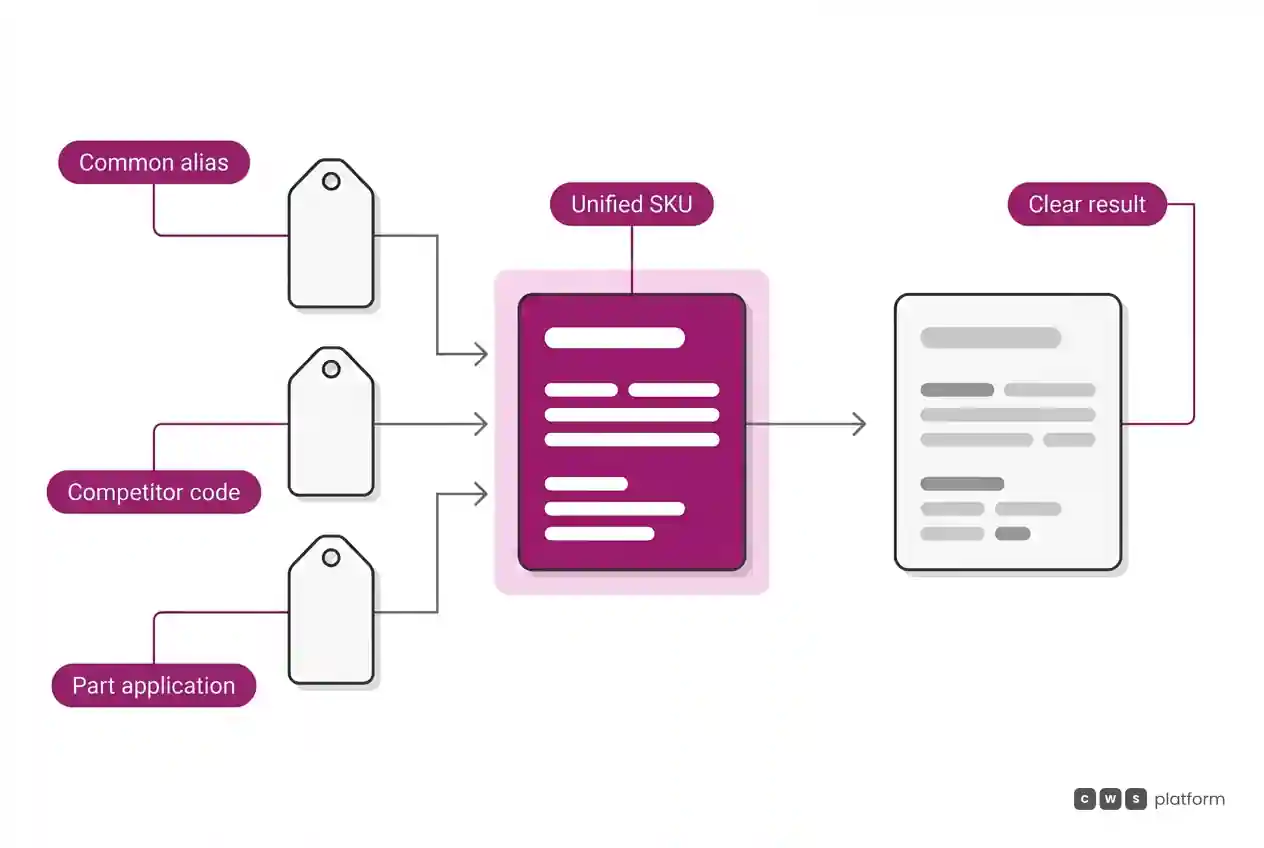
During implementation, initial audits consistently uncover three categories of failed searches:
- Trade nicknames. The market calls an item by a practical term that appears in no standard ERP field.
- Cross-reference codes. The buyer searches using a competitor reference, an OEM part number, or the code stamped directly on the failed unit.
- Application context. The buyer does not know the part number. They know the machine model, the vehicle, or the dimensions, and expect the portal to map the fit.
Every query returning zero results leads to a phone call, a text message sent to an outside rep, or an email request for a quote. The cost never surfaces inside the portal interface; it consumes the sales team's productive time.
Terminology, Application, and Results: Why Address All Three Together
Search optimization projects across CWS Platform implementations point to the same reality: nomenclature, application context, and search result readability must be adjusted in tandem. Addressing only one merely shifts the bottleneck.
Adding synonyms alone. The search engine returns products, but dumps forty nearly identical items with no clear distinction. The buyer cannot tell which one fits, so they pick up the phone to ask.
Adding application filters alone. Vehicle or machine lookups work properly, but the buyer who types an aftermarket interchange code still hits an empty page.
Improving result layout alone. Product cards display crisp images and detailed specifications, but the search engine still fails to recognize what the buyer typed.
The viable path is to attach every real-world identifier (synonyms, competitor cross-references, equipment applications) directly to the SKU, while surfacing the decisive buying criteria right on the results page: critical dimensions, direct fitment, brand, and lead time. This is a core catalog management function, precisely what Catalog Engine organizes: technical ERP master data on one side, customer discovery language on the other, tied to the exact same item.
Should Out-of-Stock Items Appear in Search Results?
Yes, provided they are displayed below available items. Hiding out-of-stock products might seem like a way to keep results clean, but it creates two critical problems. The buyer assumes the distributor does not carry the line and heads to a competitor. Meanwhile, the sales team loses the opportunity to recommend an alternative or track unmet demand.
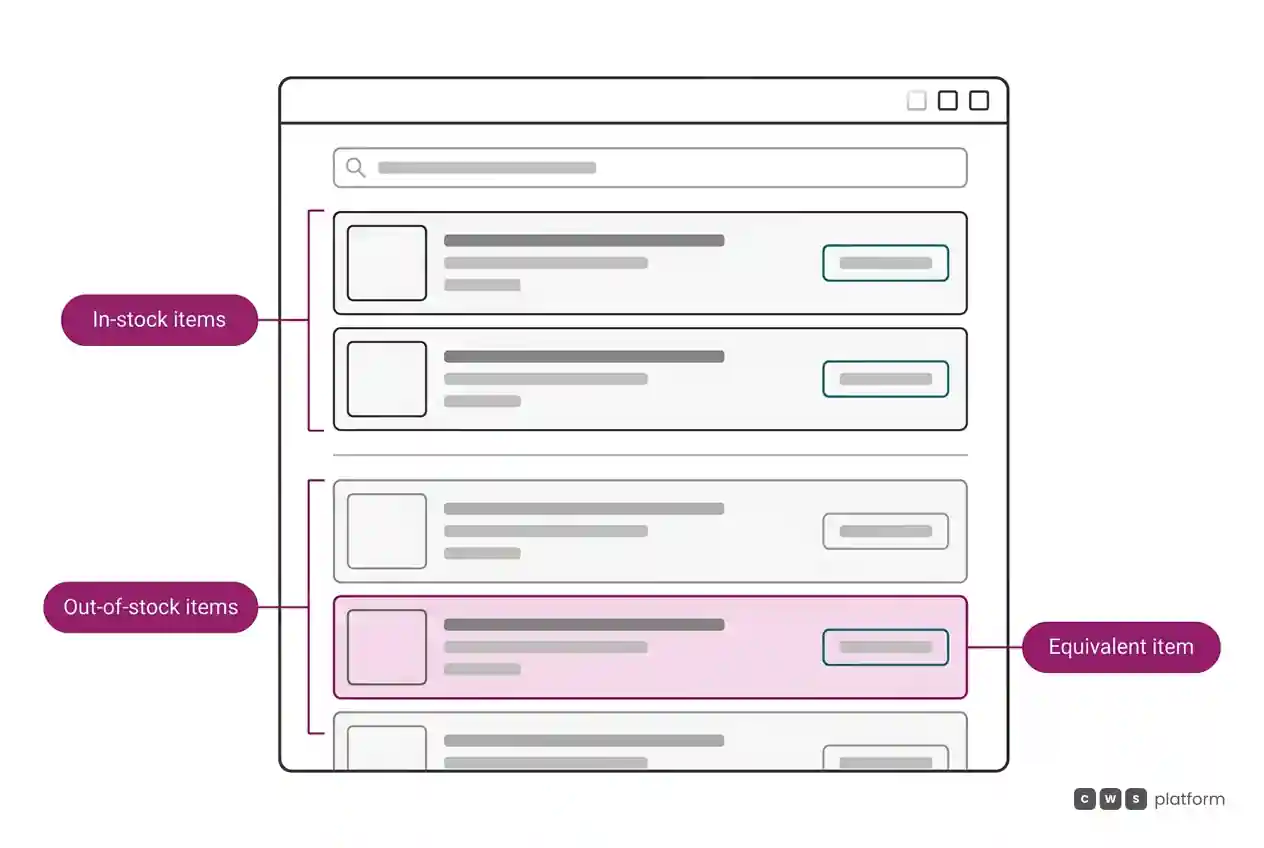
The standard implementation rule is straightforward:
- Available inventory for that specific customer account, fulfilled from their assigned warehouse or distribution center, displays first.
- Backordered or out-of-stock items stay in the list below, clearly designated as unavailable.
- Every unavailable listing offers an immediate next step: expected restock date, an equivalent in-stock substitute, or a notification request.
This ensures the portal remains the authoritative source for the distributor's complete product line, rather than just an inventory clearance check. To understand what information an order must capture once the item is selected, see what a sales order is and what it must include in B2B.
Handling Queries That Return Too Many Results
The reverse issue also drives buyers away from self-service ordering. Searching for broad terms like "filter" or "bolt" across a vast catalog can pull hundreds of unstructured records. Without clear rules, buyers scroll briefly, give up, and call their rep.
Three rules keep broad queries functional:
- Prompt for the right refinement. When result counts exceed a specific threshold, the portal recommends the attribute that best segments the group (dimensions, equipment line, thread pitch).
- Prioritize account order history. SKUs that the specific commercial account has previously purchased appear ahead of unfamiliar options.
- Restrict to contract assortments. If customer agreements or brand authorizations limit what an account can buy, unapproved lines do not surface in search.
All three rely on the portal recognizing the customer account, their servicing distribution center, and their order history, meaning the catalog must operate in lockstep with the broader system architecture. For guidance on rollout sequence, see system integration in B2B sales.
How to Measure Search Improvements
Success is not measured by how many synonyms exist in the database. It is measured by buyer behavior:
- Zero-results searches. Reviewing queries that returned zero results weekly provides the catalog team with an unedited punch list, written directly in the customer's language.
- Searches ending in immediate abandonment. The search returned items, but the user clicked nothing. This usually signals poor relevance ranking or unclear product descriptions.
- Orders redirected to sales reps. If an account runs a portal search and calls their sales rep ten minutes later, the portal search failed, even if it returned products.
Search experiments (adding a cross-reference, tuning sorting logic, refining filters) must run against production catalog and live inventory data. Testing against outdated staging data produces great results in development, only to break under real customer queries.
Next Steps
Pull your zero-results search report for the past thirty days and group the terms into three buckets: colloquial terminology, competitor cross-references, and equipment applications. The largest category indicates where to begin. If the portal does not currently log failed queries, implementing that tracking is step one. To see the architecture of a platform where buyers order self-service against their contract catalog, visit the page on the B2B digital sales portal, and review B2B portal: what it takes to stop buyers from calling to address common adoption hurdles.
Frequently Asked Questions
Why does B2B portal search fail to find the part a customer types?
Because standard searches only query the ERP description field, which is formatted for internal accounting and warehouse tracking. Buyers search using trade terminology, cross-reference numbers, or machine applications. Without these attributes mapped to the SKU, the query comes up empty.
Should out-of-stock products be hidden from B2B e-commerce search?
No. Display in-stock items first and out-of-stock items below them, showing restock dates, recommended alternatives, or backorder alerts. Hiding out-of-stock items leads buyers to assume your company does not carry the product line.
How do you build synonyms and cross-reference codes into a B2B catalog?
Map trade terms, competitor part numbers, OEM references, and machine applications directly to the core SKU, using zero-results search logs as the primary source. Audit these logs on a weekly schedule using actual customer queries.
How do you track whether B2B portal search is improving?
Track zero-results queries, search sessions that yield zero product clicks, and instances where buyers search online and call their rep shortly after. Looking at these three metrics together shows whether buyers are locating what they need independently.
About This Publication
This article outlines implementation patterns observed across B2B portal rollouts by CWS Platform. It contains no confidential client references or proprietary performance metrics.
"responsive, technically engaged, and willing to work through complex commercial rules (negotiated pricing, credit, customer-specific conditions) rather than pushing generic answers"
Is your catalog getting in the way of the sale?
Request an assessment of your operation or talk straight to a specialist, whichever you prefer.
I'd rather get the next articles on catalog management
A weekly roundup of new articles on catalog management, only in weeks when there is one. No spam, and you can leave in one click.