Optimizely Configured Commerce vs Salesforce B2B Commerce: where do reps sell?
Quoting and negotiating inside the portal, or serving a large book of accounts: where reps work decides the choice.

Editorial note: CWS Platform competes with both Optimizely and Salesforce. This comparison relies only on each vendor's public documentation, with the address next to each fact and the date of each record cited.
Short answer: Optimizely Configured Commerce fits companies that sell through reps who quote and negotiate inside the portal, with customer pricing in a matrix, quotes bounded by discount and margin limits, and prebuilt connectors for five ERPs. Salesforce B2B Commerce fits companies that want the B2B store in their Salesforce org, with accounts and buyer groups; in Sales Cloud, Salesforce documents territories, forecasts, and Spiff for commissions.
For a VP of Sales, the question is where reps work once customers buy digitally: inside the portal, quoting and negotiating price, or in the CRM, managing a large book of accounts that order through the store. The two platforms answer from different places, and the limits each one records sit at exactly those two points. The broader map is in the three B2B commerce platform models, and the other readings are in the comparisons hub.
Optimizely Configured Commerce and Salesforce B2B Commerce side by side
The table sums up what each vendor's documentation records.
| criterion | Optimizely Configured Commerce | Salesforce B2B Commerce |
|---|---|---|
| Platform model | Storefront and Admin REST APIs; on .NET Core, separate Admin, Storefront, and Integration apps | Store built from templates in the Salesforce org, customized in Experience Builder |
| Native B2B or extension | B2B capabilities in the product documentation | B2B Commerce is the mechanism described in Commerce Cloud; B2B and D2C in the same org |
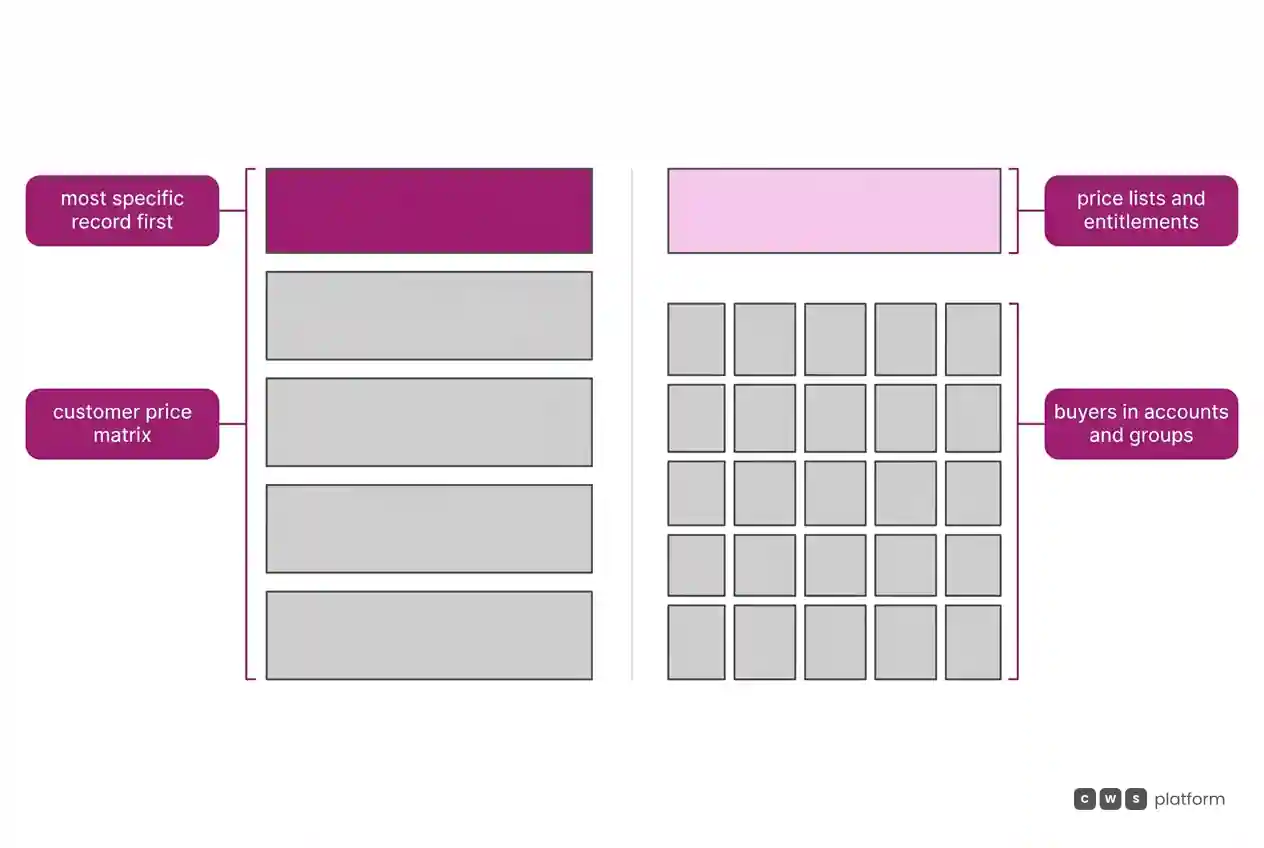
| Customer and contract pricing | Price Matrix from most specific to most general, up to 10 price breaks | Price lists and entitlements; buyers in accounts and groups |
| Quotes | RFQ from the cart or from the rep; Job Quotes | Not documented |
| Credit and net terms | Invoices, terms, due dates, and balances shown from ERP data | Not documented |
| ERP integration | Windows Integration Service and connectors for SX.e, Prophet 21, Infor A+, Acumatica, and FACTS | Not documented; loads by CSV or Data Loader |
| Billing model | Not documented | Not documented |
| Implementation | Integration jobs generated when the connector is turned on in the Admin Console | Templates, Experience Builder, and custom checkout with third-party providers |
Pricing and commercial rules: the price a rep inherits
In Optimizely Configured Commerce, customer pricing comes from the Price Matrix. Per the pricing guide, the calculation orders records from most specific to most general, applies the first match, compares it with the sale price, and returns the lower of the two, with up to 10 price breaks. The price matrix technical overview says the table is flat so pricing can be calculated without a direct ERP connection. When the price has to come from the ERP, the pricing and inventory service queries the ERP through its API or the Windows Integration Service, with caching and batches of 20 items.
Where negotiated price meets promotions is recorded in Optimizely's documentation, accessed on October 16, 2026: when a rep quotes a product price, any available promotions are disallowed ("If a sales representative provides a price quote on a product, any available promotions are disallowed.", Request for Quote configuration). Worth asking in the demo: how does the rep know, before quoting, which promotion the customer would lose, and who decides which condition wins?
In Salesforce B2B Commerce, per the Commerce introduction, accounts, products, price lists, and entitlements come in through import, and buyers are tied to accounts and groups, with access controlled by profiles and permission sets.
Search has a limit tied to those groups, recorded in Salesforce's documentation, accessed on October 9, 2026: during indexing, only the first 2,000 buyer groups for a product make it into the index ("During search indexing, only the first two thousand buyer groups for a product are included in the index.", entitlement limits). Worth asking how many groups your commercial segmentation will create per product, and how search behaves for a group past that number.
Quotes and assisted selling: the rep inside the portal
In Optimizely, the quote belongs to the rep. Per the Request for Quote guide, a request starts in the buyer's cart or is created directly by the rep, and the rep and the sales manager are notified at their next login. The RFQ configuration caps the maximum discount against list price and the minimum margin against unit cost by warehouse, and routes quotes from customers with no assigned rep to a default rep. A Job Quote sets a total quantity consumed across multiple orders until an expiration date.
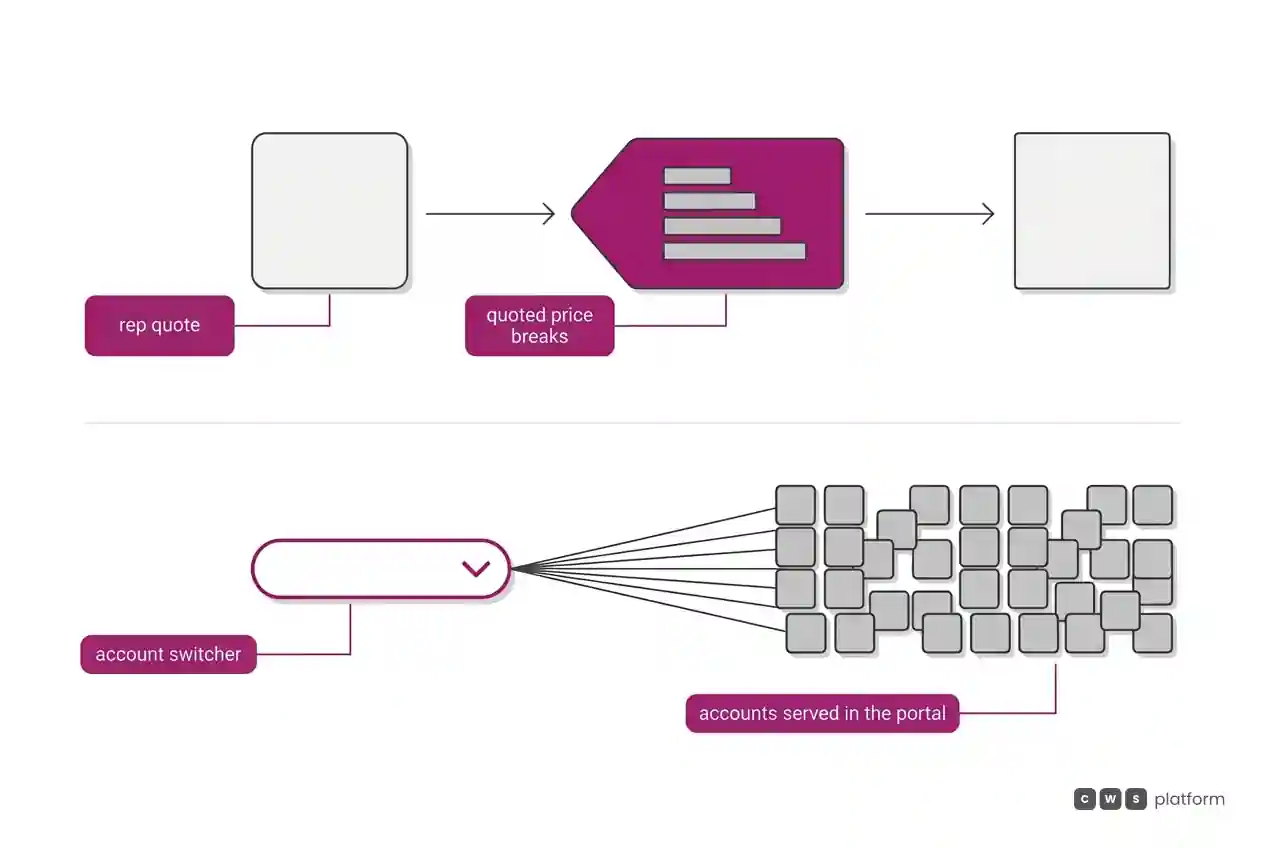
The quote calculator has a ceiling recorded in Optimizely's documentation, accessed on October 16, 2026: a rep can give at most five quoted price breaks per product ("The sales representative may provide up to five quoted price breaks for the selected product.", using the Quote Calculator). Bring a real volume-tiered quote to the demo and see how it fits into five breaks.
In Salesforce B2B Commerce, the sources in this comparison do not document a quote flow in the store; ask the demo to show where quoting happens. What the sources do document is the account side: in Sales Cloud, leads, accounts, contacts, and opportunities move through the sales process, tracking what is sold and for how much.
Serving many accounts through the portal has a limit recorded in Salesforce's documentation, accessed on October 9, 2026: the account switcher degrades beyond 200 accounts and fails at 2 thousand ("At 2 thousand Buy For accounts the Account Switcher fails.", buyer group and account limits). If users will buy through the portal on behalf of several accounts, ask how many accounts each user will carry and how operations are organized above 200.
ERP integration: where the price comes from
In Optimizely, the Windows Integration Service runs as an agent inside the customer's firewall and executes Refresh jobs, which pull products, inventory, and customers from the ERP, and Submit jobs, which push orders and customers to it. The prebuilt connectors for SX.e, Prophet 21, Infor A+, Acumatica, and FACTS generate those jobs when turned on in the Admin Console. Invoices come from the ERP too: per the order and invoice history, the portal shows invoice number, terms, due date, and current balance from the data the ERP provides.
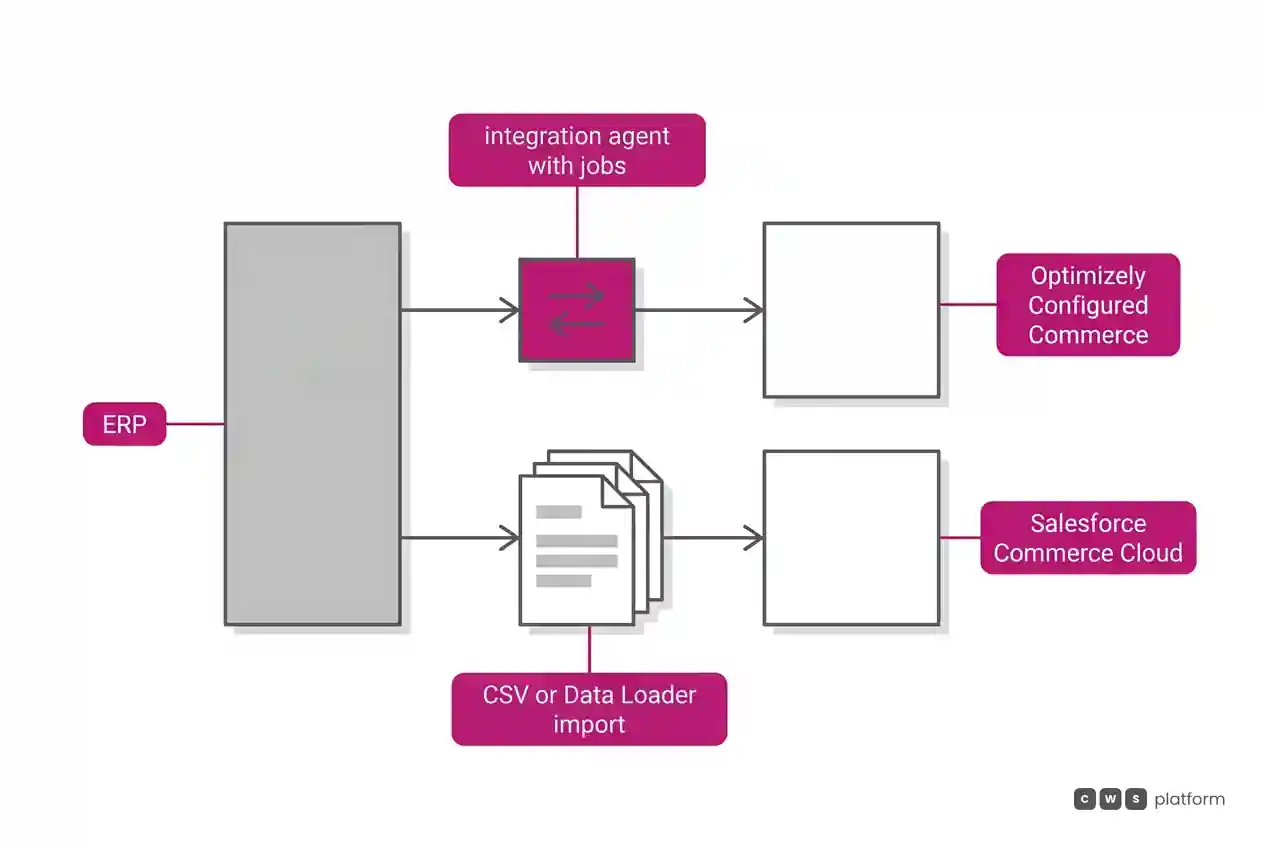
For Salesforce B2B Commerce, the sources in this comparison do not document an ERP connector. The Commerce introduction records asynchronous CSV import of up to 10,000 products per session, export of up to 300,000, and Data Loader for large loads; B2B stores use custom checkout, with services from third-party providers. Ask the implementation partner to map how price, inventory, and orders move between the store and the ERP.
Cost and billing model
Neither vendor's sources in this comparison document the billing model of the commerce platform. For a VP of Sales, the question that matters is the same in both contracts: does cost grow with the number of reps, the number of buying accounts, or the value sold?
Implementation and ongoing operations
In Optimizely, the Storefront and Admin APIs take a different shape depending on the .NET version: on .NET Core, Admin, Storefront, and Integration are separate apps behind a reverse proxy.
In Salesforce, the store starts from templates and is customized in Experience Builder, with search, cart, checkout, and payment configured through Lightning features, per the Commerce introduction. The same org can run B2B and D2C channels with shared data and processes.
When to choose Optimizely Configured Commerce
Reps who quote in the portal. Choose Optimizely when reps create quotes, pick up quotes from customer carts, and work within discount and minimum-margin limits, as described in the RFQ configuration.
Quantity contracts drawn down across orders. Choose Optimizely when you sell by job or project, with a negotiated quantity consumed until a set date, through Job Quotes.
Customer pricing that already lives in the ERP. Choose Optimizely when pricing comes from the ERP, by direct query or through the Windows Integration Service, as shown in the pricing and inventory service.
Buying from the customer's procurement system. Choose Optimizely when large customers buy through PunchOut, with catalog and negotiated pricing flowing back to their procurement system in cXML, per the PunchOut overview.
When to choose Salesforce B2B Commerce
A store in your Salesforce org. Choose Salesforce when you want the B2B store built in your Salesforce org, with buyers in accounts and groups and access through profiles and permission sets, as described in the Commerce introduction.
Territories, forecasts, and revenue splits. Choose Salesforce when sales management runs on territories, teams, pipeline-based forecasts, and revenue and credit splits, including across currencies, per the Sales Cloud core.
Commissions defined in Spiff. Choose Salesforce when your commission structure will be defined in Spiff, which Salesforce cites in the Sales Cloud developer center.
B2B and D2C side by side. Choose Salesforce when you sell to businesses and direct to consumers and want both channels in the same org, with buyers in accounts and groups and self-registration, per the same Commerce introduction.
When neither fits
The two put the rep in different places: in Optimizely, inside the portal, quoting; in Salesforce, with the book of business in Sales Cloud and the buying accounts in the store. There is a third model, laid out in the three B2B commerce platform models: bring the commercial rules into the platform.
That is the CWS Platform model. Customers and reps use the same interface and work on the same order, and one rep serves thousands of customers. The rep builds a cart with the items and the source of each one and sends the link for the customer to close; the order records who built the cart and who chose the payment method. Rep discounts go through tiered approval. Price tables, rules, and contracts are configurable on the platform and can come from the ERP or CRM through APIs, and the platform brings together 11 modules, 6 AI Agents, and 1,029 parameters.
How each vendor reads against that model is covered in Optimizely Configured Commerce vs CWS Platform: pricing rules autonomy and assisted sales and the digital counter: Salesforce and CWS. If your reps fit neither place, it is worth talking to a CWS Platform specialist.
Frequently asked questions
Optimizely Configured Commerce or Salesforce B2B Commerce: which is better for selling through reps?
Optimizely fits companies that want reps inside the portal, creating quotes within discount and margin limits. Salesforce fits companies that want the B2B store in their Salesforce org, with accounts and buyer groups, and it documents territories, forecasts, and Spiff for commissions in Sales Cloud.
How does each handle quotes?
In Optimizely, a quote starts in the cart or with the rep, carries discount and margin limits, and can become a Job Quote, with up to five price breaks per product and no promotions once the price is quoted. For Salesforce, the sources in this comparison do not document a quote flow in the store, so ask to see one in the demo.
Which one serves a rep with many accounts?
In Salesforce, Sales Cloud documents accounts, territories, and sales teams, and in the portal the account switcher degrades beyond 200 accounts and fails at 2 thousand. In Optimizely, quotes from customers with no assigned rep go to a default rep, and the rep and the sales manager are notified of quotes at login.
Which one integrates with the ERP?
Optimizely documents the Windows Integration Service and prebuilt connectors for SX.e, Prophet 21, Infor A+, Acumatica, and FACTS, and shows in the portal the invoices the ERP provides. For Salesforce B2B Commerce, the sources in this comparison document CSV import, Data Loader, and checkout with third-party providers, but not an ERP connector.
Read More
"responsive, technically engaged, and willing to work through complex commercial rules (negotiated pricing, credit, customer-specific conditions) rather than pushing generic answers"
Is selling more not turning into margin?
Request an assessment of your operation or talk straight to a specialist, whichever you prefer.
I'd rather get the next articles on margin and discounts
A weekly roundup of new articles on margin and discounts, only in weeks when there is one. No spam, and you can leave in one click.