OroCommerce vs Optimizely: how does each organize the B2B catalog?
A master catalog with several sites or calculated pricing and ordering by part number: through a COO's lens, where the B2B catalog is maintained and how buyers reach the product.

Editorial note: CWS Platform competes with Oro (OroCommerce) and with Optimizely (Optimizely Configured Commerce). This comparison uses only each vendor's public documentation, with the address next to each fact and the date of each record cited.
Short answer: OroCommerce fits teams that need several sites and web catalogs built on one master catalog, accepting that a product sits in only one master catalog category and that multiple websites require the Enterprise edition. Optimizely Configured Commerce fits teams that sell with customer-calculated pricing and order entry by item number, accepting that Search v3 does not search customer-specific part numbers and that provisioning it takes more than a day.
A COO comparing OroCommerce and Optimizely Configured Commerce is deciding where the B2B catalog will be maintained, by whom, and across how many storefronts. For operations, the catalog is the category tree, the sites each account sees, each account's price, and the number the buyer orders by, and each vendor handles those pieces in a different place.
The map of platform models is in the three B2B commerce platform models, and the other comparisons are in the comparisons hub, including OroCommerce vs Magento B2B and Optimizely Configured Commerce vs Salesforce B2B Commerce.
OroCommerce and Optimizely side by side
The table summarizes what each vendor's documentation records.
| criterion | OroCommerce | Optimizely Configured Commerce |
|---|---|---|
| Platform model | Enterprise Edition on OroCloud (managed SaaS), public or private cloud, or on-premise | Platform with REST Storefront API and Admin API, on .NET Framework 4.8 or .NET Core |
| Native B2B or extension | Native: customer tree with roles, price lists, RFQ and Quotes | Native: customer Price Matrix, RFQ and Job Quotes, Quick Order, and contract lists |
| Customer and contract pricing | Price list chains at the configuration, website, customer group, and customer levels | Price Matrix from the most specific record to the most general; contract item lists per customer |
| Quoting | RFQ with target prices, converted to a quote or an order in the back office | RFQ opened from the cart or by the sales rep; Job Quotes drawn down across several orders |
| Credit and net terms | Payment Terms, one term per customer, and invoices | Invoice history with terms, due date, and balance in My Account |
| ERP integration | Listed integrations with SAP, Epicor P21, and JD Edwards | Windows Integration Service with Refresh and Submit tasks |
| Billing model | Not covered in the sources used here; multiple websites depend on the Enterprise edition | Not covered in the sources used here |
| Implementation | OroCloud with development, testing, staging, and production environments | Search v3 with a minimum version, Optimizely ID, and ODP integration |
Pricing and commercial rules: one catalog, many storefronts
In OroCommerce, the master catalog links products to categories, which pass inventory settings, units, and purchase limits down to them. On top of it, the Web Catalog builds storefront navigation from content nodes, such as categories, dynamic product collections, or landing pages, with visibility by location, website, or customer group. For pricing, Combined Price Lists chain lists assigned to the configuration, the website, the customer group, and the customer.
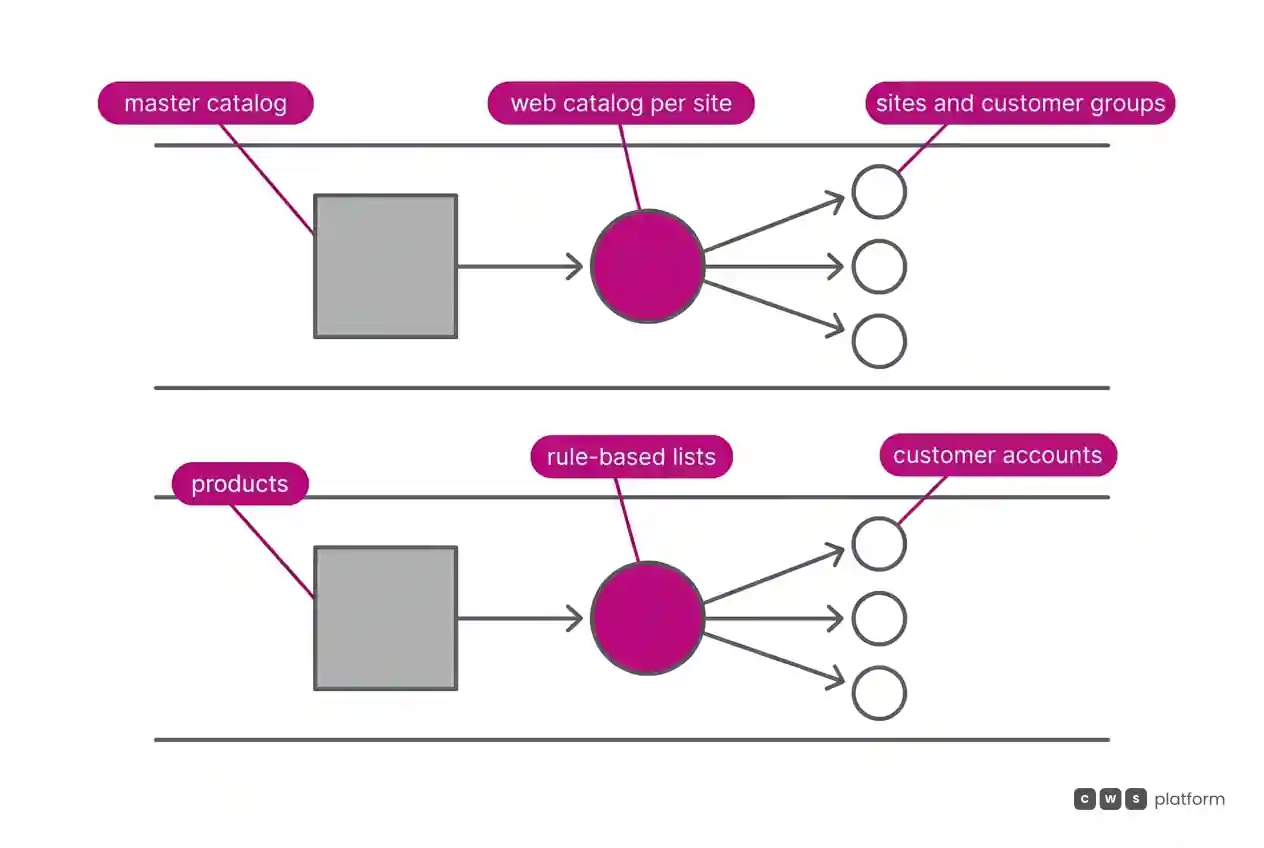
The master catalog tree has one design rule. It is recorded in Oro's documentation, accessed on October 16, 2026: "It is important to remember that one product can reside only in one category of the master catalog." (master catalog guide). It is worth bringing to the demo a product that sits in two product families today and asking how it lands in the master catalog and in the Web Catalog.
In Optimizely, customer pricing is calculated. The Price Matrix stores pricing schemes in a flat table designed to calculate without a direct ERP connection, and the calculation orders records from the most specific to the most general, applies the first match, and returns the lower of that price and the basic sale price. For each account, Optimizely offers lists: shared lists take products and customers manually or by dynamic rule, with start and end dates, and a contract item list is a product set created on the customer record itself.
Quoting, quick order, and the customer's part number
In OroCommerce, the buyer tracks the quote in their own account: the storefront RFQ shows status, ship-by date, and line items with quantities and target prices. Quick order accepts a pasted list of items or an uploaded spreadsheet with SKU and quantity, according to Oro's page on quick order. AI Smart Order reads purchase orders in PDF or image form, creates a draft order, flags uncertain fields for manual review and, with the Customer Part Number extension active, saves detected SKUs as customer-specific codes.
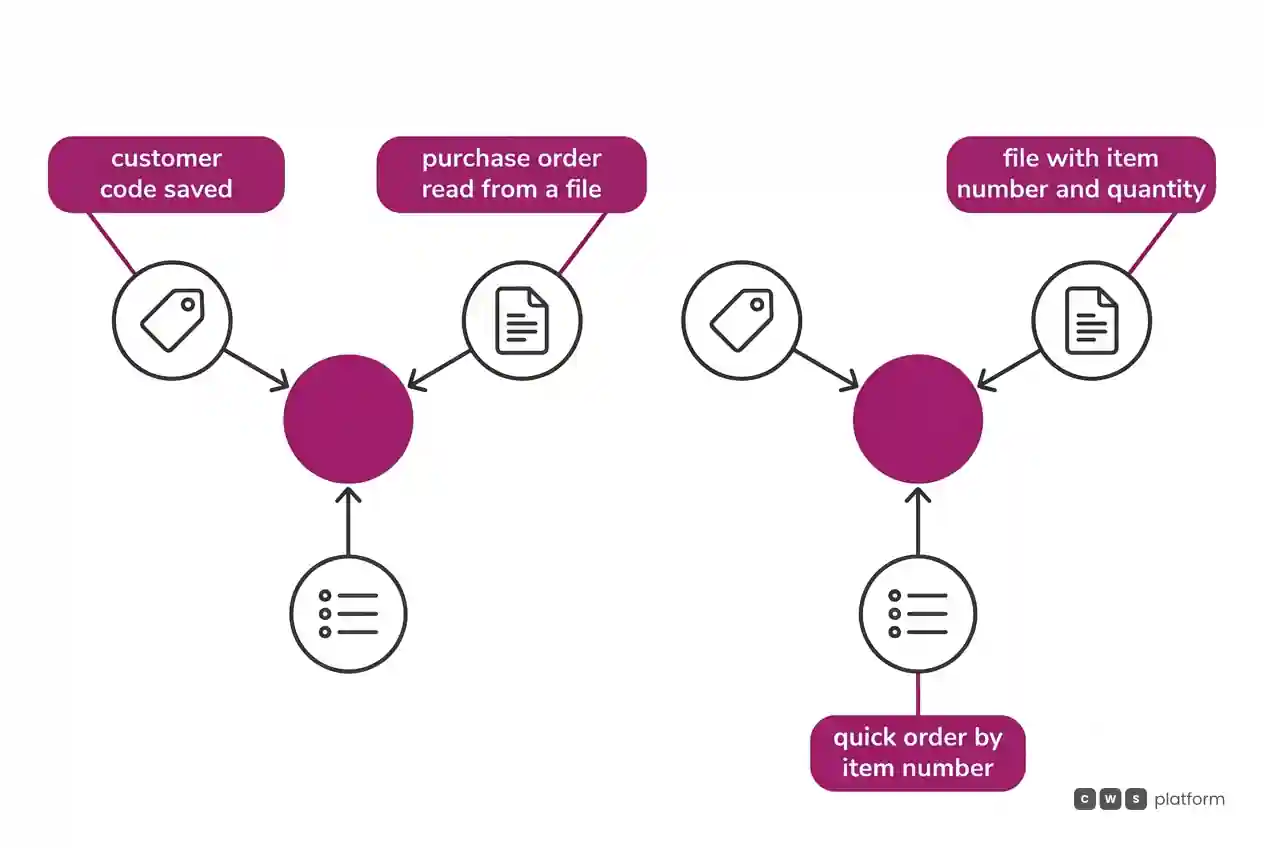
In Optimizely, an RFQ starts from the buyer's cart or is created by the sales rep, and Job Quotes set a total quantity drawn down across several orders until an expiration date. Quick Order takes product, quantity, and unit of measure and accepts any item with an activation date, even without a category, and Order Upload takes a file with item number, quantity, and unit.
The new search has a limit on the buyer's own number. It is recorded in Optimizely's documentation, accessed on October 16, 2026, that Vertex AI search does not search part numbers assigned at the customer level, and that Quick Order still accepts them: "Google Vertex AI does not currently support searches with customer-specific part numbers assigned at the customer level." (Commerce Search v3 limitations). It is worth asking in the demo how a buyer who only knows their own part number reaches the product.
ERP integration: where product data comes from
In OroCommerce, the documentation lists integrations with SAP, Epicor P21, and JD Edwards. In the Epicor P21 integration, after the historical migration, sync runs on a schedule or in real time, and OroCommerce consumes product-specific prices, promotions, and inventory levels. In the JD Edwards integration, it sends orders and customers and consumes the price tables kept in the ERP.
In Optimizely, integration has two ends. The Windows Integration Service is an agent installed on the customer's corporate firewall that polls the site and runs the jobs: Refresh tasks pull products, inventory, and customers from the ERP, and Submit tasks push orders and customers created on the site to the ERP. Product data can also come from Optimizely PIM, organized into properties, groups, and templates, with publishing handled by five sync jobs.
It is worth asking both which system owns the product record, the category, and the price.
Cost and billing model: what depends on the edition
In the Oro sources used here, the billing model is not covered, but part of the design depends on the edition: per the Community vs Enterprise comparison, Enterprise adds Elasticsearch, RabbitMQ, multiple organizations, multiple websites, multiple currencies, and multiple warehouses. It is recorded in Oro's documentation, accessed on October 16, 2026: "Multi-website management is only available in the Enterprise edition." (website management).
In the Optimizely sources used here, the billing model is not covered either; what the documentation conditions is Search v3, which requires, per the Commerce Search v3 test guide, a minimum platform version, Optimizely ID sign-in, and ODP integration.
It is worth asking both, in writing, which editions, products, and integrations the proposal includes for the number of sites and catalogs your operation runs.
Implementation and support: getting search and the catalog live
In OroCommerce, implementation starts from the hosting model. The cloud architecture covers OroCloud, public cloud, private cloud, or on-premise, with development, testing, staging, and production environments. OroCloud upgrades run with maintenance mode, as a rolling upgrade when the database does not change, or as a code-only update. Storefront search uses its own index, configured in YAML through the WebsiteSearchBundle.
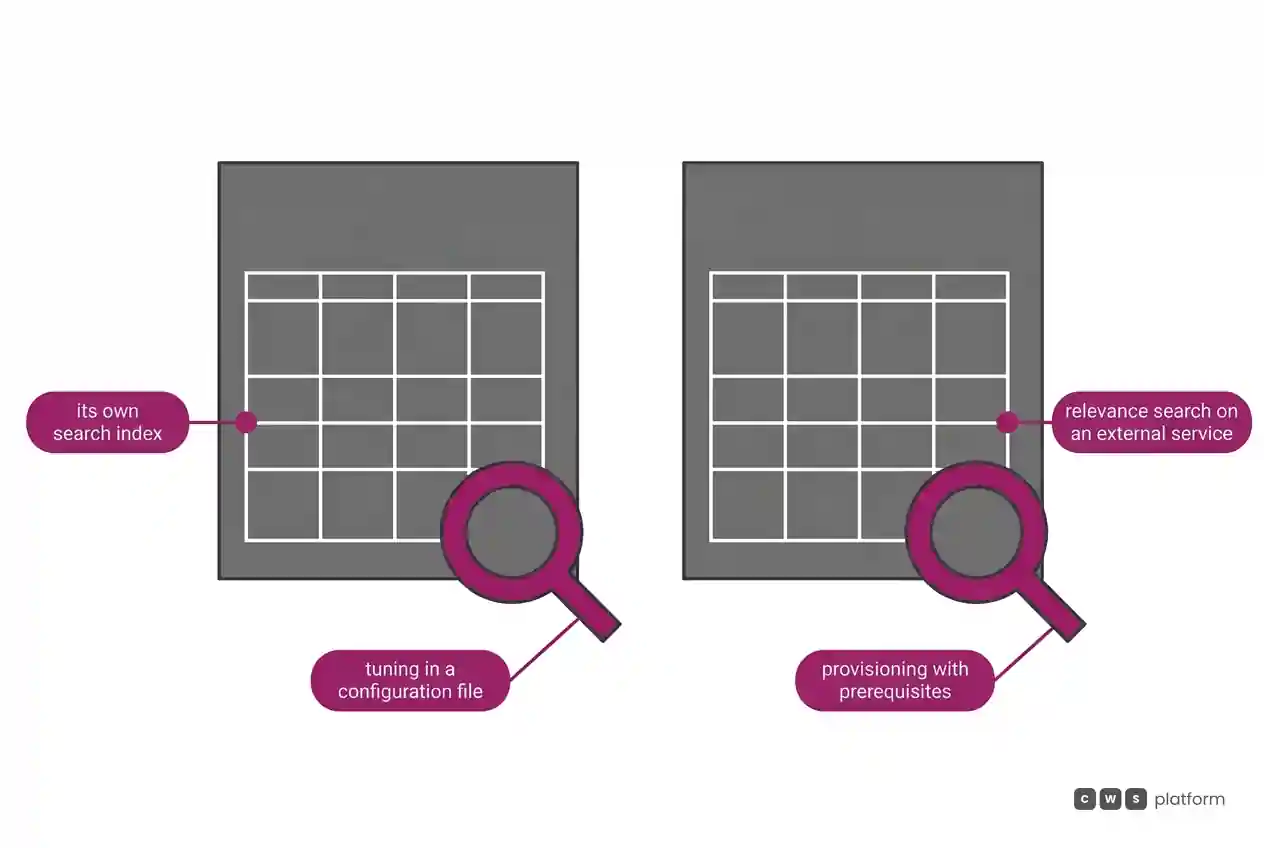
In Optimizely, Search v3 changes the engine. Per the Search v3 pipeline, relevance searches move to Google Retail Search, and Elasticsearch stays for the rest. The ranking tiers run from semantic relevance to personalization, each with its own data requirements. It is recorded in Optimizely's documentation, accessed on October 16, 2026, that Search v3 provisioning "is not completable within one day due to the many prerequisites and configuration steps" (Commerce Search v3 overview).
For both, ask for the go-live plan with search included and an owner for each step.
When to choose OroCommerce
One instance, several sites. On Enterprise, one instance holds multiple organizations and websites, with the same buyer credentials across the organization's sites.
Storefront by site and customer group. The Web Catalog builds navigation from content nodes, with visibility by website and customer group.
Pricing by site. In the website setup, price lists follow a priority order, with the option to fall back to the global list in the default price storage.
Tunable search. On Enterprise, search adds per-attribute boosts, fuzzy search, per-website synonyms, and saved searches.
When to choose Optimizely Configured Commerce
Customer-calculated pricing. The Price Matrix picks the most specific record for the customer, product, warehouse, and unit, and returns the lower of that and the sale price.
Rule-based lists. Shared lists take products and customers by dynamic rule, with effective dates.
Ordering by number and by file. Quick Order and Order Upload accept product, quantity, and unit typed in or in a spreadsheet.
Governed product records. PIM templates mark required properties and a required image before publishing.
When neither fits
In some operations, what changes from account to account is not the catalog but the commercial rule: price, contract, and payment terms. For them there is a third model, described in the post on the three B2B commerce platform models: moving the commercial rules into the platform.
That is the CWS Platform model. Price tables, rules, and contracts are configurable in the platform and can come from the ERP or CRM through APIs, with customizable decimal places. Commercial policy is stored as parameters in the CDL Workspace, configuration instead of code. The cart holds 250 items by default, configurable, and customers and sales reps use the same interface. All customers run the same version. It comes to 11 modules, 6 AI Agents, and 1,029 parameters.
To read each vendor against that model, there are two comparisons: building materials distribution: OroCommerce or CWS Platform and auto parts distribution: Optimizely Configured Commerce or CWS Platform.
If neither catalog design fits your operation, it is worth talking to a CWS Platform specialist with your price table and account list in hand.
Frequently asked questions
OroCommerce vs Optimizely: which is better for a B2B catalog?
It depends on how your catalog varies. OroCommerce fits teams that need web catalogs by site and customer group on top of a master catalog, where each product sits in one category only. Optimizely Configured Commerce fits teams that vary the catalog through calculated pricing and per-customer lists, with ordering by item number and by spreadsheet.
Which one handles multiple sites?
OroCommerce documents multiple organizations and websites in one instance, with catalog, pricing, shipping, and payment by site, and records that multi-website management is available only in the Enterprise edition. In the Optimizely sources used here, running multiple sites is not described.
Which one searches by the customer's own part number?
In OroCommerce, AI Smart Order saves detected SKUs as customer-specific codes when the Customer Part Number extension is active. In Optimizely, the documentation records that Vertex AI search does not search customer-specific part numbers, and that Quick Order still accepts them.
How long does it take to get search live?
Optimizely records that Search v3 provisioning cannot be completed within one day because of the prerequisites and configuration steps. The Oro sources used here give no timeline for search, which uses its own index configured in YAML.
Read next
Brands mentioned in this article
 Magento

- OroCommerce
- Optimizely
- Salesforce
Trademarks and logos belong to their respective owners. Mention does not imply partnership or endorsement.
"responsive, technically engaged, and willing to work through complex commercial rules (negotiated pricing, credit, customer-specific conditions) rather than pushing generic answers"
Is your catalog getting in the way of the sale?
Request an assessment of your operation or talk straight to a specialist, whichever you prefer.
I'd rather get the next articles on catalog management
A weekly roundup of new articles on catalog management, only in weeks when there is one. No spam, and you can leave in one click.